
The Negatives of Wireless PC Gaming Peripherals
Sunday, September 08, 2024The Negatives of Wireless Peripherals in PC Gaming

In the ever-evolving world of PC gaming, the debate between wired and wireless peripherals continues to spark heated discussions. While wireless keyboards and mice offer undeniable convenience and a clutter-free setup, they come with a set of drawbacks that can significantly impact your gaming experience. As a PC gaming and hardware specialist, let’s delve into why wireless peripherals might not be the best choice for serious gamers.
Latency and Input Lag
One of the most critical factors in gaming is responsiveness. Wired peripherals typically offer lower latency compared to their wireless counterparts. Even the slightest delay in input can be the difference between victory and defeat in fast-paced games. Wireless devices, despite advancements in technology, still suffer from higher latency due to the time it takes for the signal to travel from the device to the receiver.
Battery Life and Reliability
Wireless keyboards and mice rely on batteries, which can be a significant drawback during extended gaming sessions. The last thing you want is for your mouse to die in the middle of a crucial match. While rechargeable options exist, they still require downtime for charging, which can be inconvenient. Additionally, battery performance can degrade over time, leading to shorter usage periods and the need for more frequent replacements.
Interference and Connectivity Issues
Wireless devices operate on radio frequencies that can be susceptible to interference from other electronic devices, such as routers, smartphones, and even microwaves. This interference can cause connectivity issues, resulting in dropped signals or erratic behavior of your peripherals. In a competitive gaming environment, such disruptions can be incredibly frustrating and detrimental to your performance.
Weight and Ergonomics
Wireless peripherals often house batteries, making them heavier than their wired counterparts. This added weight can affect the ergonomics and comfort of the device, especially during long gaming sessions. A heavier mouse, for instance, can lead to quicker fatigue and reduced precision in your movements.
Cost Considerations
Wireless gaming peripherals tend to be more expensive than wired ones. The added cost comes from the need for batteries, charging mechanisms, and advanced wireless technology. For gamers on a budget, investing in high-quality wired peripherals can provide better performance without breaking the bank.
Conclusion
While wireless keyboards and mice offer a sleek and convenient setup, they come with trade-offs that can impact your gaming performance. For serious gamers who prioritize responsiveness, reliability, and precision, wired peripherals remain the superior choice. As technology continues to advance, we may see improvements in wireless performance, but for now, the wired connection holds the edge in the competitive world of PC gaming.

Wireless interference can be a significant issue for PC gamers using wireless peripherals. Here are some key points to understand:
Causes of Wireless Interference
-
Physical Obstacles: Walls, furniture, and other objects can obstruct wireless signals. Dense materials like concrete or brick are particularly problematic as they absorb or reflect radio waves, leading to signal degradation.
-
Overlapping Channels: When multiple nearby Wi-Fi networks use the same or overlapping channels, it can cause congestion. This congestion hampers signal strength and stability, affecting both Wi-Fi and Bluetooth connections.
-
Electronic Devices: Other electronic devices, such as microwaves, cordless phones, and baby monitors, emit signals in the same frequency range as Wi-Fi and Bluetooth. These signals can interfere with your wireless connections, causing disruptions.
Effects on Gaming
- Latency and Lag: Interference can increase latency, leading to delayed responses in your game. This can be particularly detrimental in fast-paced games where split-second decisions are crucial.
- Dropped Connections: Severe interference can cause your wireless peripherals to lose connection entirely, which can be incredibly frustrating during a gaming session.
- Erratic Behavior: Interference can cause your mouse or keyboard to behave unpredictably, such as input delays or missed keystrokes.
Mitigating Wireless Interference
-
Optimal Placement: Position your Wi-Fi router in a central location, away from physical obstructions. Keeping it elevated can enhance signal propagation and reduce interference.
-
Channel Selection: Access your router’s settings and select a less congested channel. This can improve the performance and reliability of your Wi-Fi and Bluetooth signals.
-
Distance from Interfering Devices: Ensure that your Wi-Fi router and Bluetooth devices are placed away from potential sources of interference, such as microwaves or cordless phones.
-
Use Wired Connections: For critical devices, consider using wired connections instead of wireless. Ethernet cables provide a reliable and interference-free connection, especially for devices that don’t require mobility.
Understanding these factors can help you optimize your gaming setup and minimize the impact of wireless interference.
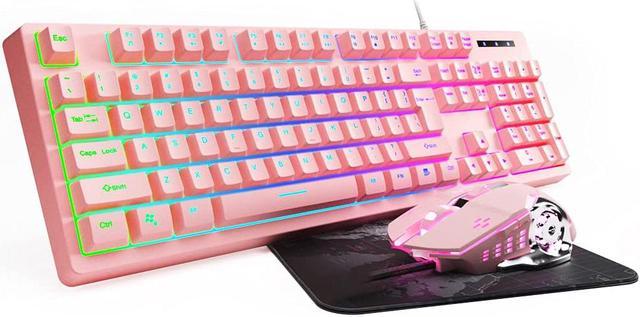
Here are some top-rated wired gaming peripherals available on Amazon:
Keyboards
-
- Features: Mechanical switches, customizable RGB lighting, dedicated macro keys.
- Why It’s Great: Known for its durability and responsiveness, making it a favorite among gamers.
-
- Features: Cherry MX mechanical switches, dynamic RGB backlighting, six programmable macro keys.
- Why It’s Great: Offers a premium build quality and extensive customization options.
Mice
-
- Features: HERO 25K sensor, 11 programmable buttons, adjustable weights.
- Why It’s Great: Highly customizable and precise, suitable for various gaming styles.
-
- Features: 16,000 DPI optical sensor, ergonomic design, seven programmable buttons.
- Why It’s Great: Combines comfort with high performance, ideal for long gaming sessions.
Headsets
-
- Features: 7.1 virtual surround sound, memory foam ear pads, durable aluminum frame.
- Why It’s Great: Offers excellent sound quality and comfort, making it a popular choice.
-
- Features: High-resolution audio, DTS Headphone:X v2.0 surround sound, retractable microphone.
- Why It’s Great: Provides superior audio clarity and a comfortable fit.
Mouse Pads
-
SteelSeries QcK Gaming Surface
- Features: High thread count, optimized for both optical and laser sensors.
- Why It’s Great: Known for its smooth surface and durability.
-
- Features: Anti-fray cloth, extended size for keyboard and mouse.
- Why It’s Great: Offers ample space and a smooth surface for precise mouse movements.
These peripherals are highly rated and widely used in the gaming
community, ensuring a reliable and enhanced gaming experience.