
Xbox Cloud Gaming in 2026: Is It Finally Worth It?
Xbox Cloud Gaming in 2026: Is It Finally Worth It?
Xbox Game Pass has changed dramatically over the last few years, and a big part of that change is cloud gaming. It’s grown fast, brought in new players, and given Microsoft a way to compete beyond selling consoles. But people still argue about quality, price, and missing games.
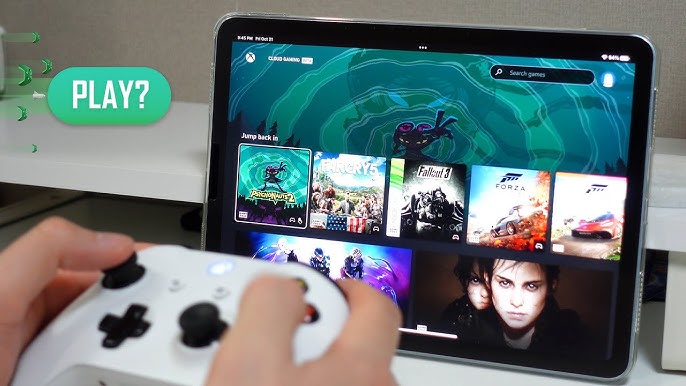
In this review, we’ll break down how Xbox Cloud Gaming works today, which Game Pass plans you actually need, how it performs on different devices, and whether it’s the right choice for you in 2026.
Why Microsoft Is Going All‑In on Cloud Gaming
If you’ve been an Xbox player for a long time, you might wonder why Microsoft is pushing so hard on cloud. The short answer: the numbers.
PlayStation has outsold Xbox in console sales for years. Instead of fighting over the same ~200 million households that might buy a plastic box under the TV, Xbox wants “Xbox” to be available wherever there’s a screen. Under Xbox head Sarah Bond, the mandate is clear: expand Xbox games onto phones, next‑gen hardware, handhelds, and especially the cloud.
Microsoft has the infrastructure to back it up. Azure is the world’s second‑largest cloud provider, and cloud services are already Microsoft’s biggest revenue driver. Combining Azure with Xbox was supposed to be a natural win. The question is: has it actually worked out for gamers?
Xbox Game Pass Tiers and Cloud Gaming in 2026
For years, Xbox Cloud Gaming (often called xCloud) was tied to Xbox Game Pass Ultimate. That changed in 2025:
- Before late 2024, only Ultimate included cloud gaming and only for games in the Ultimate library. Free‑to‑play Fortnite was the lone exception.
- In late 2024, Microsoft introduced “Stream Your Own,” letting you stream selected games you already own instead of only Game Pass titles. That library started around 50 titles and has since grown to over 2,000 streamable games, with more added weekly.
- In October 2025, Microsoft restructured Game Pass with new plan names, prices, and cloud perks. The main tiers you’ll see now are Essential, Premium, and Ultimate.
Essential
Essential is positioned as the entry‑level cloud‑friendly plan:
- Price: around $9.99/month after a $1 first month in many regions.
- Includes a smaller Game Pass library (50+ games on console, PC, and supported devices).
- You can stream games, including select games you already own, with no session limits and no monthly time cap.
For many players who mostly buy and own their games, Essential is now the “sweet spot” for cloud gaming: you’re not paying Ultimate prices, but you still get unlimited streaming.
Premium
Premium steps things up:
- Price: around $14.99/month after a $1 trial in many regions.
- Includes a larger library (200+ games), plus day‑one access for Xbox‑published games within 12 months of launch.
- Streaming with shorter wait times than Essential, and support for streaming select owned games.
If you split time between downloading games and streaming, Premium sits in the middle: more Game Pass value, plus cloud, without paying top tier.
Ultimate
Ultimate remains the “everything” plan, but the price hike after the Activision Blizzard King deal stung:
- Price: around $29.99/month after a $1 first month in many markets.
- Includes the biggest Game Pass library (500+ games), day‑one releases, perks like Fortnite Crew, EA Play, and Ubisoft+ Classics, plus online console multiplayer.
- Offers “best quality” streaming, including up to 1440p resolution on supported screens, plus the shortest wait times.
For hardcore Game Pass fans who want day‑one titles and premium streaming, Ultimate still makes sense. But if your main interest is “I want to stream games I own on lots of devices,” Essential or Premium may be much better value.
Free‑to‑Play and Fortnite
You can still play some free‑to‑play games from the cloud without Game Pass. The biggest example is Fortnite:
- All you need is a free Microsoft account in a supported region, and you can stream Fortnite by logging into xbox.com/play.
- However, free Fortnite sessions are now capped at one hour per session on many devices, so you’ll need to requeue after your time runs out.
“Stream Your Own”: The Cloud Library Explosion
One of the biggest recent wins is “Stream Your Own.” Instead of only streaming what’s in the Game Pass catalog, you can stream supported digital games you already bought or buy separately:
- Works across Xbox consoles, Windows PCs, TVs, phones, tablets, VR headsets, and browsers, as long as you have an eligible Game Pass plan and the game is marked as cloud‑playable.
- Microsoft and partners have added hundreds of titles, with the list growing from around 50 in late 2024 to well over 2,000 streamable games so far.
That list now includes popular titles such as:
- ARC Raiders, Call of Duty: Warzone, Call of Duty: Modern Warfare II & III
- The Batman: Arkham series, the Baldur’s Gate series, Borderlands 2–4, Cyberpunk 2077, the Dying Light series
- Numerous Final Fantasy games (including Final Fantasy XIV), Hell Divers 2, the Hitman series
- Kingdom Hearts, Kingdom Come: Deliverance 1 & 2, close to 15 different LEGO games
- Sports hits like MLB The Show and NBA 2K
Still, some high‑profile titles are missing. Modern EA Sports releases, several Japanese games (like Elden Ring and Valorant), and certain shooters from eastern publishers and studios are not available to stream on Xbox Cloud Gaming right now. We’ll dig into why a bit later.
What Devices Can You Use for Xbox Cloud Gaming?
One of Xbox Cloud Gaming’s strengths is how many devices it supports. According to Xbox’s official list, you can play on:
- Xbox consoles (Xbox Series X|S and Xbox One)
- Windows PCs and laptops
- Android phones and tablets
- iPhones and iPads (iOS/iPadOS)
- MacBooks
- Smart TVs (select Samsung and LG models)
- Amazon Fire TV Sticks and Fire TV Cube
- Select VR headsets, including Meta Quest headsets
How You Play on Each Device
- Xbox consoles: On your Xbox, you can stream games from the Store or your library if they’re cloud‑supported and you don’t have them installed. Availability depends on your Game Pass tier and whether you own the game.
- PC and laptops: Stream via the Xbox app or supported browsers at xbox.com/play.
- Smart TVs: On select Samsung TVs with Gaming Hub and select LG TVs with webOS, you can use the native TV apps. Google TV and Apple TV are not fully supported yet.
- Amazon Fire TV: Download the Xbox app to stream directly.
- Mobile (iOS/Android) and some tablets: The main route is still the web: go to xbox.com/play in a supported browser and add it as a “pseudo‑app” to your home screen. The Xbox mobile app exists but still doesn’t support cloud gaming directly yet, which is confusing for new users.
Microsoft really needs to add native cloud streaming into its mobile apps soon. Sending new users to a browser workaround instead of using the official Xbox app feels fragmented and outdated.
How Xbox Cloud Gaming Performs: Quality, Latency, and Input
In theory, Xbox Cloud Gaming should feel like having an Xbox in the cloud. In reality, performance is a mixed bag.
Console‑Power Hardware, but Not at Full Strength
Microsoft upgraded server hardware from Xbox One‑class blades to Xbox Series X hardware starting in 2021. However, today most streaming sessions effectively run at Xbox Series S‑level power, with resolution and bitrate caps that don’t match the Series X’s full capabilities.
- Standard cloud streams typically target 1080p at around 15 Mbps on average.
- With Ultimate, some users can stream up to 1440p, with bitrate averaging around 25 Mbps.
- By comparison, Amazon Luna can stream 1080p at up to 25 Mbps, so even when Xbox pushes 1440p, the difference isn’t always night and day because of the bitrate ceiling.
Many newer games still target 30 fps at 1080p when streamed, regardless of whether you’re on Ultimate. During peak hours, you may see lower resolution and bitrate as servers in your region get busy.
Latency: One Thing That Has Gotten Better
Early xCloud felt heavy on controller lag. Microsoft has since improved its stack with:
- More data centers worldwide to reduce physical distance.
- Optimized streaming paths and a “direct capture” path that cuts latency significantly — Microsoft says it can save tens of milliseconds on the round trip compared to older methods.
The difference is noticeable if you played at launch, but the golden rule still applies: the closer you are to an Xbox Cloud Gaming data center, the better your experience.
Controllers, Touch, and Mouse & Keyboard
Xbox Cloud Gaming is designed primarily for controllers:
- Xbox Wireless Controller, DualShock, and other compatible controllers work via Bluetooth or USB.
- Touch controls are supported for a growing but still limited number of games.
- Mouse and keyboard support exists for some titles but is far from universal. Right now, only a subset of games officially supports these inputs.
For mobile play, a clip‑on controller like a Backbone or Razer Kishi is strongly recommended if you care about precision and ergonomics.
Missing Features: No Local Multiplayer
One glaring omission is local multiplayer. Most other major cloud platforms have offered at least basic two‑player, side‑by‑side couch co‑op for years. Right now, Xbox Cloud Gaming does not:
- Want to play LEGO games or Call of Duty split‑screen with a friend on one TV? Not officially supported.
- PlayStation’s cloud service, by comparison, does support two‑player local multiplayer in some cases.
Currently, local multiplayer on Xbox Cloud Gaming is only possible via third‑party browser plugins — a workaround that really should be replaced with native support.
Data Centers, Regions, and the Road to 4K
Xbox Cloud Gaming’s performance depends heavily on where you live. Xbox only supports a subset of its Azure regions for cloud gaming. That means there are dozens of Azure locations around the world, but not all of them power xCloud yet.
Recent developments include:
- Live regions in places like the U.S., parts of Europe, Japan, South Korea, India, and others, with new locations under construction or ramping up.
- Strong growth in regions such as Brazil and Argentina, where cloud gaming hours have jumped significantly.
Microsoft is also investing heavily in data center capacity overall, with tens of billions of dollars budgeted for new and expanded sites in 2025 and beyond. That buildout is partly for AI, but gaming benefits from the same infrastructure.
Will We Get 4K Streaming?
Insiders and leaks suggest Microsoft is actively working on 4K support:
- Server hardware is already 4K‑capable, and the streaming pipeline is ready on the server side.
- The big constraint is client‑side decoding and bandwidth: 4K streaming would require heavy use of efficient codecs like AV1, and devices that support it.
- For now, Microsoft appears to be testing the new infrastructure at 1440p alongside updated Game Pass pricing and features.
Given that:
- Ultimate now touts “best quality” streaming, and
- Microsoft and Sony have been partnering since 2019 to use Azure for Sony’s future game and content‑streaming services, it’s reasonable to expect Xbox’s eventual 4K offering to resemble or exceed PlayStation’s cloud quality.
Why Are Some Games Still Missing? The Streaming Rights Problem
It’s frustrating to see popular titles absent from Xbox Cloud Gaming — modern EA Sports games, certain Japanese hits, and some big shooters. The main culprit is usually streaming rights, not technical limitations.
Examples:
- EA Sports: In 2025, Amazon Luna announced a multi‑year deal to be the exclusive cloud home for current EA Sports titles. That’s why you don’t see EA’s latest sports games streamable on Xbox Cloud Gaming right now — Luna locked in those streaming rights first.
- Eastern publishers: Games like Elden Ring, Valorant, and titles from companies like FromSoftware, Konami, Tencent, and Riot are missing from Xbox’s cloud lineup but are available on PlayStation’s cloud service in many cases. That suggests some eastern publishers are either holding back cloud rights for PlayStation, negotiating separately, or just haven’t expanded to Xbox yet.
- Potential platform politics: Rumors swirl around certain high‑profile shooters — such as Battlefield — supposedly being withheld to avoid competing with Call of Duty on Game Pass. For now, that’s unconfirmed speculation, but the pattern fits Microsoft’s broader push for Game Pass and Activision content.
Until streaming rights are as standardized as digital purchase rights, your cloud library will always be somewhat at the mercy of these deals.
Future Features: Cars, Free Tiers, and the Next Xbox
Xbox is exploring new places where cloud gaming can live:
In‑Car Gaming
Microsoft has officially partnered with LG to bring Xbox Cloud Gaming to vehicles using LG’s webOS automotive platform. That means in the backseat of compatible cars, passengers will be able to stream Xbox games much like they would on an LG TV app. Expect this to roll out to select vehicles in the coming years.
Free Ad‑Supported Tier
One of the biggest recurring rumors is a free Xbox Cloud Gaming tier with:
- Limited session times
- Ads inserted into the experience
Think of it like GeForce Now’s free tier: you can play without paying, but you’ll sit through ads and deal with time limits. Reports suggest this has been tested internally at Microsoft, but nothing is officially live yet.
Next‑Gen Xbox and UDNA
Looking further ahead, Microsoft is working with AMD on UDNA architecture to unify PC, console, and data center GPUs. The long‑term goal is a shared architecture so that games run consistently whether you’re playing on a physical console or in the cloud.
Some insiders believe we might even see:
- Next‑gen Xbox experiences available via cloud before the actual next‑gen hardware launches.
- Game Pass Ultimate members getting early cloud access to next‑gen titles as a selling point.
- A new “cloud controller” that’s been in development for years, designed specifically for streaming and cross‑device play.
It’s still early, but the pieces are there: big data center investments, AMD partnership, and a clear desire to make “any device an Xbox.”
So, Is Xbox Cloud Gaming in a Good Place Right Now?
It depends on what you care about most:
- Ease of use: Very good. If you have a Game Pass plan and a supported device, it’s usually just tap “Play” and wait a few seconds.
- Value: Much better now that Essential and Premium include cloud streaming with no session limits. You’re no longer forced into Ultimate just to stream.
- Performance: Mixed. 1080p/1440p streams are decent for casual play, but bitrate caps and Series S‑like power mean image quality and frame rate can lag behind what enthusiast gamers expect. Newer titles often target 30 fps, and quality can dip during peak hours.
- Library: Huge, especially with “Stream Your Own,” but key games are still missing because of streaming rights and platform exclusivity deals.
- Features: Latency has improved, but lack of native local multiplayer and the reliance on a web pseudo‑app on mobile are clear weaknesses.
If you’re:
- A Game Pass subscriber who wants flexibility to play on phones, laptops, and TVs, and you’re okay with “good enough” visual quality, Xbox Cloud Gaming is absolutely worth using.
- Someone who mostly buys games and just wants to stream on the go, Essential is often the best value right now.
- An ultra‑competitive player who demands the highest frame rates and minimal latency, local hardware is still the better choice — at least until 4K, higher bitrates, and more consistent performance arrive.
Xbox Cloud Gaming has come a long way, and Microsoft is clearly committed to making “everything an Xbox.” But for now, it’s a powerful complement to console and PC gaming, not a full replacement.