
How to Fix Witcher 3 Remastered Update Not Showing: 7 Fixes [2026]
Tuesday, September 29, 2026By Indie Kings | September 29, 2026
Updated September 29, 2026: No official CDPR known issues list for Remastered update delivery is published as of writing, so use the checks below in order. The order below goes cheapest first, from ownership checks to waiting out the staged rollout.
The Witcher 3 Remastered launched September 29, 2026 as an update or free claim depending on platform, per CD PROJEKT RED via IGN and The Verge. That split delivery model explains most reports of the update not showing, because the correct store entry, the correct console generation version, and the correct account must all line up before the download appears.
In the United States the rollout reached players in the morning hours, with US times listed as 3 AM PDT and 6 AM EDT, per Vice. If you checked before those times or checked the wrong edition, you may have seen nothing new even though your copy is eligible.
This guide applies the platform traps documented in the VGC start guide published September 29, 2026. On PS5 you need the PS5 version updated, and PS4 disc owners must download the PS5 version first. On Xbox you need the disc inserted or the digital copy downloaded and then updated. On PC the game just updates on GOG or Steam. On Switch 2 the release is a separate eShop product claimed free by Switch 1 owners and it shows as a separate Home icon, per Nintendo UK, with a listed size of 42.3 GB.
Work through the seven fixes below in order. After each fix, verify the same way: look for the Remastered banner or version shown on the title screen, confirm the new skill tree is visible, and confirm expansions are listed as installed or owned. If all three signals are present, you are done and you can stop.
Quick Check Before You Start
Confirm which product you own and which product the store is showing. Many players own the PlayStation 4 version but browse the PlayStation 4 store entry while the Remastered files live under the PlayStation 5 version. Others own the Switch 1 version but search for an update instead of the separate Switch 2 eShop product.
Confirm the date and time in your region. The Witcher 3 Remastered launched September 29, 2026, with US availability in the morning at 3 AM PDT and 6 AM EDT, per Vice. Checking overnight or checking a store region that refreshes later can look like a missing update when it is only an early check.
Confirm that you are signed in on the account that bought the game or claimed the free upgrade. Family sharing, secondary profiles, and switched store regions are common reasons an eligible game shows no update on one profile but shows it on another. This is especially important on PlayStation and Xbox where licenses attach to a specific account.
Remember that there is no official CDPR known issues list for Remastered update delivery published as of writing. That means any site listing exact server status or exact error codes for this rollout is guessing unless it cites CD PROJEKT RED directly. Do not chase invented codes. Follow the ownership, client, storage, account, cache, reinstall, and rollout timing sequence below.
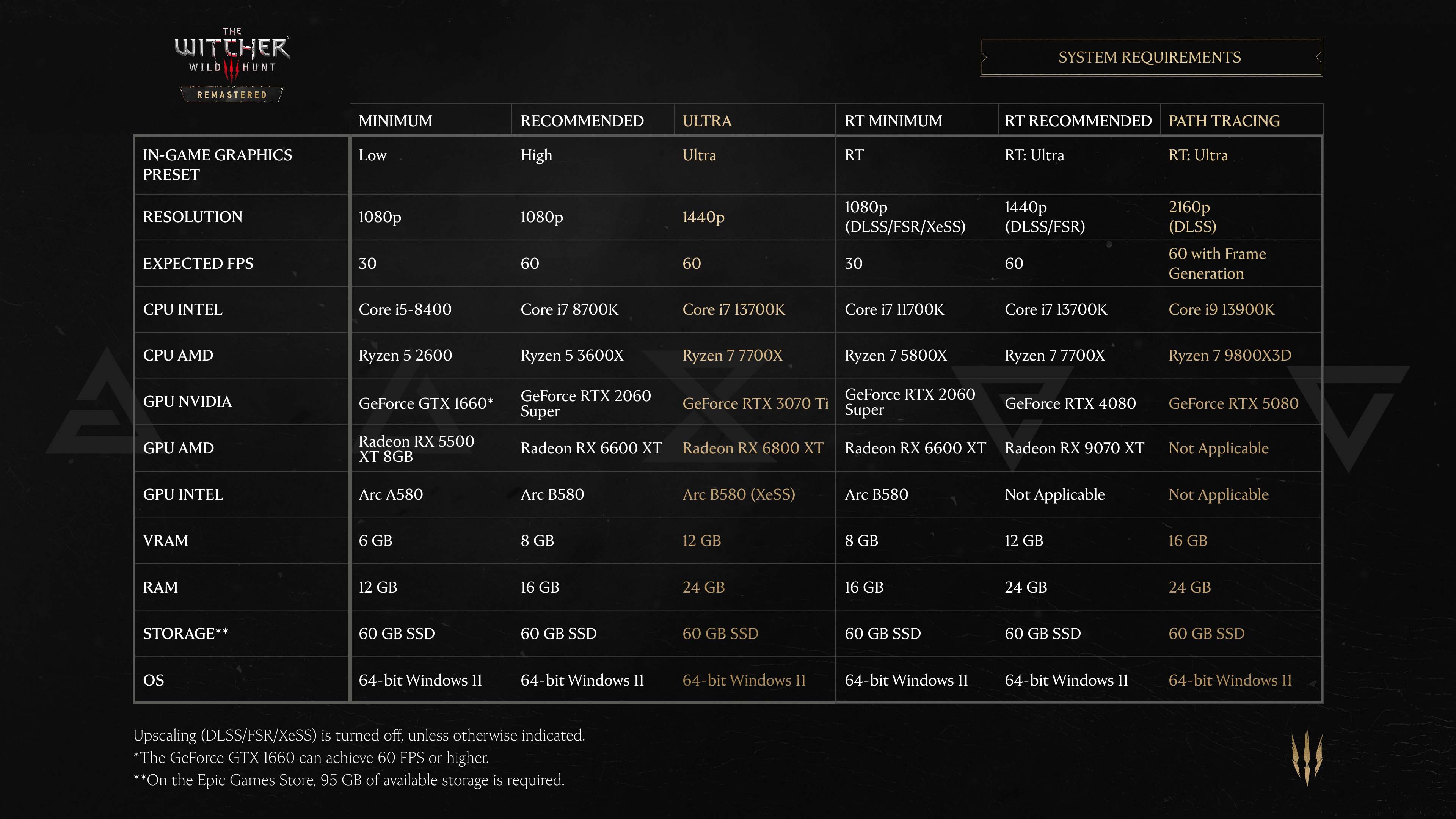
Image: Remastered requirements graphic. Credit: CD PROJEKT RED.
Symptom To First Check
Use this table to jump to the most likely first check. The fixes themselves are still best done in numbered order, but this table helps you understand why a symptom points to ownership, client refresh, storage, account, cache, reinstall, or timing.
| Symptom | Most Likely Cause | First Check |
|---|---|---|
| No update listed on PS5, only Play option | You are viewing the PS4 version instead of the PS5 version | Fix 1: confirm qualifying ownership and right version, per VGC start guide September 29, 2026 |
| Xbox shows the old version with no update prompt | Disc not inserted or digital base game not fully downloaded | Fix 1: insert disc or confirm digital install, then check for updates |
| Steam or GOG shows Play but no download | Client needs manual update check or restart | Fix 2: restart store client and check for updates manually [NEEDS VERIFICATION for exact button labels by client version] |
| Update appears but will not start or stays queued | Not enough free space for a chunky patch | Fix 3: confirm storage free, using the 42.3 GB Switch 2 figure as an example of chunky size, per Nintendo UK |
| Update shows on one profile but not another | Signed in on non purchasing account | Fix 4: sign in on the purchasing account and restore licenses |
| Download stuck at a percent or looping | Download cache or paused queue issue | Fix 5: clear download cache or pause and resume [NEEDS VERIFICATION for exact menu names on current console firmware] |
| Correct version installed but Remastered features missing | Wrong edition installed or incomplete migration | Fix 6: reinstall the correct edition after save backup |
| Nothing shows on launch morning despite correct version | Staged rollout not yet live in your region or store | Fix 7: wait past the US morning times then recheck, 3 AM PDT and 6 AM EDT per Vice |
Client specific symptoms vary by store version and console firmware, so treat exact progress bar behavior and exact queue messages as [NEEDS VERIFICATION]. The ownership and version rules above are the verified part, per the VGC start guide September 29, 2026 and per Nintendo UK for Switch 2.
7 Fixes In Order
Do these cheapest first. Verify after each fix with the same three signals: Remastered banner or version shown, new skill tree visible, and expansions listed.
Confirm qualifying ownership and the right version. This resolves most false missing update reports. On PS5, confirm you are looking at the PS5 version, not the PS4 version, because PS4 disc owners must download the PS5 version first, per the VGC start guide September 29, 2026. On Xbox, confirm the disc is inserted if you own disc, or confirm the digital base game is downloaded if you own digital, then check for an update. On PC, confirm you own the game on the same GOG or Steam account you are checking, since the release just updates on GOG or Steam. On Switch 2, search the eShop for the separate Switch 2 product rather than looking for an update to the Switch 1 icon, because Switch 1 owners claim the Switch 2 product free and it shows as a separate Home icon, per Nintendo UK. Verify: Remastered banner or version shown on the title screen, new skill tree visible in the character menu, expansions listed as owned or installed. If all three show, stop here.
Ownership edge cases take only a few minutes to rule out. Check physical versus digital entitlement, check PlayStation 5 versus PlayStation 4 tiles, check Xbox disc versus digital installs, and check Switch 1 versus Switch 2 Home icons. Also check that any upgrade claim completed fully, because an interrupted claim can leave the new product unowned in the store even though the old product still launches. If the store still shows a price instead of Get, Download, or Update on the correct Remastered entry, do not buy it yet. Move to the account check in Fix 4 before spending money, then return here.
Restart the store client and check for updates manually. Store clients cache catalog data, so a fresh launch morning listing may not appear until the client refreshes. Close GOG Galaxy or Steam fully on PC, then reopen it and use the manual check for updates function. On console, close the game, return to the system menu, highlight the game tile for the correct generation version, and use the system check for update option. Exact button names and menu placement by current client and firmware version are [NEEDS VERIFICATION]. Verify: Remastered banner or version shown, new skill tree visible, expansions listed. If the update now appears, let it finish and then verify the three signals in game.
This step is cheap and safe, so repeat it once after a full system restart if the first manual check shows nothing. On PC, also confirm the client itself is updated, because an old client can fail to display new depots or new branches correctly [NEEDS VERIFICATION]. On console, confirm the console system software is current enough to display the new product listings, then recheck the correct tile. Do not change regions or create a new account at this stage, because that can split entitlements and make diagnosis harder. If a manual check still shows nothing on the correct version and correct account, move to storage.
Confirm enough storage is free. Large remaster patches may appear to be missing when the real problem is that the store hides or refuses to queue a download that cannot fit. Free space first, then recheck. As an example of chunky size, the Switch 2 product is listed at 42.3 GB, per Nintendo UK. Other platforms will differ in exact download size, so treat exact PlayStation, Xbox, and PC patch sizes as [NEEDS VERIFICATION] and leave generous headroom above the listed figure. Verify: Remastered banner or version shown after the download completes, new skill tree visible, expansions listed. If the update was stuck in a queue, it should now start once space is available.
Check both internal and external locations. Some systems will not stage a PlayStation 5 or Xbox Series generation update from extended storage, so confirm the target internal drive has room even if an external drive looks empty [NEEDS VERIFICATION]. On PC, confirm the library folder drive has room, not just the system drive, and confirm no background download is paused waiting for space. Delete or move unrelated games and captures rather than game saves. Keep saves intact. If storage was the blocker, the update usually appears within one manual refresh after space is freed.
Sign in on the purchasing account and restore licenses. If the game was bought, claimed, or upgraded on one account, other profiles on the same machine may not see the Remastered update. Sign in on the purchasing account, open the store entry for the correct Remastered product, and confirm it shows as owned, downloadable, or updatable. On PlayStation, also use the system restore licenses function and then restart the console before rechecking. Exact menu names for restore licenses on current firmware are [NEEDS VERIFICATION]. Verify: Remastered banner or version shown, new skill tree visible, expansions listed. If the purchasing account sees the update, start the download there.
Also check family sharing, suspended payment holds, refunded orders, and region mismatches. A game bought in one region and checked in another store region may show as unowned. A shared library may hide new entitlements until the owner accepts them [NEEDS VERIFICATION]. Do not buy a second copy while the correct Remastered entry still shows an ownership conflict. Confirm primary console settings, confirm default store account, and confirm that any free Switch 2 claim was completed on the account that owns the Switch 1 version, per Nintendo UK. If account fixes do not reveal the update, move to cache.
Clear the download cache or pause and resume. A stalled queue can look like no update, especially when a progress bar freezes, loops, or returns to queued after a restart. Pause the download, wait briefly, resume it, and then restart the client or console if it still stalls. On PC, clearing the download cache in the store client settings often forces a fresh manifest fetch. Exact menu names and cache clear effects by client version are [NEEDS VERIFICATION]. Verify: Remastered banner or version shown after completion, new skill tree visible, expansions listed. If the bar now moves steadily, leave it alone until it finishes.
Keep this step non destructive. Do not delete the game, do not delete saves, and do not reset the console at this stage. If your client offers repair, verify integrity, or check local files options, those are safer than reinstall and belong before Fix 6 [NEEDS VERIFICATION for exact option names]. Note the time, note whether the stall repeats at the same percent, and note whether other downloads work, because a repeat stall at the same point can indicate local network caching or storage faults rather than a missing update. If pause, resume, cache clear, and one full restart all fail, move to reinstall.
Reinstall the correct edition. Use this only after ownership, client refresh, storage, account, and cache checks pass, because reinstall costs the most time and bandwidth. First back up saves or confirm cloud save is current. Do not delete saves blindly. Exact local save paths by platform and client are [NEEDS VERIFICATION], so confirm the backup in the system save manager or cloud save screen before uninstalling anything. Then uninstall the wrong edition if you have the PS4 tile but need the PS5 version, or uninstall the incomplete download if files are corrupted. Reinstall from the correct Remastered store entry: the PS5 version on PlayStation, the updated Xbox install with disc inserted or digital owned, the updated GOG or Steam install on PC, or the separate Switch 2 eShop product on Switch 2. Verify: Remastered banner or version shown, new skill tree visible, expansions listed.
Take care with disc owners and Switch owners. PS4 disc owners must still have the disc available for the PS5 version path where required, per the VGC start guide September 29, 2026. Xbox disc owners should keep the disc inserted during install and update checks. Switch 2 owners should confirm both the old Switch 1 icon and the new Switch 2 Home icon so they do not delete the version that holds their current saves before confirming transfer or cloud status. After reinstall, launch once, load a save or start a test save, and check the three verification signals before changing settings or adding mods. If the correct edition still shows no Remastered features, the remaining likely cause is rollout timing.
Wait out the staged rollout past the US morning times, then recheck. The Witcher 3 Remastered launched September 29, 2026 as an update or free claim depending on platform, per CD PROJEKT RED via IGN and The Verge, and US times are listed as 3 AM PDT and 6 AM EDT, per Vice. Stores roll out in stages, so waiting is a real fix when everything else is correct. If you checked early, wait until after those US morning times, restart the client or console once, manually recheck the correct edition, and then verify. Verify: Remastered banner or version shown, new skill tree visible, expansions listed. If all three appear after waiting, no further steps are needed.
While waiting, avoid repeated reinstalls and avoid region hopping, because both reset queues and can delay a staged release further. Recheck once per hour rather than constantly, and keep the console or PC online so queued entitlements can attach. Remember that no official CDPR known issues list for Remastered update delivery is published as of writing, so treat social posts about server status as unconfirmed unless they cite CD PROJEKT RED. If the update still does not show the next day on the correct version, correct account, with free space and a fresh client, contact platform support with proof of ownership and screenshots of the store entry you are checking.
Fix Order By Cost And Time
This second table shows why the numbered order is cheapest first. Start at the top and stop when the three verification signals appear.
| Fix | What You Do | Cost | Typical Time |
|---|---|---|---|
| 1 | Confirm ownership and right version | Free | 5 minutes |
| 2 | Restart client and manual update check | Free | 5 to 10 minutes |
| 3 | Confirm storage free | Free, may need to move games | 10 to 20 minutes |
| 4 | Purchasing account and restore licenses | Free | 10 minutes |
| 5 | Clear cache or pause and resume | Free | 10 to 15 minutes |
| 6 | Reinstall correct edition with save backup | Free but heavy bandwidth | 1 hour or more depending on connection |
| 7 | Wait past rollout times and recheck | Free | 1 to several hours of waiting |
Typical times are estimates only and vary by connection, drive speed, and queue depth. Treat exact download times as [NEEDS VERIFICATION] for your setup. The cost column stays simple on purpose: none of these steps should require buying registry tools, driver tools, or a second copy of the game.
Myths To Avoid
Registry cleaners do not deliver a missing store update. They risk breaking the PC client and the operating system while leaving store entitlement untouched. Use the official client restart and cache options instead.
Driver updater spam does not unlock a staged rollout. Updated graphics drivers matter for performance after install, but they do not make an update appear in GOG, Steam, PlayStation Store, Xbox Store, or Nintendo eShop. Check ownership and version first.
Deleting saves blindly does not fix delivery. Saves are small, and deleting them risks losing progress without freeing meaningful space. Back up saves or confirm cloud save first, and never delete saves as a first step.
One patch does not fix all rigs. A file that helped one player clear a stuck queue may do nothing for a player on another platform with a different cause, such as viewing the PS4 tile instead of the PS5 version or waiting for the separate Switch 2 product claim. Follow the full sequence and verify with the Remastered banner or version shown, the new skill tree visible, and expansions listed.
Paid unlock tools and invented error code guides do not help here. No official CDPR known issues list for Remastered update delivery is published as of writing, and this guide invents no error codes. If a tool or video asks for payment or login to reveal a secret fix, close it and return to the ownership and account checks.
FAQ
Why is the Witcher 3 Remastered update not showing on September 29, 2026?
The most common reasons are checking the wrong generation version, checking before the staged rollout reached your store, or being signed in on the wrong account. The release launched September 29, 2026 as an update or free claim depending on platform, per CD PROJEKT RED via IGN and The Verge, so confirm version, timing, and account first.
How do PS5 players get the Remastered update?
You need the PS5 version updated, and PS4 disc owners must download the PS5 version first, per the VGC start guide September 29, 2026. Confirm you are on the PS5 tile, check for updates manually, and verify the Remastered banner, new skill tree, and expansions listed.
How do Xbox and PC players get the Remastered update?
On Xbox keep the disc inserted or confirm the digital base game is downloaded, then update, per the VGC start guide September 29, 2026. On PC the game just updates on GOG or Steam, so restart the client and use manual check for updates.
Where is the Switch 2 version in the store?
It is a separate eShop product claimed free by Switch 1 owners and it shows as a separate Home icon, per Nintendo UK. Search for the Switch 2 product directly rather than looking for an update on the old icon, and note the listed 42.3 GB size when planning space.
What should I check after each fix?
Check the same three signals every time: Remastered banner or version shown, new skill tree visible, and expansions listed. If all three are present, the fix worked and you can stop.
Is there an official CDPR known issues page for missing updates?
No official CDPR known issues list for Remastered update delivery is published as of writing. Do not trust invented error codes, and recheck the correct edition after the US morning times of 3 AM PDT and 6 AM EDT, per Vice.
Bottom Line
Most missing update reports come down to version, timing, or account. Confirm the PS5 version on PlayStation, disc or digital status on Xbox, updated client on PC, and the separate Switch 2 product on Nintendo, per the VGC start guide September 29, 2026 and per Nintendo UK.
Then work cheapest first: restart and manual check, storage, account licenses, cache pause and resume, reinstall with save backup, and waiting past 3 AM PDT and 6 AM EDT, per Vice. Verify each step with the Remastered banner or version shown, the new skill tree visible, and expansions listed.
Sources
Coverage and listings used for verified facts only. All other steps are general store troubleshooting and labeled [NEEDS VERIFICATION] where client menus differ.