
OpenROM: Convert and Patch Every Retro ROM Format With This Free Toolkit
Sunday, September 13, 2026By Indie Kings | September 13, 2026
Updated September 13, 2026: OpenROM, an open-source toolkit for retro game collection management, has climbed to over 100 stars on GitHub by doing one thing well: replacing the pile of single-purpose ROM utilities with a single app. It converts, patches, compresses, and organizes ROMs across PS1, PS2, Xbox, GameCube, Wii, Saturn, and Sega CD, runs fully offline on Windows, Linux, and macOS, and ships both a Flutter desktop UI and a headless command line core. If you have ever hit the CHD conversion wall or patched a fan translation, this is the tool to know. Here is everything the repository promises, verified against the official README.
Table of Contents
- What OpenROM Is
- ROM Conversion: 20+ Paths
- Patching: 9 Formats, Auto Detection
- Compression and Cleanup
- The Headless CLI
- The Bundled Engine Tools
- Formats at a Glance
- Bottom Line
- Frequently Asked Questions
1. What OpenROM Is
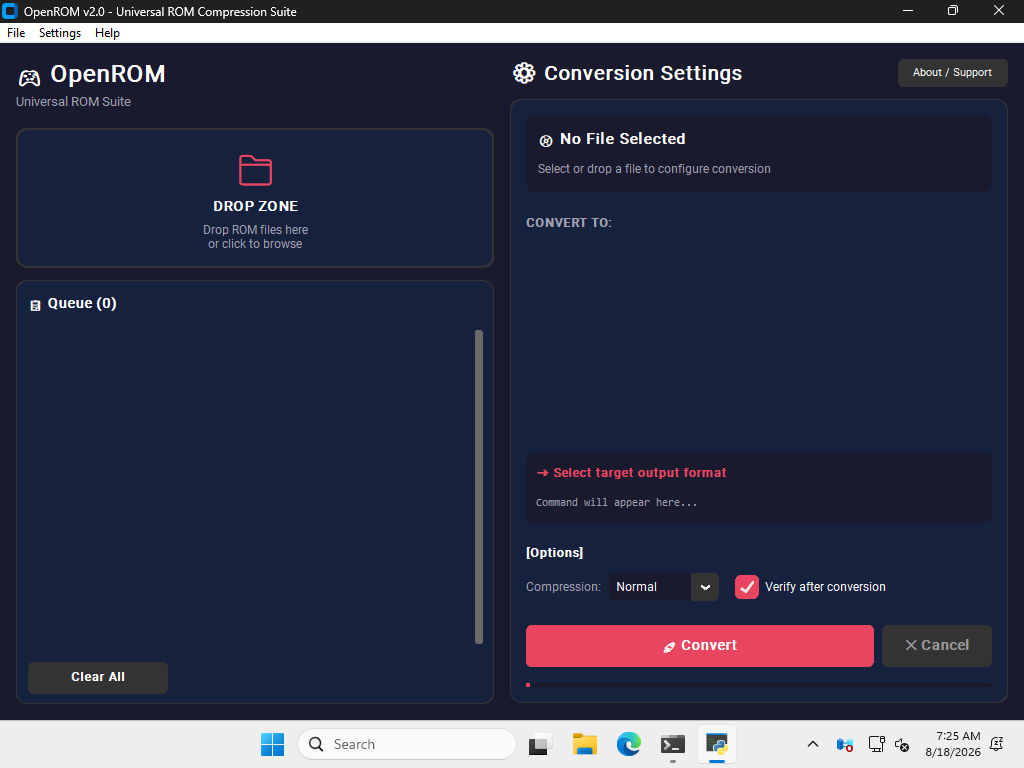
OpenROM is a free, GPL v3 licensed universal retro gaming toolkit created by "M5 Dev," per the project README and license file. The pitch is consolidation: instead of juggling chdman, maxcso, unecm, extract-xiso, and nodtool separately, OpenROM wraps them all in one interface with a modern Flutter desktop UI, a real-time terminal log, and smart platform detection that reads magic bytes rather than guessing from file size. The project's key selling points are that it runs 100% offline with zero telemetry and no network requests, and every tool it bundles is itself open source with published checksums. Releases are distributed via GitHub and a SourceForge mirror, with native builds for Windows, Linux x86_64, and macOS on both Intel and Apple Silicon.
2. ROM Conversion: 20+ Paths
The core feature is conversion. OpenROM handles ISO, BIN, CUE, GDI, IMG, ECM, CHD, CSO, ZSO, XISO, RVZ, WIA, WBFS, and GCZ, covering the formats that actually matter for modern emulation setups. The project highlights four details that separate it from simple converters. First, platform detection uses magic byte signatures for PS1, PS2, PSP, Xbox, GameCube, Wii, and Dreamcast, so a file is identified by its contents, not by a filename guess. Second, it reads real CHD v4 and v5 headers to distinguish CD versus DVD types correctly. Third, it auto-generates CUE sheets for standalone BIN files with the correct track mode (MODE1, MODE2, or AUDIO). Fourth, it runs chdman verify after conversion to confirm the output is intact.
3. Patching: 9 Formats, Auto Detection
OpenROM also covers the patch side of the retro hobby. It supports IPS, IPS32, UPS, BPS, PPF, APS, EBP, DPS, and xdelta3, which covers NES, SNES, GBA, N64, PS1, PS2, PSP and DOS patches. Dropping in a patch file triggers automatic format detection, and the tool runs CRC32 checks before and after with a detailed report. There is an ignore checksum mode for forcing patches onto modified ROMs, which is the escape hatch every translation-patch veteran will recognize as essential. Patching is one of the least glamorous and most error-prone ROM tasks, and it is also the one where a tool that validates its own work is genuinely worth downloading.
4. Compression and Cleanup
Collection management is the quieter half of the app. OpenROM compresses ROMs and whole folders into ZIP or 7Z with fast, normal, and ultra presets, and it smart-skips formats that are already compressed, like CHD, CSO, RVZ, and 7Z, instead of wasting cycles recompressing them. Batch extraction handles ZIP and 7Z archives with progress tracking, and an optional delete source setting cleans originals after a successful run. The header removal tool strips copier headers from NES (iNES), SNES (SMC), and Game Boy and Game Boy Color files with a confidence rating of "certain" or "likely," writes output to a separate file by default, and auto-backs up the original as .bak before any change. For multi-disc games there is an M3U playlist generator and a BIN merger that combines multi-track BIN files into a single BIN plus CUE.
5. The Headless CLI
The same engine powers a text interface called openrom-core, which is the part automation builders will care about. Commands include file detection, single conversion, folder batch conversion with compression level, patching, 7Z compression at a set level, header removal, M3U generation, and CHD verification, and every command accepts JSON output for scripting and Flutter IPC. That makes OpenROM usable inside RetroDECK-style workflows, cron jobs, or homegrown scripts on a headless NAS, which is a meaningful bonus over the GUI-only ROM tools most people are used to.
6. The Bundled Engine Tools
OpenROM does not reinvent the wheels; it bundles the established open-source engines. The README names chdman from MAME (GPL v2) for CHD, maxcso (ISC) for CSO and ZSO, ecm and unecm (GPL v2) for error-corrected iso files, extract-xiso (GPL v2) for Xbox, nodtool (MIT) for GameCube and Wii formats, and xdelta3 (Apache 2.0) for patches. Every tool carries its own license and SHA256 checksums are published in SECURITY.md, which is the kind of transparency that matters when you are downloading binaries that will handle your library.
7. Formats at a Glance
Table 1: The primary conversion map
| Input | Output | Engine Tool | Typical Use |
|---|---|---|---|
| ISO | CHD | chdman | PS1, PS2, Dreamcast, GameCube |
| ISO | CSO / ZSO | maxcso | PSP and PS2 compressed images |
| ISO | XISO | extract-xiso | Xbox disc images |
| ISO | RVZ | nodtool | GameCube and Wii compressed images |
| BIN | CHD | chdman | Auto CUE generation if missing |
| GDI | CHD | chdman | Dreamcast disc folders |
| ECM | ISO / BIN | unecm | Fixing error-corrected discs |
| WBFS, GCZ | ISO | nodtool | Wii and GameCube legacy formats |
Table 2: Patch formats supported
| Format | Typical Targets |
|---|---|
| IPS / IPS32 | NES, SNES, GBA, and most retro systems |
| UPS / BPS | Universal, works on any ROM |
| PPF | PS1 and PS2 disc patches |
| APS | GBA and N64 |
| EBP | EarthBound / SNES |
| DPS | DOS / PC titles |
| xdelta3 / VCDIFF | Large images, PS2, PSP |
8. Bottom Line
OpenROM is the strongest all-in-one ROM management toolkit released this year for the retro crowd. It converts across every modern emulation format, patches with validation, compresses without touching already-compressed files, removes headers non-destructively, and exposes the whole engine through a JSON-capable CLI, all offline and GPL licensed. The 2026 roadmap points to Wii U support, an Android build via Termux, and a ROM checker wired to No-Intro DAT files and RetroAchievements hash verification. If your collection lives in CHD, CSO, or a tangle of IPS patches, this is the download to try first.
Related reading: GPU Prices September 2026 and NVIDIA Sells FE Cards at MSRP at PAX.
Frequently Asked Questions
What is OpenROM?
OpenROM is a free, open-source universal retro gaming toolkit that converts, patches, compresses, and manages ROM files for systems including PS1, PS2, Xbox, GameCube, Wii, Saturn, and Sega CD, per the official repository README. It runs fully offline on Windows, Linux, and macOS.
What formats can OpenROM convert?
It handles ISO, BIN, CUE, GDI, IMG, ECM, CHD, CSO, ZSO, XISO, RVZ, WIA, WBFS, and GCZ across the supported platforms, using the bundled chdman, maxcso, unecm, extract-xiso, and nodtool engines.
Which patch formats does OpenROM support?
Nine: IPS, IPS32, UPS, BPS, PPF, APS, EBP, DPS, and xdelta3, with automatic format detection and CRC32 verification before and after patching.
Is OpenROM safe to run on my ROM collection?
The tool is designed to be non-destructive: header removal writes to a separate file and auto-backs up the original as .bak, compression has smart skip for already-compressed formats, and conversion supports verification. All bundled tools are open source with published SHA256 checksums.
Does OpenROM work on a NAS or with scripts?
Yes. The openrom-core CLI supports file detection, batch conversion, patching, compression, header removal, M3U generation, and verification, all with JSON output for scripting.
Is using OpenROM legal?
OpenROM is a standard-format utility under GPL v3 and is legal to use. As with all ROM tools, what you do with game files depends on your local laws and whether you own the software in question.