
2026 OLED Monitors Near CRT Clarity Windows Blocks Nirvana
By Indie Kings | October 12, 2026
Updated October 12, 2026: 2026 OLED monitors can nearly recreate the motion clarity of a 1990s CRT, but true nirvana still needs a Windows change, per columnist Wes Fenlon in an October 2026 PC Gamer feature built around Blur Busters beam simulation and ShaderBeam testing on a 540 Hz Asus OLED. Standing: Per columnist account, this article reports tested impressions and makes no independent hardware claim of its own.
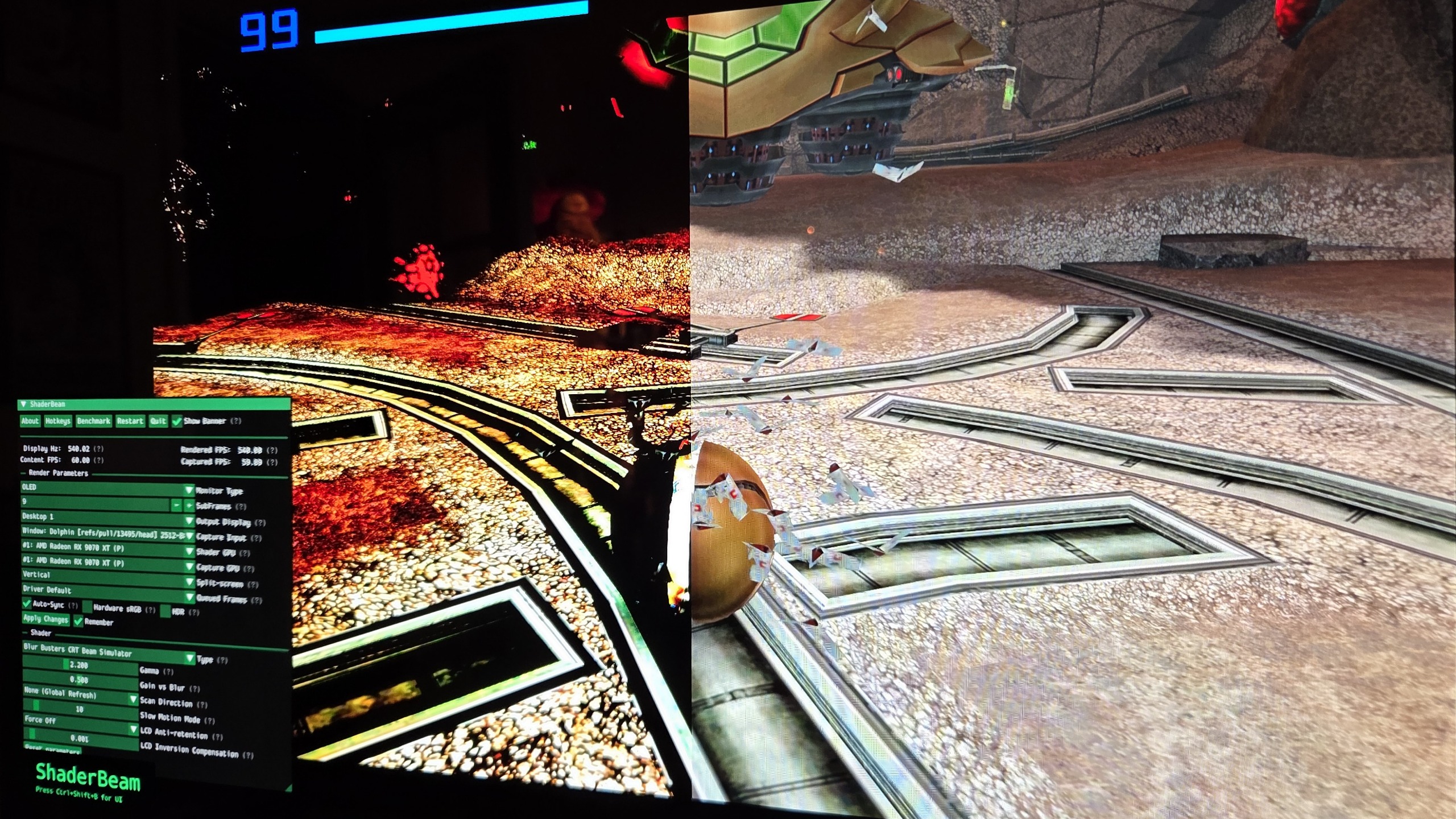
Image: CRT beam simulation shown on an Asus PG27AQWP-W OLED monitor. Credit: PC Gamer.
Summary of the column
Per columnist Wes Fenlon, the sublime motion clarity of a 1990s CRT is almost reachable on a 2026 OLED, yet the last step to true nirvana is not a brighter panel or a faster refresh rate alone. The columnist frames the missing piece as a Windows change, meaning the path between game executable and screen needs deeper operating system support before beam simulation can feel routine. That framing matters because the rest of the feature is a long test diary about brilliant lab results wrapped in exhausting setup work.
The technical core comes from Mark Rejhon, founder of Blur Busters, and former Nvidia developer Timothy Lottes. Per the columnist, the pair debuted a breakthrough algorithm in late 2024 for simulating a CRT tube in a GPU shader, built to take advantage of 240 Hz and faster displays. The goal is to cut visible motion blur in retro games and other content locked at 60 Hz, without demanding the raw frame rate that would normally be needed for equal clarity. The columnist compares the idea to DLSS, but for motion instead of resolution.
The test hardware is an Asus ROG PG27AQWP-W sent to the columnist, a 540 Hz OLED with a 720 Hz mode at lower resolution. Per the columnist, OLED helps because the panel can go fully black with no backlight bleed and can get extremely bright, which gets closer to the contrast behavior that CRTs offered naturally. The software side is ShaderBeam, a standalone tool by developer Mausimus that applies the beam simulation as an overlay on top of a game window. The columnist says the combination can look uncanny when it locks in, with turning cameras and scrolling scenes holding fine pixel detail that would normally smear into blur.
This article stays inside that October 2026 feature and adds no outside test data. Every technical claim below is attributed as per the columnist, per Rejhon as quoted by the columnist, or per Mausimus as quoted by the columnist. The Windows change requirement is presented exactly as the columnist frames it, namely that either new hardware such as a next generation of Nvidia Pulsar monitors or deeper Microsoft work on what happens between executable and screen will be needed for wide adoption. Readers should treat the clarity gains as demonstrated in a demanding test rig, not as a plug and play preset.
The CRT memory and the LCD tradeoff
Per the columnist, the story opens with a television twist used as a technology metaphor. The 2007 season finale of Lost revealed that what looked like flashbacks were actually flash forwards, and the columnist says modern display progress can feel the same way. Escape from bulky CRTs once looked like the whole point, until later experience suggested that something precious had been left behind on the island. The line about having to go back is therefore both a joke and a thesis.
The personal anchor is a 26 inch Samsung LCD bought for college use for about 1,000 dollars, rated at 1366 by 768 resolution. Per the columnist, it served as dorm television and computer monitor and felt state of the art at the time because it was thinner and sharper than the family CRT. Twenty years later the columnist views that trade with more regret, saying the HD novelty hid what was lost in richer color and smoother motion. That lost smoothness is the thread the rest of the feature tries to recover.
Per the columnist, Rejhon draws a generational line around age 40 for remembering CRT motion clarity firsthand. Older readers generally remember it, while younger readers who never saw a CRT in daily use do not have the same reference point. The columnist says Blur Busters Test UFO, a browser tool starring a small green figure in a red saucer, became the de facto way to judge moving object clarity on modern panels. Against that test, mid 2000s LCDs looked particularly poor because slow pixel response left ghost trails behind fast motion.
The columnist stresses that modern high refresh monitors are far better than the smeary and washed out LCDs of the 2000s, yet even the best current panels still chase CRT clarity. That chase defines Rejhon too. The feature therefore treats CRT nostalgia as a measurable engineering target rather than a vague aesthetic fondness. Motion blur, flicker behavior, contrast in motion, and the visibility of fine texture while the camera moves are the yardsticks, not scanline overlays or curved glass.
For readers new to the subject, the useful mental picture is that a CRT drew the image with a traveling electron beam while an LCD holds each frame on screen until the next one arrives. Per the columnist, the hold behavior is a large part of why sample and hold panels blur motion even when response times improve. The beam simulation project is an attempt to bring back the time domain behavior of the beam, not merely the look of old phosphors. That distinction explains why refresh rate alone has not closed the gap.
The Rejhon and Lottes beam simulation
Per the columnist, Rejhon and Lottes introduced the new CRT tube simulation approach in late 2024. The headline idea is to recreate the visual phosphor fade of a CRT, which the columnist describes as gentler on the eyes and less flickery than harsh black frame insertion. Black frame insertion, often shortened to BFI, had been the previous go to method for cutting blur during pixel transitions. The new shader tries to keep the blur reduction while softening the flicker penalty.
Per Rejhon as quoted by the columnist, there are two main ways to reduce display motion blur. One is to flicker the frames the way a CRT did. The other is to add more frame rate so each frame is shown more briefly, like a faster camera shutter. Both methods shorten the time each image is held before the eye, which reduces perceived blur. The columnist adds the striking detail that CRTs could flicker pixels brightly for less than one one thousandth of a second, which is why they achieved low blur without needing high frame rates.
The columnist offers a compact analogy for readers who find the shader math opaque. Think of the CRT simulation as DLSS, but for motion instead of resolution. When everything aligns, a game locked at 60 frames per second could look as smooth and clean as a game running near 540 frames per second, without needing a flagship card such as an RTX 5090 to brute force those numbers. That comparison is deliberately provocative because it reframes old locked games as hidden high clarity content waiting for better presentation.
Per the columnist, Rejhon also notes on Blur Busters that 60 Hz BFI and strobing flicker strongly because a black frame flashes between each game frame. CRT simulation is described as much gentler for 60 fps content because of phosphor fade plus rolling scan, with some light emitted somewhere on the screen at all times. The top to bottom scanning effect therefore avoids the harsh on off rhythm of full screen black insertion. Comfort is part of the engineering goal, not an afterthought.
Newcomers should keep two numbers separate. One is the content frame rate, often 60 fps for retro consoles and many PC classics. The other is the display refresh rate, ideally 240 Hz or higher for this shader. Per the columnist, the higher the refresh rate, the more the perceived motion blur can be reduced. The shader uses the extra refresh cycles to paint the rolling beam and fading phosphor behavior between content frames. That is why a 540 Hz panel is such a desirable test bed even for 60 fps games.
Why 2026 OLED hardware matters
Per the columnist, the Asus ROG PG27AQWP-W used for testing runs at 540 Hz and offers a 720 Hz mode when resolution drops to 720p. Unlike LCDs, the OLED panel can switch pixels to fully black because there is no backlight to leak light, and it can also reach high brightness. That combination gets much closer to the contrast that CRTs produced naturally. High refresh then helps recreate the electron beam that traveled down a CRT screen to draw the image line by line.
The columnist is careful to say that hardware alone does not solve the problem. A fast OLED provides the headroom, but the image still needs the beam simulation to use that headroom correctly. Without the shader, a 60 fps game on a 540 Hz panel is still largely a held image repeated across many refresh cycles. With the shader, those extra cycles carry the rolling scan and fade that shorten the effective exposure of each moving edge. Panel speed is therefore necessary but not sufficient.
Per the columnist, the browser based electron beam demonstration photographed for the feature shows the simulated scan traveling from top to bottom on the Asus OLED. Capturing that effect on camera is difficult, and perceiving it at all requires a 240 Hz or faster display. That caveat runs through the whole feature. Screenshots flatten a time domain effect into a single instant, so still images can hint at the scan without conveying the clarity felt during motion.
The table below summarizes the panel progression strictly as the columnist presents it. It is a reading aid, not new test data. The point is to show why 2026 OLEDs are described as nearly there rather than fully there. The panel has finally supplied the blacks, brightness, and refresh density that the shader wants, while the remaining friction sits in software timing and operating system plumbing.
| Display type per columnist | Motion behavior | Why it matters for CRT simulation |
|---|---|---|
| 1990s CRT | Bright flicker shorter than one one thousandth of a second with rolling beam and phosphor fade | Reference target for low blur without high frame rate |
| Mid 2000s LCD | Slow pixel transitions with ghost trails on fast images | Explains why HD sharpness did not equal motion clarity |
| Modern high refresh LCD and early OLED | Much improved over 2000s panels but still chasing CRT clarity | Better hold behavior yet still missing beam timing |
| 2026 high refresh OLED at 240 Hz and above | True black with high brightness plus dense refresh cycles | Gives shader the contrast and cycles needed for rolling scan |
| 540 Hz Asus ROG PG27AQWP-W in this test | 540 Hz full mode plus 720 Hz mode at 720p resolution | Ideal bed because higher refresh allows lower perceived blur |
Readers shopping for monitors should not read this table as a buying chart. Per the columnist, even the ideal panel in this test still needed extreme tinkering to hold sync, and the photographed result is best understood as a glimpse of retro motion done right rather than a guarantee. The hardware verdict is therefore narrow. OLEDs have finally become fast and contrast rich enough to host a convincing beam, while the software path to that beam remains fragile.
From RetroArch to ShaderGlass to ShaderBeam
Per the columnist, the first actual implementation of the Blur Busters technique appeared as a shader for the emulation frontend RetroArch. It then moved into an experimental branch of a standalone app called ShaderGlass, a Windows overlay that applies visual effects to desktop content such as scanlines and analog signal fuzz. The CRT beam simulation proved far more complex than a typical video shader, so app developer Mausimus split it into a separate tool called ShaderBeam. That tool is now described as the best way to use the Rejhon algorithm.
Per Mausimus as quoted by the columnist, the ideal use of beam simulation demands perfect synchronization in two directions at once. It must stay locked to the display without dropping even a single frame at very high refresh rates, since a dropped frame causes very noticeable flashing. It must also stay aligned with the input content so source frame generation lines up with the simulated CRT refresh. Either axis slipping is visible, which is why the setup tolerances feel so tight.
The core difficulty is that ShaderBeam works from outside the rendering pipeline. Per Mausimus as quoted by the columnist, the tool uses whatever the system offers, including screen capture and window transparency, even though those technologies were not designed for this use case and provide no timing guarantees. The tool therefore tries to compensate from the outside for its inability to insert itself into the chain from source content to display. It remains at the mercy of opaque scheduling algorithms in the operating system and graphics drivers while hoping for enough resources to hold timing.
Per the columnist, ShaderBeam itself looks simple to run because it launches as an executable and applies the shader to a game window with a hotkey. That surface simplicity hides the timing battle underneath. Readers should picture a precise metronome balanced on a busy desk where other software keeps bumping the table. The hotkey is easy, while the steady beat is hard, especially at 540 Hz where each cycle leaves almost no slack.
This history also explains why the project feels both mature and experimental at once. The underlying idea has roots in emulation shaders and desktop overlays, yet the beam accurate variant is bleeding edge enough that the columnist describes the test process as painful. The lineage from RetroArch through ShaderGlass to ShaderBeam is therefore a story of increasing specialization. Each step moved the code closer to the display timing problem that general purpose overlays were never built to solve.
The tinkering tax and the two GPU trick
Per the columnist, the ideal ShaderBeam setup involves disabling pleasant defaults and removing variables. That means turning off variable refresh rate, switching off assorted features in graphics driver settings, unplugging secondary monitors, raising priority with Process Lasso, and even editing the registry. The list also includes the novel idea of splitting duties across two graphics processors, using the processor integrated GPU for the shader while the main GPU renders the game. If the system has integrated graphics, that split can reduce desync between game frame output and shader application.
Per Mausimus as quoted by the columnist, moving beam simulation to another GPU reduces contention for the primary GPU and improves scheduling consistency for a much more stable experience. The single GPU problem is not framed as weak hardware. It is framed as unpredictable distribution of strong hardware, where the operating system may not hand ShaderBeam enough time exactly when it needs it. A second GPU gives the shader a quieter room to keep its beat.
Per the columnist, missing the timing budget produces flashing because ShaderBeam was not given enough GPU time to present on schedule. The columnist hit that wall while pushing an Intel integrated GPU to output 1440p at 540 Hz, then worked through steady stuttering across emulators and shooters including Quake and Amid Evil. That troubleshooting led into display subframe timing, where monitor minutiae quickly turn arcane. The columnist calls the total effort a borderline extreme amount of work for replaying something like Metroid Prime 2 the way it once looked on a school friend CRT.
Per the columnist, game side hitches can also break the illusion. Unreal Engine 5 stutter is named as an example that naturally disturbs the frame pacing of the simulation. That detail is important because it shows the chain has no shock absorber. Source jitter, operating system scheduling jitter, driver behavior, and display timing all feed the same fragile sync. One weak link can turn smooth phosphor motion into visible flicker or judder.
For ordinary players, the takeaway is blunt. Per the columnist, ShaderBeam as tested is impressive yet demands a level of fiddling and compromise that does not make sense for most people right now. The tinkering tax includes lost features such as variable refresh rate, physically simpler desk setups with fewer monitors, unfamiliar utilities, registry changes, and constant attention to GPU load. Enthusiasts may accept that price for a glimpse of CRT motion, while most readers will reasonably wait for deeper platform support.
What it looks like when it works
Per the columnist, the payoff moment came in GameCube emulator Dolphin while rolling the morph ball in tight circles in Metroid Prime 2 Echoes. Room columns stayed pin sharp while the camera whirled, which is exactly the opposite of normal sample and hold blur. Per Mausimus as quoted by the columnist, the shader should let viewers see individual pixels on moving objects or during look around motion, where normally those pixels blur together. Intricate textures on a Quake column are given as another prime example.
Per the columnist, Factorio is another strong test because walking moves the whole scene smoothly. Without the shader, pixels blur together during that glide. With the shader, detail remains readable while moving. The columnist says the shift can feel uncanny once the eye learns what to notice, comparing the jump to first controlling a familiar game at a much higher refresh rate after years at 30 fps. Small text, fine grilles, brick edges, and foliage stop melting during pans.
The columnist also warns that words and photos undersell the effect. Capturing beam accurate motion on camera is tough, and impossible to perceive properly without a 240 Hz or faster display on the reader side. The photographed split screen comparison in the feature, showing the beam scan frozen in slow motion in Metroid Prime 2, is therefore evidence rather than experience. It proves the scan exists without letting a reader feel the clarity.
That demonstration gap helps explain the mixed emotions in the feature. The columnist writes of feeling like a struggling scientist while chasing stutters, flicker, and color banding for hours, then suddenly seeing the intended result snap into focus. The joy is real, but so is the fatigue. Intermittent nirvana is still intermittent, which is why the columnist keeps returning to the need for structural support beyond clever overlays.
The locked 60 club
Per the columnist, a large library of 60 Hz console games plus a set of PC classics would benefit most from CRT simulation. Locked frame rate is the key because the shader gives old pacing new clarity without asking developers to patch in uncapped modes. Emulated console titles are the broad prize, while the named PC examples show how even respected releases can remain frame capped years later. The table below repeats only the Hard Locked examples named in the feature.
| Game named per columnist | Lock or limit described | Why clarity would help |
|---|---|---|
| Dark Souls Remastered | 60 fps cap in a catalog where 120 fps support waited until Armored Core 6 | Camera turns and enemy reads stay sharper during motion |
| Sonic Racing Crossworlds | 2025 racing game capped at 60 fps | High speed trackside detail holds together at racing pace |
| Nier Automata | Action game without uncapped frame rate despite strong demand for one | Fast combat animation keeps edge definition while moving |
| Mirrors Edge | Tweaks can uncap it but physics behave oddly | Gleaming cityscape keeps architectural detail during runs |
Per the columnist, these examples sit beside a vast console back catalog at 60 Hz where the same logic applies. Retro platforms were built for CRT timing, so their motion often looks most correct under beam style presentation. The columnist treats that fit as more than nostalgia. It is presented as restoring the temporal conditions those games were designed around, now on panels that finally have the speed and blacks to honor them.
Readers should avoid turning this section into a demand list for remasters. The columnist does not argue that every capped game must be patched. The argument is that simulation can rescue clarity where patches are unlikely, unwanted, or risky for physics. That makes the shader a preservation tool as much as a performance tool, provided the platform timing problem gets solved.
Why Windows has to change
Per the columnist, ShaderBeam intermittently restores what was left behind with CRTs, but the real solution will come from either new hardware or from Microsoft changing internals in Windows. The exact frame given is that progress depends on new hardware such as the next generation of Nvidia Pulsar monitors, or on Microsoft digging into the guts of Windows to change some of the processing that happens between executable and screen. That is the Windows change requirement as the columnist frames it, and this article preserves that either or structure rather than upgrading one branch into a promise.
The hardware branch is represented by Nvidia G Sync Pulsar, built into a range of gaming monitors in the covered year. Per the columnist, Pulsar works with variable refresh rate and combines backlight strobing with a rolling top to bottom refresh cycle much like a CRT, targeting perceived clarity around 1000 Hz. Two limits are stated plainly. No OLED models use the tech yet, and the tech is locked to Nvidia graphics cards. It is therefore a powerful but gated preview of hardware assisted clarity, not a universal fix.
The software branch is represented by hope rather than a shipping feature. Per Mausimus as quoted by the columnist, even if ShaderBeam makeshift workarounds never reach the consistency needed for wide adoption, they may boost user interest in proper support from operating system, GPU, and display makers. The columnist presents that advocacy goal sympathetically. A fragile tool can still prove that the destination is worth building a road toward.
Per Rejhon as quoted by the columnist, the friendlier future arrives when shader hooks are built into operating systems and when video processing GPUs are integrated into the displays of the 2030s. That prediction is tied to advocacy through the Blur Busters Open Source Display Shaders Initiative. The columnist does not date the outcome or assign it to a specific Windows release. The point is architectural. Timing critical presentation work needs first class hooks, not screen capture tricks.
The columnist closes that argument with a personal conversion. ShaderBeam awakened enough belief that the columnist writes of being convinced that the way forward is to go back, even if it means dragging graphics driver stewards along to CRT paradise. Readers should take that line as enthusiasm for the visual result, not as a claim that Windows work has started. The standing remains per columnist throughout. Monitors are nearly ready, the shader logic is demonstrated, and the operating system layer is the named gate to true nirvana.
FAQ
What does the columnist mean by nearly recreating CRT clarity?
Per columnist Wes Fenlon, a 2026 high refresh OLED with beam simulation can hold fine pixel detail during motion much like a 1990s CRT, with rolling scan and phosphor fade doing the work. Nearly matters because the result still needs extreme setup care and can slip into flashing or stutter.
Which algorithm and tools are behind the effect?
Per the columnist, Mark Rejhon and former Nvidia developer Timothy Lottes debuted the CRT tube simulation algorithm in late 2024 for 240 Hz and faster displays. It first appeared in RetroArch, then in an experimental ShaderGlass branch, then as the standalone ShaderBeam tool by Mausimus.
Why is a 540 Hz OLED such a good test bed?
Per the columnist, the Asus ROG PG27AQWP-W runs at 540 Hz with a 720 Hz mode at 720p, while OLED supplies true black and high brightness. Higher refresh gives the shader more cycles to paint rolling scan and fade, which lowers perceived blur for 60 fps content.
Why is ShaderBeam so hard to run smoothly?
Per Mausimus as quoted by the columnist, the tool needs perfect sync with both display and content yet must rely on screen capture and window transparency with no timing guarantees. Missed timing causes flashing, so users disable variable refresh rate, trim driver features, unplug extra monitors, raise priority, edit the registry, and sometimes split work across two GPUs.
What Windows change does the columnist call for?
Per the columnist, either next generation hardware such as Nvidia Pulsar monitors or deeper Microsoft work on what happens between executable and screen will be needed. Mausimus hopes current tinkering builds demand for proper operating system, GPU, and display support, while Rejhon predicts built in shader hooks and in display processing in the 2030s.
Does this help ordinary locked 60 fps games?
Yes in principle per the columnist. The feature names Dark Souls Remastered, Sonic Racing Crossworlds, Nier Automata, and Mirrors Edge as PC examples beside a vast 60 Hz console library. The benefit is clearer motion without uncapping frame rate, though capture and display limits mean readers need fast panels to judge it.
Bottom Line
Per columnist Wes Fenlon, 2026 OLEDs have finally supplied the blacks, brightness, and refresh density that CRT simulation needs, and the Rejhon and Lottes approach through ShaderBeam can make locked 60 fps motion look strikingly sharp in moments. Yet the columnist frames true nirvana as gated on a Windows change, either through next generation Pulsar style hardware or through Microsoft reworking the path between executable and screen, with built in shader hooks and in display processing as the 2030s horizon. Until then the effect stays a demanding enthusiast glimpse rather than a default.
Sources
Primary report for all facts, quotes, and setting details in this article: PC Gamer, October 10 2026, columnist Wes Fenlon on 2026 OLED monitors and CRT clarity. No other external source was used for facts.