
DroidDeck: Valve Full Steam Client Runs on Android, No Root Needed
By Indie Kings | October 18, 2026
Updated October 18, 2026: DroidDeck, a GPL-3.0 Kotlin app published on GitHub on September 24, 2026, runs Valve's actual Steam client in Big Picture mode on Android, with Windows games through Valve's ARM64 Proton and no root required. The repository has collected 10,735 stars in roughly three and a half weeks, the biggest star count of any repo we tracked this Sunday.
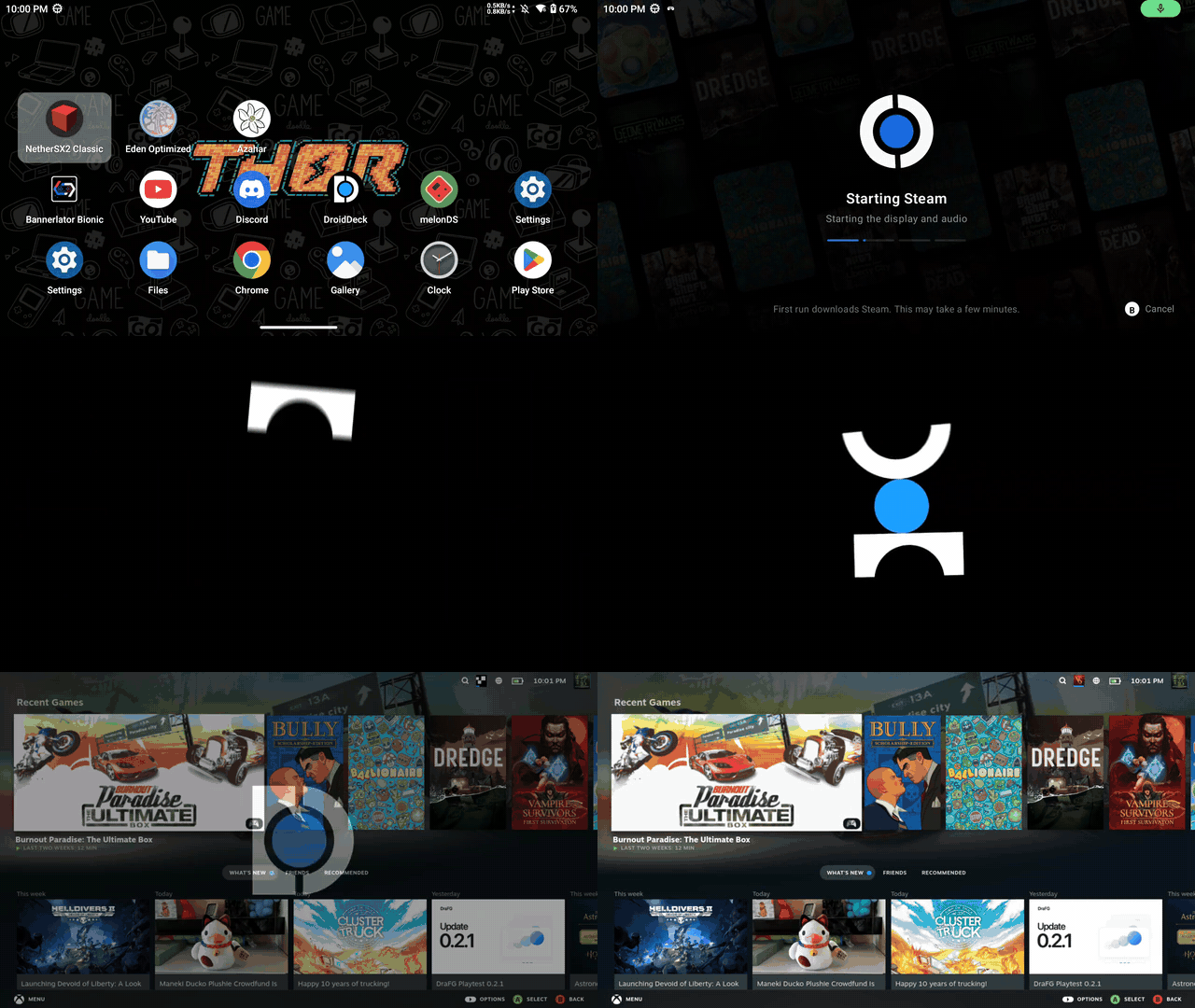
Image credit: Droid-Deck/GitHub.
DroidDeck is Valve's Steam client, not a clone
Per the project's README, DroidDeck brings the SteamOS experience to Android: Valve's Steam client opens in Big Picture mode on Adreno handhelds, and Windows games run through Valve's ARM64 Proton port. Nothing in the README describes a fork or a replacement client. The user presses Play, signs in, and Steam downloads on first launch.
That distinction matters. Most Android gaming stacks steer you toward streaming from a PC or toward native Android ports. This one puts Valve's desktop client, its library view and its Proton compatibility layer directly on the device, which is why the README's summary line leads with the SteamOS experience rather than with any Android store integration.
The project sits under the DroidDeck GitHub repository, written in Kotlin and licensed GPL-3.0, with the README stating plainly that Steam and Proton belong to Valve and that this project is not affiliated with Valve.
10,735 stars in three and a half weeks
The repository was created September 24, 2026 and had been pushed the morning of October 18, 2026, sitting at 10,735 stars. For context, that is the largest star count we logged across any repository covered this Sunday, and it accumulated in about three and a half weeks of public life.
The number itself is part of the story. It is a demand signal for running real Steam on Android hardware, and on virtual screens worn on the face, from an audience that existing handheld Linux distributions do not currently reach. This also lands in the same week our site covered SteamOS 3.9 main booting an Intel Arc B580 and Steam for Linux going 64-bit, which fits the broader pattern of Steam tooling spreading outward from Valve's own boxes into hardware Valve does not sell.
Which GPUs run it and which do not
Per the README, requirements are Android 9 or newer on an Adreno 730 or newer GPU, with Adreno 8xx chips recommended. Compatibility and performance vary by device and hardware validation is limited, so treat the tiers below as the project's own stated expectations rather than tested benchmarks.
| GPU family | Status per README | Detail |
|---|---|---|
| Adreno 8xx | Supported, recommended | Best tier for Windows games through ARM64 Proton |
| Adreno 730 and newer 7xx | Supported | Baseline requirement, Android 9 or newer |
| Adreno 6xx | Experimental | DirectX 11 via DXVK 2 may run, DirectX 12 games can still crash |
| Adreno 710 | Unsupported | Excluded from current support |
| Mali | Unsupported | Arm's mobile GPU family |
| Xclipse | Unsupported | Exynos-integrated GPUs |
| PowerVR | Unsupported | Imagination Technologies GPUs |
Storage and one Developer options switch
Space matters before anything launches. The README asks for about 3 GB for the Linux runtime and another 1.1 GB for the desktop and emulators layer, before any Steam downloads land.
There is one Android quirk worth knowing before buying into the idea. On Android 14 and newer, the user must enable Disable child process restrictions in Developer options before Steam will launch at all. On Android 12 and 13 devices where that toggle is not present, the first Steam launch presents a Fix it for me button that automates the setup. That the project ships automation to route around an OS-level restriction is itself a signal of how much friction Valve's client carries on Android, and a reminder no root is required anywhere in the flow.
Flathub, GOG, Epic Games and Amazon Games built in
The Desktop and apps layer adds a full Linux desktop plus emulators. The Store inside DroidDeck installs Linux apps and games from Flathub using ARM64 builds through Flatpak, with options for AppImages and setup scripts beyond Flathub.
Stores, listed under Setup with a toggle to show them in the rail, signs in to GOG, Epic Games and Amazon Games and pulls purchases into DroidDeck's library and shortcuts. Epic retains its direct API install path.
The Epic path has an unusual wrinkle the README is explicit about. Opening the Epic store prepares Epic's official Linux launcher preview, an x86-64 client run through the FEX emulator on ARM, with DroidDeck keeping its Proton hooks; games installed in that client import back into DroidDeck's library. Per the README, that preview and its ARM setup sit outside Epic's listed Linux support, so treat it as something that works with Epic's client but is not a configuration Epic endorses.
Steam on VITURE, RayNeo and XREAL glass
Under Setup, Smart glasses settings apply app-wide across DroidDeck's menus, launchers, desktop sessions and games, so the virtual screen behaves consistently everywhere rather than per app. Supported VITURE, RayNeo and XREAL connections provide 3DoF head tracking. A Luma Ultra connection adds optional, explicitly experimental 6DoF plus stereo-assisted hand and Joy-Con tracking.
The README points to a per-model support matrix for device support, controls, setup and limitations, and states that model support and SDK requirements differ. Because hardware validation is limited, glass models outside the tested set may work differently than the matrix suggests. REDMAGIC glass displays appear in the credits as well, where the project says its findings were drawn from a MagicDesk investigation and a decompiled Nubia kernel.
The borrowed-parts engineering stack
The credits section reads like an inventory of the mobile Linux ecosystem rather than a single rewrite. Epic and GOG support build on adaptations of Legendary and gogdl, the command-line clients behind Heroic. The runtime, shim, input and controller work builds on WinNative and Bannerlator by maxjivi05, and mmap ring-buffer controller input is credited to ribbit384.
Frame generation is the most legally careful piece. LSFG is taken from the work of Camille LaVey and the Eden emulator project, following lsfg-vk, and ported into WinNative and DroidDeck. The README states it requires the user's own copy of Lossless Scaling on Windows and that the project ships none of Lossless Scaling's shaders, so the Android port uses the technique without redistributing its assets.
The VR internals borrow just as deliberately. Camera hand tracking runs Google MediaPipe's hand and pose models on AndroidX CameraX frames, with MediaPipe's usage reports switched off. Joy-Con VR controllers adapt hand models associated with Monado and Valve's Index skeletons, while Joy-Con behavior was researched through Linux's own hid-nintendo driver work; the README notes Joy-Con is a Nintendo trademark and the project is unaffiliated.
Honest limits, stated up front
The README states limits without hedging. Desktop compositing uses software rendering, so the desktop layer is not a GPU-accelerated shell. Firefox sandboxing is reduced under proot, the container approach used to run Linux userspace. Compatibility and performance vary by device, and hardware validation is limited.
Telemetry-minded users get a concrete answer: logs are kept app-private, covering the last 30 sessions, and the Share logs function packs the newest session along with store and tool logs into a single scrubbed zip for bug reports. That scrubbing-before-sharing behavior is more careful than many Android app logs.
The no-official-website warning
The README carries an explicit warning: DroidDeck does not have a stand-alone website, and users should not click download links on websites claiming to be the DroidDeck team. Official downloads are the repository's Releases page only. Any site presenting installers or droiddeck.com domains is presenting something the DroidDeck developers do not vouch for.
That warning pairs with the project's open-source posture. With GPL-3.0 code and a Discord tied to the repository for help, preview builds and device reports, the only trust chain the project endorses runs from its own source, which is exactly the kind of thing fake-download sites tend to hopscotch around.
FAQ
Does DroidDeck require root?
No. Per the README, no root is required. The main setup tasks are installing the APK and Linux runtime from the repository's Releases, plus a Developer options toggle on Android 14 or newer.
Does it modify Valve's Steam client?
No. Steam downloads and launches as Valve's own client in Big Picture mode after you press Play and sign in. The README states DroidDeck is not affiliated with Valve.
Can it run Windows games on a phone?
Yes, through Valve's ARM64 Proton on Adreno GPUs. Support tiers matter: Adreno 730 or newer is the supported path, Adreno 6xx is experimental with DirectX 12 crashing possible, and Mali, Xclipse, PowerVR and Adreno 710 are unsupported.
Why will Steam not launch on my Android 14 phone?
The README says you must enable Disable child process restrictions in Developer options before Steam launches on Android 14 or newer. On Android 12 and 13 without that option, the first Steam launch shows a Fix it for me button that automates setup.
Is DroidDeck's Epic Games integration officially supported by Epic?
Sign-in and library import are built in, and Epic keeps its direct API install path. But the README is explicit that Epic's official Linux launcher preview running through FEX on ARM, and DroidDeck's ARM setup of it, sit outside Epic's listed Linux support.
Is there an official DroidDeck website with downloads?
No. Per the README, there is no stand-alone website, download links on sites claiming to be the DroidDeck team should not be clicked, and official downloads come only from the repository's Releases page.
Our take
We think the star count is honest, because what is being demonstrated is genuinely new: Valve's own client, running on a phone, projecting itself onto a VITURE or XREAL face screen, with purchased GOG, Epic and Amazon libraries snapping in. What impresses us more, though, is the assembly discipline. Proton ARM64, FEX, Legendary, gogdl, LSFG from Camille LaVey's work through Eden, MediaPipe, Monado hand models, none of those were written from scratch here, and the project's credits say so in unusual detail. In our view, that composition approach is how Android becomes Steam's second surface, not a rewrite nobody can staff, and the LSFG handling, which demands you bring your own Lossless Scaling license and redistributes no shaders, shows the copying done by the rules.
Bottom Line
DroidDeck runs Valve's real Steam client in Big Picture mode on Android with Windows games through ARM64 Proton, no root needed, on Android 9 or newer with an Adreno 730 or newer GPU. It layers in a full Linux desktop, Flathub, GOG, Epic Games and Amazon Games, virtual-screen support for VITURE, RayNeo and XREAL glasses, and optional experimental frame generation that borrows from Lossless Scaling rather than shipping it. It took 10,735 stars in about three and a half weeks, the biggest repo star count of this Sunday, and its stated limits, software-rendered desktop compositing and limited hardware validation, are printed openly. The only official download location is the repository's Releases page, because no official website exists.
Sources
- DroidDeck repository README, fetched from raw.githubusercontent.com on October 18, 2026
- GitHub repository metadata for Droid-Deck/DroidDeck, October 18, 2026