
Gears of War E-Day Pre-Install Guide: 115 GB SSD and Launch Times [2026]
By Indie Kings | October 1, 2026
Updated October 1, 2026: Early access is live today at 8am PT for Premium Edition owners after pre installs opened on September 29 at 8am PT. Plan for a 115GB SSD install on PC and console and confirm your edition timing before you queue your download.
Gears of War E-Day preload week is here and timing matters more than hype. This guide covers when pre installs opened, when Early Access unlocks, when the full launch unlocks, how much SSD space to reserve, and how to verify your install on each storefront. Specs detail lives in the companion specs draft, summarized here in one line: the PC build needs an SSD with 115GB free and a ray tracing capable GPU per the official specs shared via Xbox Wire. Editions detail lives in the early access draft, summarized here in one line: Premium Edition at 99.99 dollars unlocks up to 5 day early access while Standard at 69.99 dollars and Game Pass unlock on October 6 per Xbox Wire and Microsoft Store listings.
Gone gold status was confirmed per the Xbox Wire post from September 17 2026 by Mike Crump of The Coalition. That milestone locked the launch build and allowed pre installs to begin on September 29 at 8am PT which is 15:00 UTC on Series X and S, Xbox on PC, and Steam. Early Access begins October 1 at 8am PT and full launch follows on October 6 at 8am PT. Those three times anchor every step below.
Launch Timeline
Preload timing for a major Unreal Engine 5 release can decide whether you play at launch minute or spend launch night watching a progress bar. The Coalition and Xbox set three public beats for E-Day: gone gold, pre install start, then staged unlocks. Gone gold per Xbox Wire on September 17 2026 signaled that the master build was approved and distribution could begin. Pre installs began September 29 at 8am PT across Series X and S, Xbox on PC, and Steam. Early Access unlocks October 1 at 8am PT and the full launch unlocks October 6 at 8am PT.
Use Pacific Time as your source of truth and convert locally. 8am PT equals 11am ET in the United States, 4pm BST in the United Kingdom during daylight saving, and 15:00 UTC. Console storefronts usually unlock automatically if you leave the console in connected standby with updates enabled. PC storefronts on Xbox on PC and Steam usually need the app open or background downloads enabled. If you travel across time zones during launch week, keep your device clock on automatic so entitlement checks match the server unlock.
The table below condenses the full schedule into one reference you can screenshot. All times are 8am PT unless noted. Pre install availability does not equal playability. You can download early and still wait for your edition unlock.
| Milestone | Date In 2026 | Time | Who It Applies To |
|---|---|---|---|
| Gone gold announced | September 17 | Xbox Wire post by Mike Crump | All players, build locked |
| Pre install opens | September 29 | 8am PT, 15:00 UTC | Series X and S, Xbox on PC, Steam preorder and Premium owners [NEEDS VERIFICATION for exact Steam entitlement cutoff] |
| Early Access unlock | October 1 | 8am PT | Premium Edition owners |
| Full launch unlock | October 6 | 8am PT | Standard Edition plus Game Pass Ultimate and PC Game Pass |
Early Access being live today changes preload priority. If you own Premium, verify your install now rather than tonight. If you own Standard or plan to play through Game Pass Ultimate or PC Game Pass on October 6, you still benefit from pre installing early because day one patches and shader compilation can add time on top of the base download. Per Xbox Wire, Game Pass Ultimate and PC Game Pass join on October 6, not during early access, so Game Pass members should schedule downloads closer to October 6 entitlement.
Online multiplayer on console needs a Game Pass subscription with online multiplayer per Xbox Wire. Two player split screen is console only per Xbox Wire. 4K 60FPS needs a compatible display per Xbox Wire. None of those change download size, but they affect what to test after the unlock. Plan a quick campaign boot first, then test multiplayer entitlements, then test split screen or high refresh output if your hardware supports it.
Edition Access
Edition confusion causes more launch day support threads than any bug. E-Day uses a simple split: Premium plays first, everyone else plays October 6. Premium Edition at 99.99 dollars includes the base game, up to 5 day early access, Bravo Squad Signature Weapon Pack, 5 seasonal customization packs from Emergence Pack at launch, and 1000 Iron currency per Xbox Wire and Microsoft Store listings. Standard Edition at 69.99 dollars unlocks at full launch. Preorder bonus of Exfil Dom skin plus Exfil Weapon Skin Set applies to orders before October 6 at 7:59am PT per Xbox Wire and Microsoft Store listings.
The table below maps edition to access date so you can confirm in seconds. Check your library receipt, not just your memory of what you clicked. Refunds, upgrades, and Game Pass stacking can change entitlement without changing what the store tile shows.
| Edition Or Membership | Price Or Plan | Playable From | Pre Install |
|---|---|---|---|
| Premium Edition | 99.99 dollars | October 1 at 8am PT Early Access | From September 29 at 8am PT |
| Standard Edition | 69.99 dollars | October 6 at 8am PT | From September 29 at 8am PT [NEEDS VERIFICATION for Standard preload wave timing] |
| Game Pass Ultimate and PC Game Pass | Subscription | October 6 at 8am PT, not early access | Preload when the Game Pass tile enables install [NEEDS VERIFICATION for exact tile timing] |
If you upgraded from Standard to Premium close to launch, restart the store app and check for add ons. The Bravo Squad Signature Weapon Pack and Emergence Pack seasonal packs can appear as separate managed items. The 1000 Iron currency grant can require a full game boot to the main menu rather than appearing in the store wallet instantly [NEEDS VERIFICATION for grant timing]. Take a screenshot of your order history showing Premium Edition and the preorder bonus cutoff of October 6 at 7:59am PT in case support needs proof.
Households sharing a console should confirm home console settings before October 1. Early Access entitlement usually follows the purchasing account, and shared access rules vary by platform [NEEDS VERIFICATION for E-Day home sharing behavior]. Do not assume a second profile can play early just because the game files are installed. Verify each profile at unlock rather than discovering the limit with guests waiting.
Five Preload Steps
Follow these five steps in order. They are written for Series X and S, Xbox on PC, and Steam, with PC storage warnings called out explicitly. Total active time is about 20 minutes plus download time. Total download size centers on 115GB SSD space on PC, with 120.04GB reported by GameRant as the Steam facing figure, so reserve 120GB to be safe.
- Confirm your edition and access date. Open your store order history and confirm Premium Edition for October 1 at 8am PT, Standard Edition for October 6 at 8am PT, or Game Pass Ultimate or PC Game Pass for October 6 at 8am PT per Xbox Wire. Confirm the preorder bonus cutoff of October 6 at 7:59am PT if you expect the Exfil Dom skin plus Exfil Weapon Skin Set. If your receipt says Standard but you paid for Premium, resolve it before downloading 100GB twice. If you plan to play multiplayer on console, confirm your Game Pass subscription includes online multiplayer. If you plan split screen, confirm you are on console because 2 player split screen is console only. Write down your expected unlock date and time in PT plus your local time so the whole household shares the same plan.
- Free 120GB on an SSD and remove HDDs from the plan. On PC, free at least 120GB on an internal SSD because the official requirement lists 115GB SSD space and GameRant reports 120.04GB on Steam. HDDs are unsupported and cause severe issues per the Coalition open beta FAQ, so do not install to a spinning drive even as a temporary staging drive. On Series X and S, free matching space on internal storage or an approved expansion card and remember that external USB drives can store but not always play current generation builds [NEEDS VERIFICATION for E-Day USB play policy]. Empty the recycle bin or trash after deleting, clear other game update caches, and leave 10 to 20GB of headroom beyond the listed size for patches and shader caches. Reboot after freeing space so the store rechecks available bytes correctly.
- Pre install on your storefront starting September 29 at 8am PT. On Series X and S, queue the download from your library, enable automatic updates, and leave the console in connected standby. On Xbox on PC, open the Xbox app, confirm the correct drive under install options, then start the install and allow background downloads. On Steam, open your library, start the pre install, confirm the install drive has 120GB free, and set downloads to allow background downloads while playing only if you accept slower speeds. Do not pause and resume across different drives because that can orphan chunks and force verification. If the store shows Play or Update instead of Pre installed, click through to managed items and install any missing packs.
- Update your GPU driver and OS build. On PC, install the latest stable GPU driver from NVIDIA, AMD, or Intel that lists E-Day or current Unreal Engine 5 support [NEEDS VERIFICATION for exact Game Ready driver version]. Minimum OS builds matter here: Windows 10 22H2 for minimum spec systems and Windows 11 25H2 for recommended systems per final specs relayed by Wccftech. Confirm your Windows build from Settings, install pending cumulative updates, then reboot before launch day. On console, check for system updates under Settings and controller firmware updates if you use wireless controllers. Updated drivers reduce shader compilation hitches and black screen reports that spike during launch week.
- Verify at 8am PT launch and check Game Pass timing. At October 1 at 8am PT, Premium owners should fully quit the game, reboot the store app or console, then launch and check for a day one patch before entering campaign. At October 6 at 8am PT, Standard and Game Pass Ultimate and PC Game Pass players should repeat the same cold boot check. If the game says too early or not entitled, confirm the account that owns Premium, confirm Game Pass membership is active and includes online multiplayer for console multiplayer, and confirm the device clock is automatic. Test campaign boot first because campaign plus Horde Siege 4 player squads with Assault, Marksman, Medic, and Breacher classes plus world bosses and Versus 4v4 Ranked and Social modes all share the same base install but gate differently on entitlements [NEEDS VERIFICATION for mode unlock sequencing].
Each step above prevents a specific launch day failure. Step 1 prevents entitlement mismatch where players download early but cannot play early. Step 2 prevents the most severe PC failure, which is installing a 115GB Unreal Engine 5 build to an HDD that the Coalition open beta FAQ says is unsupported. Step 3 prevents partial installs where the base game downloads but weapon packs or customization packs stay queued. Step 4 prevents driver and OS blocks that look like game crashes but are really platform mismatches. Step 5 prevents false bug reports where a missing reboot hides an available unlock.
Storage And Driver Checks
Storage deserves its own section because E-Day is an SSD gate, not just a size gate. The official PC requirement calls for 115GB SSD space per the specs shared via Xbox Wire, while GameRant lists 120.04GB as the store facing file size. Treat 120GB as your planning number. Unreal Engine 5 streaming, high resolution textures, campaign plus Horde Siege with world bosses, and Versus maps all assume fast random reads. An HDD cannot sustain that pattern, which is why the Coalition open beta FAQ warns of severe issues on HDDs. This is not a preference for faster loads. It is a compatibility floor.
On PC, open Settings and confirm install drive type before you download. Many systems mix a small SATA SSD boot drive with a large HDD media drive, and launchers default to the drive with the most free space, which is often the HDD. In the Xbox app, change the install drive under Settings before queuing. In Steam, check Storage under Settings and create a library folder on the SSD explicitly. Aim for 130GB to 140GB free on that SSD if you can, because Windows updates, hibernation files, and shader caches grow after install. If your SSD is nearly full, move video captures, move other large games first, then defragment only if the drive is an HDD [NEEDS VERIFICATION for current Windows optimization wording], and never defragment an SSD.
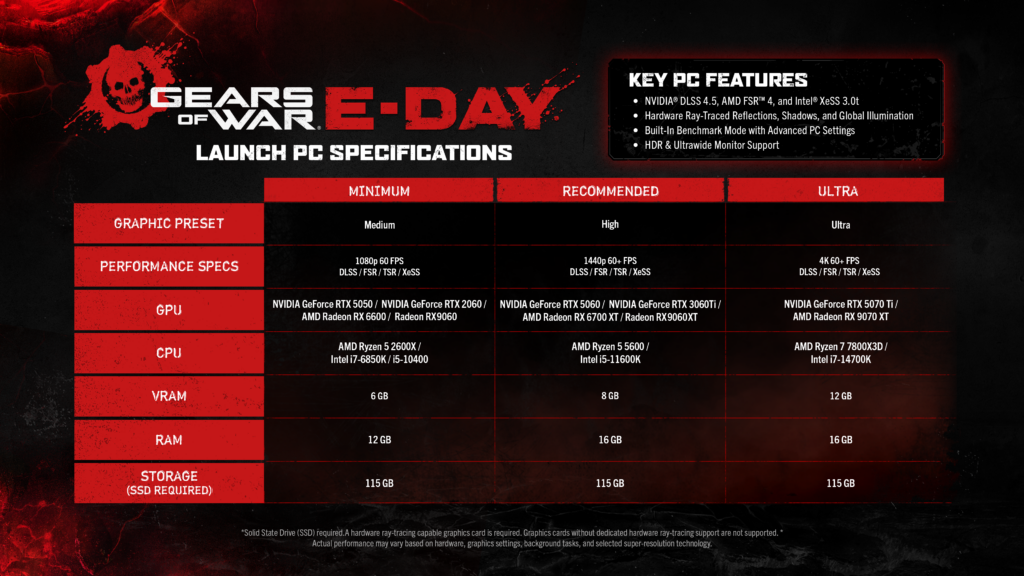
Image: Official PC specs. Credit: The Coalition via Xbox Wire.
Driver and OS checks close the loop. Minimum GPUs start at ray tracing capable RTX 2060 class hardware per final specs relayed by Wccftech, with minimum CPUs including Ryzen 5 2600X, i7-6850K, and i5-10400 with 12GB RAM on Windows 10 22H2. Recommended systems center on Ryzen 5 5600 or i5-11600K with 16GB on Windows 11 25H2. High end targets list RTX 3060 Ti for 1440p60 and RTX 5070 Ti or RX 7900 XT for 4K60 with upscaling per final specs relayed by Wccftech. You do not need to memorize those tiers for preload, but you do need to match driver and OS to them. An RTX 2060 class card on an old driver plus an outdated Windows 10 build is the classic combo behind launch crashes that get blamed on servers.
Update in this order to save time: Windows cumulative update first, reboot, then GPU driver clean install, reboot, then store app update, then game patch check. On laptops, plug into AC power, set the discrete GPU as preferred for the game, and confirm the display output if you chase 4K 60FPS because that mode needs a compatible display per Xbox Wire. On desktops with multiple drives, label your SSD in Windows as GAMES SSD so future installs default correctly. On consoles, check for system software updates the night before each unlock, test your headset and network NAT type, and confirm Quick Resume behavior by fully quitting E-Day before the unlock minute [NEEDS VERIFICATION for Quick Resume support at launch].
Network planning is the final multiplier. A 115GB to 120GB download takes about 2 hours 40 minutes on a sustained 100 Mbps link and about 32 minutes on a sustained 500 Mbps link before overhead, patches, and household congestion. Those math estimates assume ideal throughput and will vary [NEEDS VERIFICATION for real world Steam and Xbox CDN speeds during preload]. Use wired Ethernet where possible, pause cloud backups and 4K streams during preload, and schedule downloads overnight after September 29 at 8am PT. If your ISP enforces data caps, preloading once to the correct SSD avoids paying for the same bytes twice. Verify file integrity after download completes rather than assuming 100 percent means verified.
Verification steps differ slightly by storefront but share the same logic. On Series X and S, highlight the game tile, open Manage game and add ons, and confirm the base game plus entitled packs show as Installed. On Xbox on PC, open the library entry and confirm the install size and drive plus any add ons for Bravo Squad Signature Weapon Pack and Emergence Pack seasonal packs. On Steam, open Properties then Installed Files and run Verify integrity of game files after pre install completes. If verification finds missing chunks, let it repair on the same SSD rather than moving folders mid repair. Screenshot your installed size and version number so support threads can help faster if unlock fails.
FAQ
When does Gears of War E-Day pre install open?
Pre installs opened September 29 at 8am PT which is 15:00 UTC on Series X and S, Xbox on PC, and Steam per Xbox Wire. Gone gold was confirmed September 17 2026 by Mike Crump of The Coalition, which locked the build for distribution.
When is Early Access versus full launch?
Early Access begins October 1 at 8am PT for Premium Edition owners. Full launch is October 6 at 8am PT for Standard Edition plus Game Pass Ultimate and PC Game Pass per Xbox Wire.
How much SSD space does E-Day need on PC?
Reserve 120GB on an SSD. The official spec lists 115GB SSD space and GameRant reports 120.04GB, while the Coalition open beta FAQ says HDDs are unsupported and cause severe issues.
Which edition do I need to play on October 1?
You need Premium Edition at 99.99 dollars for October 1 Early Access, which also includes the Bravo Squad Signature Weapon Pack, 5 seasonal customization packs from Emergence Pack at launch, and 1000 Iron currency per Xbox Wire and Microsoft Store listings. Standard at 69.99 dollars and Game Pass play on October 6.
Does Game Pass include Early Access?
No. Game Pass Ultimate and PC Game Pass join on October 6, not during early access, per Xbox Wire. Console online multiplayer also needs a Game Pass subscription with online multiplayer.
What should I check if the game will not unlock at 8am PT?
Fully quit the game, reboot the store app or console, confirm the purchasing account owns Premium for October 1 access, confirm Game Pass is active for October 6 access, and check for a day one patch. Also confirm your device clock is automatic and your install is on SSD storage.
Bottom Line
Pre install now, play on your edition date. Premium Edition unlocks October 1 at 8am PT after pre installs opened September 29 at 8am PT, while Standard and Game Pass Ultimate and PC Game Pass unlock October 6 at 8am PT. Reserve 120GB on an SSD, avoid HDDs entirely per the Coalition open beta FAQ, update GPU drivers and Windows builds, then verify files with a cold boot at unlock. Gone gold per Mike Crump and The Coalition via Xbox Wire means the build is ready, so any remaining delay is storage, entitlement, or patch related and fixable before launch night.
Campaign fans, Horde Siege squads running Assault, Marksman, Medic, and Breacher against world bosses, and Versus 4v4 Ranked and Social players all share the same download. Confirm edition once, install once to the right SSD, and test campaign boot first at 8am PT. That single clean pass beats redownloading 115GB under launch load.
Sources
Primary launch timing and edition facts in this guide are attributed to the Xbox Wire gone gold post from September 17 2026 by Mike Crump of The Coalition, Microsoft Store listings for Standard and Premium editions, the Steam store page for E-Day, the Coalition open beta FAQ for HDD guidance, GameRant for the 120.04GB file size figure, and Wccftech for relaying final PC specifications. Links below open the official sources used for verification.
- Xbox Wire Gears of War E-Day gone gold post, September 17 2026
- Microsoft Store Gears of War E-Day Standard and Premium listings
- Steam Gears of War E-Day store page
- The Coalition open beta FAQ on storage and HDD support
- GameRant E-Day file size report, 120.04GB
- Wccftech final E-Day PC specifications relay