
Neural Rendering on AMD: Two OptiScaler Forks Build a Front End for DLSS 5
By Indie Kings | October 20, 2026
Updated October 20, 2026: Two community forks released new builds on October 20 that put NVIDIA's DLSS neural rendering model into the OptiScaler pipeline on AMD GPUs. TheAutomatic's dlss-5-amd-project shipped v1.13.0-alpha8 with a graphical launcher and a smaller model path, while MatheusFerreiraS's OpenNR-OptiScaler shipped v0.5.6-opennr with a VRAM leak fix and support for 10-bit SDR games. Neither project runs DLSS 5 super resolution on AMD hardware; both use the neural denoiser and leave upscaling to FSR.
The one-sentence version: this is a community bridge that feeds a game's DLSS or XeSS buffers into NVIDIA's neural denoiser, runs that denoiser on an AMD GPU, and hands the result to FidelityFX Super Resolution for the final image.
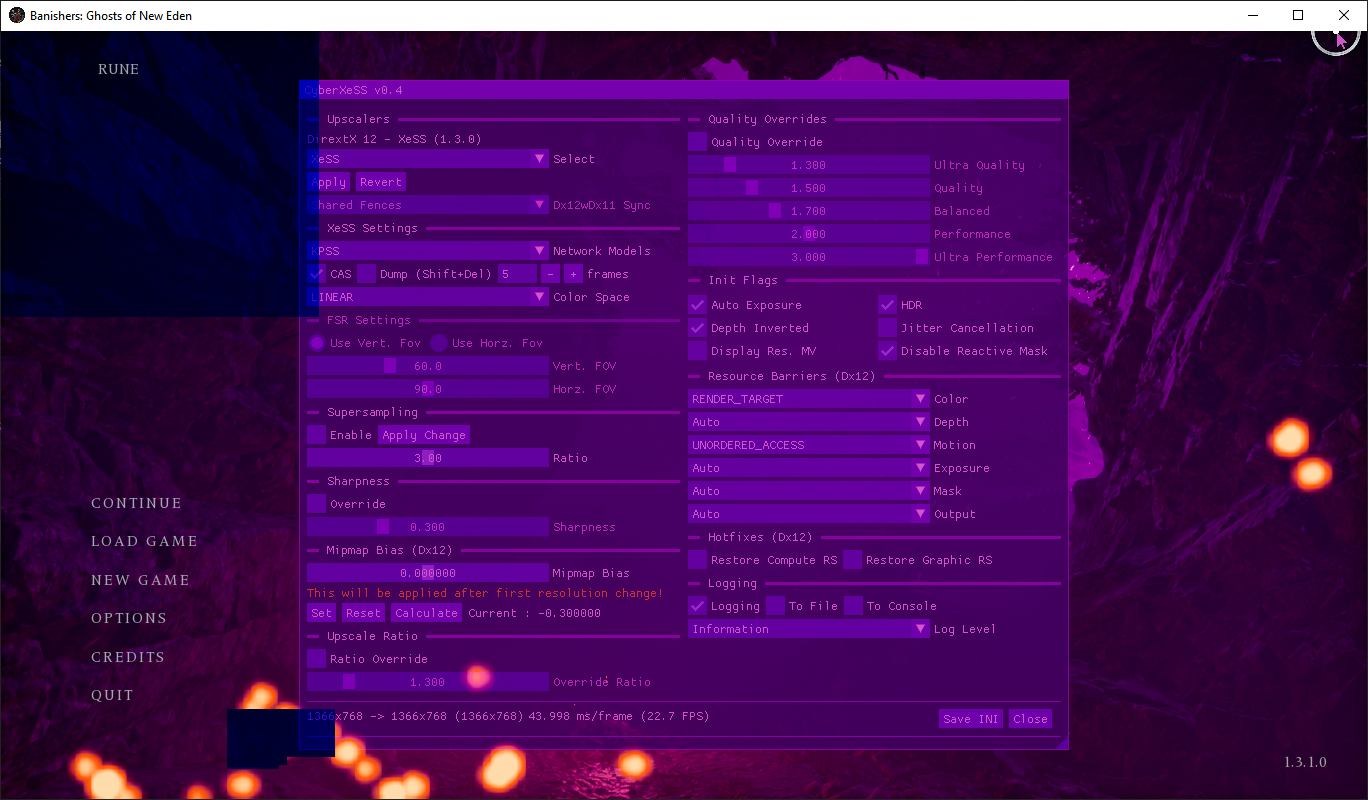
Image credit: TheAutomatic/dlss-5-amd-project, OptiScaler overlay in Banishers: Ghosts of New Eden.
What "DLSS 5 on AMD" actually means
The phrase is misleading if you read it as DLSS super resolution running on a Radeon card. DLSS Super Resolution is NVIDIA's upscaler, and these projects do not replace it with an AMD equivalent. What they use is NVIDIA's neural rendering component, the part that denoises a scene before it is upscaled. The model is shipped in NVIDIA's nvngx_dlssnr.dll, and the projects call it DLSS-NR or DLSS 5 neural rendering.
The pipeline is: the game asks for DLSS or XeSS, OptiScaler intercepts that request, the neural rendering runtime runs the denoiser on the AMD GPU, and FidelityFX Super Resolution produces the final upscaled image. The game sees a DLSS-style input and an upscaled output, but the upscaler doing the work is FSR, not DLSS.
That distinction matters for image quality. The neural denoiser is trained on NVIDIA's model and weights, while the upscaler is AMD's. The combination can look different from either vendor's native path, and the projects themselves say the results are still being validated across games. It is not a free upgrade, and it is not a universal speedup.
It also matters for licensing. Neither project distributes NVIDIA's DLL or the model weights. The user has to supply nvngx_dlssnr.dll, version 310.9.16 or 310.8.0, and the weights derived from it. The projects are GPL-3.0, but that does not settle whether using NVIDIA's binaries and weights this way complies with NVIDIA's terms. Users should read the licenses and make their own call.
The two forks and what they shipped
TheAutomatic's project is the larger of the two. It was created on September 15, 2026, and had 261 stars, 13 forks and one open issue as of October 20. Its v1.13.0-alpha8 release is the newest build. OpenNR-OptiScaler was created on September 22, 2026, and had 32 stars, three forks and no open issues. Its v0.5.6-opennr release landed the same day.
| Project | Latest build | Focus | Repository size |
|---|---|---|---|
| TheAutomatic/dlss-5-amd-project | v1.13.0-alpha8, October 20 | Graphical launcher, three backends, model management | 261 stars, 13 forks, 1 open issue |
| MatheusFerreiraS/OpenNR-OptiScaler | v0.5.6-opennr, October 20 | OptiScaler integration, FSR ray reconstruction, 32-bit support | 32 stars, 3 forks, 0 open issues |
Source: GitHub repository metadata and release pages, fetched October 20, 2026. Star and issue counts are snapshots.
Both are forks of earlier work. TheAutomatic credits MatheusGViana's dlss-5-amd-project, Dagherbou's OptiScaler_DLSSNR and wilsjo2's PreSR-Multipass for the original integration. OpenNR credits the same lineage plus danielblnc's runtime, lmxxf's HIP port and mochizuki0323's Vulkan port. The shared idea is to run the neural pass before FSR, with multiple passes for a stronger effect.
They are not identical products. TheAutomatic's build is aimed at managing three backends and installing them per game, with a graphical launcher that scans Steam, Xbox PC, Epic and GOG libraries. OpenNR is closer to a traditional OptiScaler fork: it adds a Neural tab, FSR ray reconstruction and XeSS multi-frame generation, and it expects the user to run a setup script. Both end up in the same place, but they serve different levels of patience.
How the pipeline works
OptiScaler is the host. It injects a proxy DLL into the game, intercepts the upscaler calls and presents a menu. The neural rendering fork adds a stage before the upscaler: the game's color, depth and motion vectors go into the neural network, the network returns a denoised frame, and FSR upscales that frame to the display resolution.
Running the network before super resolution is the Pre-SR design. It lets the denoiser work at render resolution, which is cheaper than running it at display resolution, and it gives FSR a cleaner input. The alternative is to run the network after the finished frame, which some ray reconstruction titles require because the denoiser needs the final signal. TheAutomatic's build supports both, with a per-game choice; OpenNR supports the after-frame path for danielblnc and the pre-SR path for lmxxf and Mochizuki.
The projects also deal with synchronization. A neural pass takes time, and a naive implementation makes the GPU wait for the previous frame's denoiser before it can start the next one. TheAutomatic's README describes a multi-slot scheduler that gives each in-flight denoise its own buffer, eliminating an 8.7 ms per-frame stall in its test. OpenNR's README describes the same problem and credits the multi-slot work to TheAutomatic's fork. These are project claims, not independent measurements, but the architectural point is real: a neural pass inserted into a frame pipeline has to overlap with the rest of the frame or it costs more than it saves.
Three runtimes, three hardware paths
Both projects expose three backends, and the hardware requirements differ. The danielblnc runtime is the most widely compatible: it supports RDNA3 and RDNA4 with HIP 7, and its 0.6.0 build adds RDNA2 with the HIP 7.2 runtime. The lmxxf backend is an open-source HIP port of a 71-block network, with a newer 31-block small model, and it targets RDNA4 cards such as the RX 9070 and RX 9060 series. The Mochizuki backend is a Vulkan port for RDNA4, with its own model extraction and shader pipeline.
| Backend | Runtime | GPU support | Where it runs |
|---|---|---|---|
| danielblnc | DLSS-NR-on-AMD 0.5.1 or 0.6.0 | RDNA3 and RDNA4 with HIP 7; RDNA2 with 0.6.0 and HIP 7.2 | Before or after super resolution |
| lmxxf | Open-source HIP port | RDNA4, RX 9070 and RX 9060 series | Before super resolution, up to 1080p render resolution |
| Mochizuki | Vulkan port | RDNA4 | Before super resolution or after the finished frame |
Source: TheAutomatic and OpenNR READMEs, fetched October 20, 2026.
The backends are not interchangeable in quality or cost. The lmxxf small model is faster and lighter than the original 71-block model, but the projects describe it as a lighter edit. The Mochizuki path has its own styles, pass counts and resolution scaling, and OpenNR says the network takes about 8.5 ms per frame at 1080p on an RX 9070 XT. Those numbers are not comparable across projects because the test scenes and settings differ.
The hardware list is narrow. RDNA4 owners have the most options; RDNA3 owners can use danielblnc; RDNA2 owners need the 0.6.0 build and the HIP 7.2 runtime. NVIDIA and Intel GPU owners are not the target. This is an AMD-specific bridge, even though the model comes from NVIDIA.
What is new in these builds
TheAutomatic's v1.13.0-alpha8 is mostly about installation and model management. It adds a graphical launcher that scans local Steam, Xbox PC, Epic and GOG libraries, identifies the real game executable instead of a launcher or crash helper, and lets the user install multiple backends and pick the active one. It also adds a runtime compatibility repair that compares DLL versions in the game folder with the package and can replace or restore them with backups.
The same release updates the Mochizuki backend to 0.0.7 with FP8, INT4 and Small model support, and the lmxxf backend to 0.44 with the Small model and W16 path. It fixes an input stall when a proxy DLL is loaded through a low-level hook, and it improves injection stability in some DX11 and DX12 games. The release notes also list known issues: the new launcher is functional but not polished, RenoDX cannot run with person protection, inline mode is experimental, and the new model variants are still being validated.
OpenNR's v0.5.6-opennr focuses on the runtime. It adds lmxxf 0.44's Small model, which it says is about a third faster on an RX 9070 XT: 10.3 to 6.5 ms at 1080p with one pass, and 30.1 to 18.7 ms with three passes. It fixes a VRAM leak of about 35 MB per network rebuild when temporal history is on. It adds 10-bit SDR backbuffer support for games such as inZOI and Mortal Shell 2, fixes Forza Horizon 6 flicker with Streamline, and fixes a black screen in Xbox or Game Pass games whose executable sits in a subfolder of the package.
The common thread is maturity work. The first wave of these projects proved the neural pass could run on AMD. The current wave is about installing it without breaking a game, switching models without leaking memory, and handling the odd backbuffer formats that real games use. That is less exciting than a frame rate screenshot, and it is the work that decides whether anyone can use the feature.
The performance claims, with caveats
The performance numbers from both projects are best read as demonstrations, not benchmarks. TheAutomatic reports a test where multi-slot scheduling raised a 4K FSR Super Performance run from 33.5 fps to 44.5 fps, about 33%, while reducing GPU wait from 8.69 ms per frame to nearly zero. OpenNR reports the lmxxf Small model cutting 1080p one-pass cost from 10.3 ms to 6.5 ms on an RX 9070 XT, and three-pass cost from 30.1 ms to 18.7 ms.
| Claim | Project | Test |
|---|---|---|
| 33.5 to 44.5 fps, about +33% | TheAutomatic | 4K FSR Super Performance, 720p render, 60 fps cap, multi-slot vs single-slot |
| 8.69 ms to about 0 ms GPU wait | TheAutomatic | Same test, PresentMon measurement |
| 10.3 to 6.5 ms per frame, one pass | OpenNR | lmxxf Small vs original model, 1080p, RX 9070 XT |
| 30.1 to 18.7 ms per frame, three passes | OpenNR | lmxxf Small vs original model, 1080p, RX 9070 XT |
Source: Project release notes and READMEs, fetched October 20, 2026. These are the projects' own measurements, not independent benchmarks.
None of those numbers says the image is better. A denoiser can remove noise and also soften detail, and the projects expose strength, style, pass count and resolution controls because there is no single correct setting. TheAutomatic's release notes explicitly say the new model variants are still being validated for image quality, long runs and performance across games, and that no universal speedup is claimed. That is the right framing.
The other caveat is the frame rate cost of the neural pass itself. The gain in the TheAutomatic test came from removing a stall, not from making the network free. If the GPU cannot afford the pass, the frame rate drops. Both projects offer dynamic resolution or a frame rate guard to reduce the cost, but those are trade-offs, not magic.
Why this is not a one-click feature
The install starts with files the projects cannot ship. The user needs nvngx_dlssnr.dll, the NVIDIA model DLL, and the weights. TheAutomatic's quick start asks for the DLL, the lmxxf weights folder and danielblnc's setup executable in the same folder as Setup.bat. OpenNR asks for danielblnc's version.dll or setup, plus the weights, and for lmxxf it asks for the weights folder. Mochizuki adds a Python 3.10 requirement for model extraction.
Then the user picks the game's actual executable folder, not the launcher shortcut. Unreal Engine games usually put the executable under Binaries\Win64. The installer renames OptiScaler to a proxy DLL, usually dxgi.dll, and writes the configuration. Some games need OptiPatcher to enable DLSS in the first place. Some need a different proxy name. Some anti-cheat systems will not tolerate any of this.
The result is a per-game setup, not a driver feature. It can be scripted and the new launchers make it easier, but it is still a compatibility layer with a list of known issues. That is the price of running a model the hardware vendor did not ship for this GPU.
Licensing, anti-cheat and alpha software
The licensing question is the one the projects cannot answer for the user. NVIDIA's DLL and weights are not redistributed, and the user supplies them. The projects are GPL-3.0, but the NVIDIA binaries keep their own terms. Whether extracting and running the model on non-NVIDIA hardware is permitted is a question for NVIDIA's license, not for a README. The projects are careful to say they do not bundle the files; they are not in a position to grant permission.
Anti-cheat is the second risk. OptiScaler injects a DLL and hooks graphics calls. Some multiplayer games treat that as tampering, even when the feature is only upscaling. The projects do not claim compatibility with anti-cheat, and users should assume online games are off-limits unless the developer explicitly allows it.
The third risk is that these are alpha builds. TheAutomatic's version is literally alpha8, and its release notes list unresolved issues with RenoDX, inline mode and model validation. OpenNR's build is more stable but still tied to specific runtimes and GPU generations. A crash or a black screen is a normal part of testing this kind of software, not a sign that the project is fraudulent.
The fourth risk is the install footprint. These tools replace or rename DLLs in the game folder, and the launchers add compatibility repair and backup features because that is necessary. Users should keep the backups, read the uninstall instructions and test on a single game before applying anything to a library.
Our take
The most interesting thing here is not that a neural denoiser runs on an AMD GPU. It is that the community has built a complete pipeline around it: OptiScaler for injection, three runtime backends for different GPU generations, FSR for upscaling, and now graphical installers and model managers. That is a lot of engineering for a feature neither AMD nor NVIDIA ships as a supported configuration.
The two forks also show where the work is going. TheAutomatic is building the front end: a launcher, a game scanner, model selection and compatibility repair. OpenNR is building the plumbing: 10-bit SDR support, VRAM leak fixes, Xbox package paths and ray reconstruction. Both are necessary, and neither is finished. The fact that they shipped on the same day is a sign of how fast this corner of graphics modding moves.
We would not recommend this to someone who wants a supported upscaler. It requires a model DLL the user must obtain, a per-game install, a compatible AMD GPU and a tolerance for alpha software. We would recommend watching it if you are interested in how neural rendering is being reverse-engineered onto hardware it was not designed for. The image-quality comparisons are still missing, and that is the next thing to look for.
FAQ
Does this run DLSS 5 super resolution on AMD GPUs?
No. The projects run NVIDIA's neural denoiser, often called DLSS-NR, on AMD GPUs and use FSR for super resolution. The game's DLSS or XeSS request is intercepted, the neural pass runs on the AMD GPU, and FSR produces the final upscaled image.
What is the difference between TheAutomatic's project and OpenNR?
Both are OptiScaler forks that add AMD neural rendering. TheAutomatic's build focuses on a graphical launcher, game scanning and three-backend management. OpenNR focuses on the OptiScaler integration, FSR ray reconstruction, 32-bit support and runtime fixes. They share upstream code but are separate projects.
Which AMD GPUs are supported?
The danielblnc backend supports RDNA3 and RDNA4 with HIP 7, and RDNA2 with its 0.6.0 build and HIP 7.2. The lmxxf backend targets RDNA4, including the RX 9070 and RX 9060 series. Mochizuki targets RDNA4. Check the project README for the exact runtime and model requirements.
Do I need an NVIDIA DLL?
Yes. The projects do not distribute NVIDIA's nvngx_dlssnr.dll or the model weights. The user supplies the DLL, version 310.9.16 or 310.8.0, and the weights. That is also why the licensing question is not settled by the project's GPL license.
Will it work in multiplayer games?
Do not assume so. OptiScaler injects a DLL and hooks graphics calls, and some anti-cheat systems treat that as tampering. The projects do not claim anti-cheat compatibility. Use it in single-player games unless the developer explicitly allows it.
Is it faster than FSR alone?
Not necessarily. The neural pass costs GPU time, and the projects' performance claims are about recovering stalls or using a smaller model, not about making the network free. Image quality and frame rate depend on the game, GPU, model, pass count and resolution. The projects say no universal speedup is claimed.
Bottom Line
TheAutomatic's dlss-5-amd-project v1.13.0-alpha8 and MatheusFerreiraS's OpenNR-OptiScaler v0.5.6-opennr are two community forks that run NVIDIA's DLSS neural denoiser on AMD GPUs through OptiScaler, with FSR handling super resolution. They support danielblnc, lmxxf and Mochizuki backends across RDNA2, RDNA3 and RDNA4 with different runtime requirements. The October 20 builds add graphical installation, a smaller lmxxf model, Mochizuki 0.0.7, VRAM leak fixes, 10-bit SDR support and Xbox package path fixes. They do not run DLSS 5 super resolution on AMD, they require the user to supply NVIDIA's DLL and weights, and they are alpha or enthusiast software with unresolved image-quality and anti-cheat questions.
Sources
- TheAutomatic/dlss-5-amd-project repository and English README: github.com/TheAutomatic/dlss-5-amd-project
- v1.13.0-alpha8 release notes, published October 20, 2026: v1.13.0-alpha8
- MatheusFerreiraS/OpenNR-OptiScaler repository and README: github.com/MatheusFerreiraS/OpenNR-OptiScaler
- v0.5.6-opennr release notes, published October 20, 2026: v0.5.6-opennr
- danielblnc/DLSS-NR-on-AMD runtime: github.com/danielblnc/DLSS-NR-on-AMD
Related: DLSS-NR-on-AMD: An RX 9070 XT Runs the Full DLSS 5 HT Model at 90 to 100 FPS at 1080p | Upshift Wraps OptiScaler With Full Game Library Manager