
Swing, Draw, Heal: Vanilla WoW Gets A Full Body VR Client
By Indie Kings | October 15, 2026
Updated October 15, 2026: Vanilla VR is a full body VR client for the 1.12 game, played with body motion for combat, casting, healing and proximity voice. Per the official repository README, it ships as a kit with client plus launcher plus guide, reads data from your own 1.12.1 install, and supports a friend server over a private share or a solo realm built on your PC.
What Vanilla VR is
Per the official repository README, Vanilla VR is a VR client for the 1.12 game that is played with the body. The README frames the pitch in physical verbs. You swing to swing a sword, you draw to draw a bow, you push a palm out to cast, you lay a hand on a friend to heal that friend, and you talk to the players near you. That set of actions defines the project. It is not presented as a visual filter over normal play. It is presented as a body client where motion and proximity carry combat and social contact.
Per README, the repository is the kit. The kit means the client plus its launcher plus its guide. The client is built on benilla, a 1.12.1 client written from scratch in Rust. This site covered benilla separately. The distinction matters because the kit does not include game files. Per README, no game files are included. You need your own copy of the 1.12.1 client in a folder of its own. The kit reads the game data from your install on your PC. The launcher look works the same way. It wears your game login screen art read from your install. Nothing of the game is downloaded or shared by the kit.
Per README, Vanilla VR is not affiliated with or endorsed by Blizzard Entertainment. That line sits next to the note that the World of Warcraft name is a trademark of Blizzard Entertainment Inc. The legal posture is therefore explicit. Bring your own legal client, use the open kit for VR and launcher and realm tooling, and keep game data local. The install guide in the repository, named INSTALL.md, takes the reader from nothing to standing in the game, per README, and the README points to that guide as the path from setup to first login.
The social structure is also explicit in the first paragraphs. Per README, you play either on a friend server joined privately over Tailscale, or on a realm of your own that the launcher builds on your PC. Those are the two play modes. There is no public server promise in the excerpt. There is a private friend path and a solo path. Both paths use the same body client. The difference is where the realm lives and how you connect. The rest of the README then explains needs, launcher behavior, voice, controls, reports, file list and license.
The body action list deserves close attention because it sets expectations for moment to moment play. Swing your sword points to melee as arm motion rather than a key press. Draw your bow points to a two hand posture rather than a single action button. Push a palm out to cast points to a directional hand gesture for spell output. Lay a hand on a friend to heal points to touch range cooperation rather than target frames alone. Talk to players near you points to proximity voice rather than party channels alone. Per README, those five ideas together are the core. The controls sheet and progress page carry the full move list and implementation status, and first time tips in the game explain each control as it comes up.
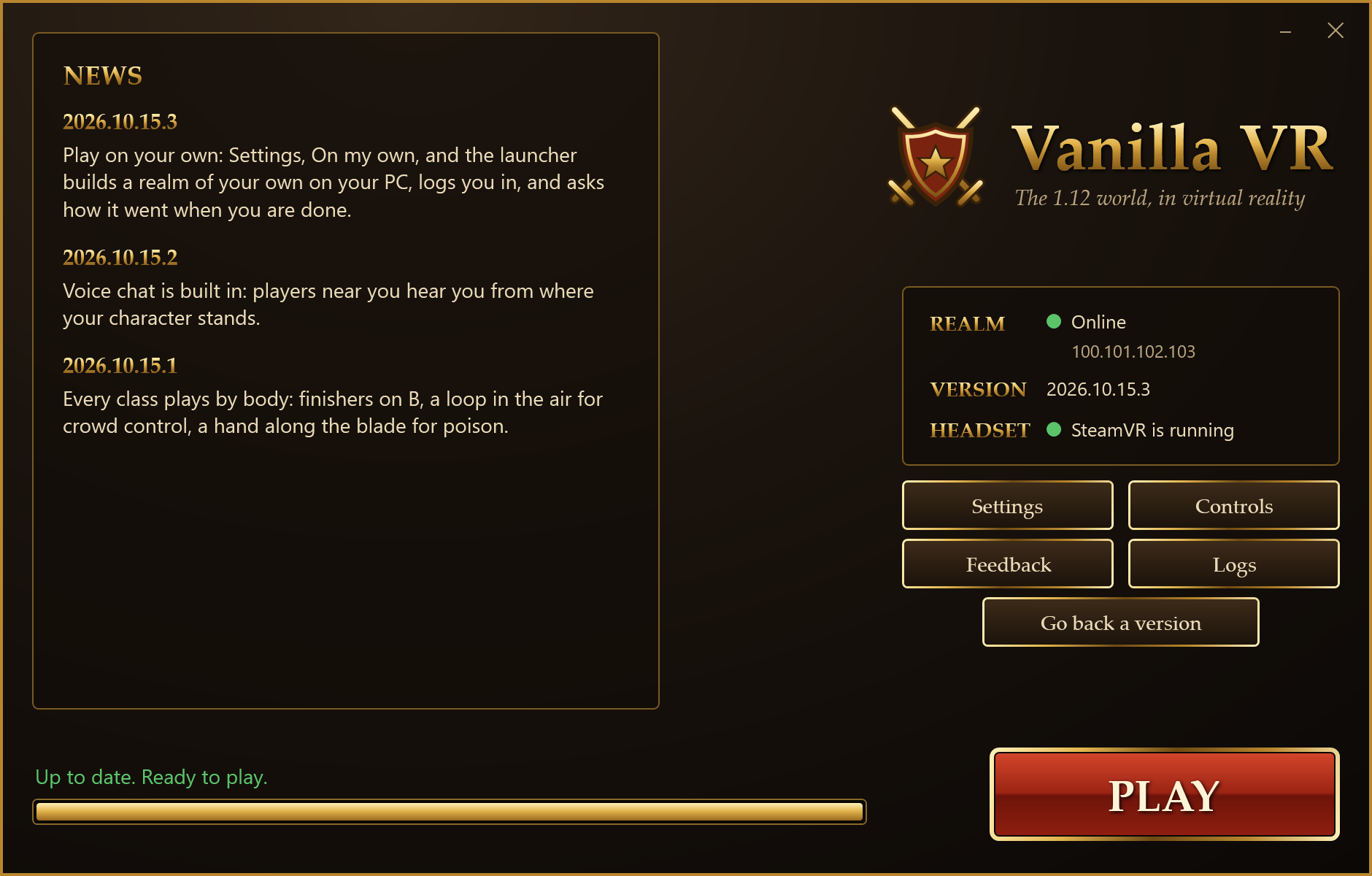
Image: Vanilla VR launcher. Credit: GitHub repository justiceofrip/vanilla-vr.
Requirements
Per the official repository README, the requirements list is short and specific. It names operating system, graphics capability, headset path, game version and network or disk needs by mode. The table below restates that list without adding new hardware claims. Standing for the table is Per README. Any current price, driver version or headset firmware detail beyond the README would need fresh verification, so this article stays with what the README states.
| Area | What the README asks for | Notes in own words |
|---|---|---|
| Operating system | Windows 10 or 11 | Per README, the supported PC path is Windows 10 or Windows 11. |
| Graphics | Card that supports Vulkan, described as any recent AMD or NVIDIA card | Per README, Vulkan support is the gate. Recent AMD or NVIDIA parts are named as the expected class. |
| Headset | PC VR headset that works with SteamVR, with Quest through Quest Link, Air Link, Steam Link or Virtual Desktop | Per README, SteamVR is the platform. Quest is named only through those four PC link paths. |
| Game files | Own World of Warcraft 1.12.1 client, build 5875, English, in a folder of its own | Per README, no game files are included. The version and language and separate folder are explicit. |
| Friend server path | Free Tailscale account, plus from the friend a share link and an account on that server | Per README, Tailscale is the private join path. The friend supplies share access and a server account. |
| Solo path | About 6 GB free, and an hour of PC time once | Per README, the solo realm build is a one time cost in disk and time on your PC. |
Standing: Per README.
The Windows plus Vulkan pairing is the technical core of the list. Per README, Windows 10 or 11 is required and the graphics card must support Vulkan. The README does not list a minimum model in the excerpt, only the class of any recent AMD or NVIDIA card. That wording leaves room for edge cases, so readers with older or integrated parts should treat compatibility as unverified until tested against the guide. The article does not add a driver number or a card list because the source does not give one. The safe reading is that a modern discrete PC GPU path is assumed, on Windows, with Vulkan present.
The headset wording is also careful. Per README, the requirement is a PC VR headset that works with SteamVR. Quest is then addressed as working through Quest Link, Air Link, Steam Link or Virtual Desktop. Those four names are given without links in this article, per scope. The point is that Quest is supported as a PC VR endpoint, not as a standalone build. Steam is therefore the VR platform name in the chain, used here in prose without a link. Readers should not read standalone Quest support into the text. The README describes a SteamVR path, with Quest bridged to the PC.
The game files rule is the legal and practical center. Per README, you need your own World of Warcraft 1.12.1 client, build 5875, English, in a folder of its own. The build number and language are explicit and worth preserving exactly. The kit reads data from that install on your PC. The launcher art is also read from that install, including logo, red buttons, gold frames and fonts. Per README, nothing of the game is downloaded or shared. That design keeps the kit free of game data while still presenting a familiar login look drawn from the copy you already own.
The mode split in requirements is clean. For a friend server, per README, you need a free Tailscale account, and from your friend a share link and an account on their server. Tailscale is named here in prose without a link. For solo play, per README, you need about 6 GB free and an hour of PC time once. Those figures are restated as about values because the README states them as about values. Actual disk use and build time can vary by PC, so treat the numbers as planning guides from the source rather than guarantees.
Play modes
Per the official repository README, there are two ways to play. You join a friend server privately, or you run a realm of your own that the launcher builds on your PC. The table below compares those modes on connection, setup cost, accounts and session flow. Standing for the table is Per README. The article does not direct readers to download a binary. It describes what each mode means in the source.
| Mode | Connection | Setup and cost | Session flow per README |
|---|---|---|---|
| Friend server | Private join over Tailscale with a share link and a server account from the friend | Free Tailscale account on your side, no realm build on your PC | Launcher updates from the friend PC, you log to the friend realm, reports and logs go to the friend host |
| Solo realm | Local realm built and run on your PC, logged straight in by the launcher | About 6 GB free and about an hour of PC time once for the one time build | Launcher wakes the realm while you read news, logs you straight in, saves progress and sleeps on close |
Standing: Per README.
The friend path is social and light on your disk. Per README, you play on a friend server joined privately over Tailscale. You bring a free Tailscale account. Your friend supplies a share link and an account on their server. The launcher updates from the friend PC in that mode, fetching only what changed and checking every file before anything is replaced. Your logs and motion recording go only to the friend whose server you play on, per README, never to GitHub. That last point matters for privacy expectations. The data path is to the host you already trust, not to a public tracker.
The solo path is self contained and heavier up front. Per README, the launcher builds your realm once on your PC, wakes it while you read the news, logs you straight in, and puts it to sleep with progress saved when you close the game. The build uses the free vMaNGOS server plus its world database plus MariaDB, downloaded from their own pages, then your game maps read from your install. The article names those components without links, per scope. The time and disk note of about 6 GB and about an hour applies to this one time build. After that, the loop is open launcher, read news while realm wakes, press play, close to save and sleep.
Account power differs in a way worth stating plainly. Per README, your account on your own realm is a game master account. The README names .levelup plus .tele plus partybot add as working in chat. That makes solo play useful for testing, travel, leveling and party bot experiments without a host. On a friend server, by contrast, access comes from the account your friend creates for you. The README does not promise game master powers there. Readers should expect host rules to apply on a friend realm and full local control only on a solo realm.
Update behavior also splits by mode. Per README, the launcher updates itself every time it opens, from your friend PC when you play with a friend, or from the project releases when you play on your own. Only what changed is fetched. Every file is checked before anything is replaced. A go back version option undoes an update that plays worse. That rollback note is reassuring for a body client where feel can change between builds. The article describes that mechanism without linking to any release file, per scope, and without giving step by step download directions.
Launcher
Per the official repository README, PLAY.cmd opens a launcher in the manner of the old game. The elements are the news plus your realm plus a progress bar plus a big PLAY button. Once it knows your game folder, it wears your game own login screen art. The README lists the logo plus the red buttons plus the gold frames plus the fonts, read from your install. Nothing of the game is downloaded or shared in that process. The effect is familiar presentation built from local data, not a redistributed skin.
Settings come first in practice. Per README, the launcher Settings ask for your game folder and where you play. That single step answers two gates at once. It points the kit at your legal 1.12.1 build 5875 English copy, and it selects friend or solo flow. From there the launcher knows which update source to use and whether a local realm must exist. The article stays descriptive here. It does not walk through clicks as instructions. It reports what the launcher asks and why that matters.
The update and safety model is spelled out in compact language. Per README, updates arrive every time the launcher opens. The source is the friend PC or the project releases depending on mode. Only changed files move. Every file is checked before replacement. A rollback option reverses an update that plays worse. That is the full safety story in the excerpt. No hash algorithm name is given, no channel name is given, and no version string is given, so this article adds none. The citable facts are frequency plus incremental fetch plus verification plus rollback.
The kit contents help explain what the launcher is made of. Per README, the kit folder holds PLAY.cmd plus launcher.ps1 plus play.ps1 described as its engine plus solo.ps1 for your own realm plus ROLLBACK.cmd plus README.txt plus vr settings text. The client files named are benilla vr exe and launcher art exe for the launcher look read from your game, shipped with the files above, plus the update the launcher fetches. File names are restated here as names only, without links and without download direction, per scope. The point is that the zip is a small script plus executable kit, not a game repack.
The post play loop is unusual and worth describing in full. Per README, after you play, the launcher asks how it went. It asks about fun, whether it worked, and how arms and back feel on a 1 to 5 scale, plus what felt great and what broke. That response, combined with what the session measured, becomes a playtest report. On a friend server the report path stays with the host. On solo play with no friend, a Post on GitHub option opens the report as a form for the player to post. The design ties subjective body feel to measured session data from the start.
Solo realm
Per the official repository README, solo play means the launcher builds a realm once on your PC and then manages it quietly. The build inputs are the free vMaNGOS server plus its world database plus MariaDB, downloaded from their own pages, then your game maps read from your install. The article names vMaNGOS and MariaDB here in prose without links. The README is explicit that those server pieces are downloaded from their own project pages when you build, and that they are not part of the kit. That separation keeps licensing and sourcing clean.
The time and space cost is stated as about 6 GB free and an hour of PC time once. Per README, that cost applies to the one time build. Readers should treat it as a planning figure, not a benchmark. Disk speed, CPU speed and background load can shift the hour. The value of stating it is expectation setting. Solo play is not instant. It is a single longer setup followed by quick sessions where the realm wakes while you read news and sleeps with progress saved on close.
The session flow for solo play is described as hands free after setup. Per README, the launcher wakes the realm while you read the news, logs you straight in, and puts it to sleep with progress saved when you close the game. That loop removes manual server console work from daily play. You do not start services by hand each time. You open the launcher, let it wake the local realm, press play, and close to save and sleep. The convenience claim is limited to what the README states. No boot time promise is given beyond waking while you read news.
Power and identity on a solo realm are also stated. Per README, your account is a game master account. The named chat powers are .levelup plus .tele plus partybot add. Those three strings are useful signals. Level control plus teleport plus party bot support point to a test friendly solo world where travel and group simulation do not require other players. The article does not expand those commands with syntax or extra powers because the README does not give more. The citable fact is that those entries work in chat on your own realm.
Licensing for the solo stack is separated from the kit license. Per README, your own realm runs vMaNGOS and MariaDB, both GPL 2.0, which the launcher downloads from their own project pages when you build it. They are not part of the kit. The client and launcher themselves are under MIT or Apache 2.0 at your option, as benilla is, with license files named in the repository. Libraries inside the client keep their own licenses listed in THIRD PARTY NOTICES text. The article keeps those names as plain file and license names without links, per scope.
Voice chat
Per the official repository README, voice chat is built in. Players near you hear you from where your character stands, and you hear them the same way, fading out by about 30 yards. Nothing extra is needed to install. The game uses the Windows default microphone, and only talking is sent, never silence. That last detail is a bandwidth and privacy touch. The system sends speech, not quiet room tone. The distance figure of about 30 yards is restated with about intact, because the README gives it as an approximate range.
The in game book holds the VR page with three controls. Per README, Microphone offers System default in parentheses as Windows default, plus Headset own in parentheses as your VR headset own, plus Muted. Voices controls their volume or Off. Voice goes selects Straight to players described as the quickest, or Through the host. Those labels are restated exactly enough to be usable as a map, without inventing button art or menu paths beyond what the README names. First time tips in the game explain controls as they come up, which should reduce the need to memorize this page.
The routing choice carries a clear tradeoff. Per README, Straight to players means your PC and theirs talk directly, so the players you talk with can see your internet address, as in most online game voice chat. Two public servers, named as Google plus Cloudflare, are also asked what that address is. Through the host sends voice through your friend PC instead. No other player learns your address in that mode, at a little more delay. Everything said is encrypted, and only players near you can hear it. Those sentences are kept close to the source because they describe privacy and latency in one place.
The privacy lines around voice deserve plain restatement. Per README, everything said is encrypted. Only players near you can hear it. In direct mode, peers can see your internet address and two public servers are asked to determine that address. In host mode, no other player learns your address, at the cost of a little more delay. The article does not add claims about codec, port, or retention because the README does not give them. Readers who need those details should treat them as unverified until the project documents them.
Hardware handling is simple by design. Per README, the game uses the Windows default microphone with no install step, and the Microphone setting allows switching to the headset own mic or to Muted. That covers desktop mics, headset mics and silence in three choices. Voices volume or Off covers hearing others. The routing switch covers direct speed versus host privacy. Together the three settings make voice usable without leaving the game book. Nothing in the excerpt suggests external voice software is needed or supported.
Controls and first time tips
Per the official repository README, every button and body move is on one page called the controls sheet. In the game, first time tips explain each control as it comes up. What the client can do so far is on the progress page. This article names those pages without linking them, per scope, because the Sources rule keeps the repository as the only external href. The citable structure is that a single sheet holds the full map, the game teaches in context, and a separate page tracks implementation status.
The body verbs from the top of the README remain the best short map. Swing for sword, draw for bow, palm push for cast, hand lay for heal, and proximity talk for social play. Per README, those are the headline actions. The full button plus motion mapping lives on the controls sheet. The article does not invent gestures for dodge, block, jump or loot because the excerpt does not list them. Readers should use the sheet and the in game tips as the live reference, with the progress page showing what works so far.
The session marking gesture is one concrete control worth surfacing. Per README, players mark moments by clicking both thumbsticks when something misfires. That input feeds the playtest record alongside moves that fired, frame times, arm load and other session measures. It is a small but telling design choice. Instead of asking players to remember bugs after the headset comes off, the client gives a physical bookmark at the moment of failure. The post play questions then capture what felt great and what broke while the marks preserve timing.
The progress page role is to bound expectations. Per README, what the client can do so far is on the progress page. That single line signals active development and partial coverage. Body VR for a full MMO is a large surface, from locomotion to targeting to menus to chat. A reader should not assume every class or every action is mapped. The safe reading is that headline melee plus bow plus cast plus touch heal plus proximity voice define the direction, while the progress page defines the present.
For new players, the practical takeaway in the source is to rely on teaching inside the game. Per README, first time tips explain each control as it comes up. That suggests a gradual introduction rather than a manual to memorize. Combined with the single sheet reference and the progress tracker, the learning loop is read the sheet for the map, learn by tips in context, and mark misfires with both thumbsticks when the map and the body disagree. No extra software or setup step for controls is named in the excerpt.
Playtest reports
Per the official repository README, Vanilla VR is built around three questions. Is it fun, does it work, and how does the body feel after an hour. Every report helps answer them. That framing explains why the post play survey asks about fun plus function plus arms and back on a 1 to 5 scale. It also explains why session measures travel with answers. The project treats comfort as a first class signal, not an afterthought, with arms and back rated numerically plus free text for what felt great and what broke.
The report payload is listed with unusual care. Per README, sent with answers are how long played and as which class, PC parts and headset, VR settings, what the session asked of arms, frame times, moves that fired and moments marked. That bundle pairs subjective feel with objective load. Play time and class give context. PC parts and headset plus VR settings give reproduction clues. Arm load plus frame times plus move firing plus marked moments give body and performance evidence. The article restates that list without adding fields, because the source list is already specific.
Routing and consent for reports are explicit. Per README, logs and motion recording go only to the friend whose server you play on, never to GitHub. A player name appears on a report only if the player ticks Put my name on it. Playing solo with no friend, a Post on GitHub option opens the report as a form for the player to post. Those three rules set expectations. Host play keeps data with the host. Public posting is opt in by name tick or by solo post action. There is no silent public upload in the described flow.
The marking habit connects play to reports. Per README, players click both thumbsticks when something misfires. Those marks travel with the session record. After play, the launcher asks how it went across fun plus function plus body feel 1 to 5, plus great versus broken notes. That pairing of in moment marks with post session reflection is stronger than either alone. Marks preserve when, notes preserve why. Future readers of reports get both timing and language.
The value of reports to the project is stated simply. Per README, every report helps answer whether it is fun, whether it works, and how the body feels after an hour. That is the full test lens. Fun covers game feel and motion satisfaction. Works covers stability and control firing. Body feel covers arms and back after sustained play. The article does not add metrics or thresholds because the source does not give them. The citable claim is that those three questions organize development, with reports as the evidence stream.
License and files
Per the official repository README, the client and launcher are under the MIT license or the Apache License 2.0, at your option, as benilla is. License files are named LICENSE MIT and LICENSE APACHE in the repository. Libraries inside the client keep their own licenses, listed in THIRD PARTY NOTICES text. Your own realm runs vMaNGOS and MariaDB, both GPL 2.0, which the launcher downloads from their own project pages when you build it. They are not part of the kit. That paragraph is kept as plain names without links, per scope.
The file map in the README, under the heading of what is here, names four entries. INSTALL.md is the install guide with what to do when something goes wrong. The kit folder holds the launcher and guide as they ship in the zip, with PLAY.cmd plus launcher.ps1 plus play.ps1 as its engine plus solo.ps1 for your own realm plus ROLLBACK.cmd plus README text plus vr settings text. Releases holds the kit itself, described as the client benilla vr exe plus launcher art exe with the files above, plus the update the launcher fetches. THIRD PARTY NOTICES text holds library licenses. Names only, no links, per scope.
The no game files rule repeats here because it is load bearing. Per README, no game files are included. The kit reads game data from your install on your PC. The launcher look is read from your game. Nothing of the game is downloaded or shared. Your own copy of the 1.12.1 client, build 5875, English, in its own folder, is therefore a hard requirement rather than a suggestion. The article treats that as the legal center of the project and does not describe any other source for data.
The launcher art detail is worth isolating. Per README, once the launcher knows your game folder it wears your game own login screen art. The listed elements are the logo plus the red buttons plus the gold frames plus the fonts, read from your install. Nothing of the game is downloaded or shared in that step. That is a careful way to get a familiar look without redistribution. It also means the launcher appearance depends on a valid local install. Without that folder set, the themed look cannot resolve.
The update artifact is also described without direction. Per README, Releases holds the kit itself plus the update the launcher fetches, while the launcher updates from the friend PC or from releases by mode, fetching only what changed and checking every file before replacement, with rollback available. This article describes that flow without linking any release file and without giving download steps, per scope. The repository link in Sources is the only external href. Readers who need the guide should start from the repository and its named INSTALL.md file.
FAQ
What is Vanilla VR in one sentence?
Per the official repository README, Vanilla VR is a full body VR client for the 1.12 game where sword swings plus bow draws plus palm casts plus touch heals plus proximity talk replace flat input for those actions.
What do I need to run it?
Per README, you need Windows 10 or 11 with Vulkan graphics plus a SteamVR headset plus your own 1.12.1 build 5875 English client, with Tailscale access for friend play or about 6 GB and an hour for a solo realm build.
How do friend play and solo play differ?
Per README, friend play joins a private friend server over Tailscale with a share link and server account, while solo play builds a local realm on your PC and the launcher wakes it for news reading then sleeps it with progress saved on close.
How does voice chat work?
Per README, nearby players hear you from your character position fading by about 30 yards, with mic plus voices plus routing controls in the game book and direct or host routing trading speed against address privacy.
What happens after a session?
Per README, the launcher asks about fun plus function plus arms and back on a 1 to 5 scale with notes on great versus broken, paired with session measures to form a playtest report kept with the host or posted by choice.
Are game files included?
Per README, no game files are included, the kit of client plus launcher plus guide reads data and art from your own install, and the project states no affiliation with or endorsement by Blizzard Entertainment.
Bottom Line
Per the official repository README, Vanilla VR is a body played path into the 1.12 game with a clear contract. You bring Windows plus Vulkan plus SteamVR plus your own 1.12.1 build 5875 English copy. The kit brings client plus launcher plus guide. You either join a friend privately over Tailscale or build a solo realm on your PC for about 6 GB and about an hour once. The launcher then carries news plus realm plus progress plus play, themed by your own login art, updated incrementally with rollback, and followed by a report that pairs fun plus function with arms and back feel.
The strongest details are the physical verbs and the test lens. Swing sword, draw bow, palm cast, hand heal and proximity talk define the promise. Fun plus works plus body feel after an hour define the measure. Voice fading by about 30 yards plus direct versus host routing plus encrypted speech define the social layer. Game master powers on a solo realm plus wake on news plus sleep on close define the solo convenience. None of that requires game redistribution, because data and art stay read from your install.
Readers should keep expectations tied to the source. The controls sheet holds the full button and motion map, first time tips teach in context, and the progress page shows what works so far. The install guide named INSTALL.md is the path from nothing to standing in the game. The repository is the only external reference in this article. Start there, confirm your build number and language and headset path, choose friend or solo, and treat comfort reports as part of play rather than paperwork.
Sources
Per the official repository README for all facts above. Repository: Vanilla VR repository. Standing: Per README.