
Xodus Nexus: A Game Pass Launcher for Linux, With a List of What Works
By Indie Kings | October 20, 2026
Updated October 20, 2026: Xodus Nexus, an unofficial open source launcher for Microsoft Store and PC Game Pass games on Linux, released version 0.3.9 on October 20, 2026, with keyring checks, a Start service action, download reliability fixes and clearer diagnostics. The previous 0.3.8 release on October 19 added game pages, Xbox achievements and controller navigation. The project appeared on GitHub on October 11 and had 598 stars and 53 open issues as of October 20. It installs supported games locally on x86_64 Linux, including SteamOS, and its own compatibility list names Gears of War: E-Day, Forza Horizon 6 and Avowed as playable.
The one-sentence version: Xodus Nexus is not cloud streaming and not an emulator, it is a reverse-engineered bridge that makes Microsoft Store games install and launch locally on Linux, and its compatibility list is the real story.
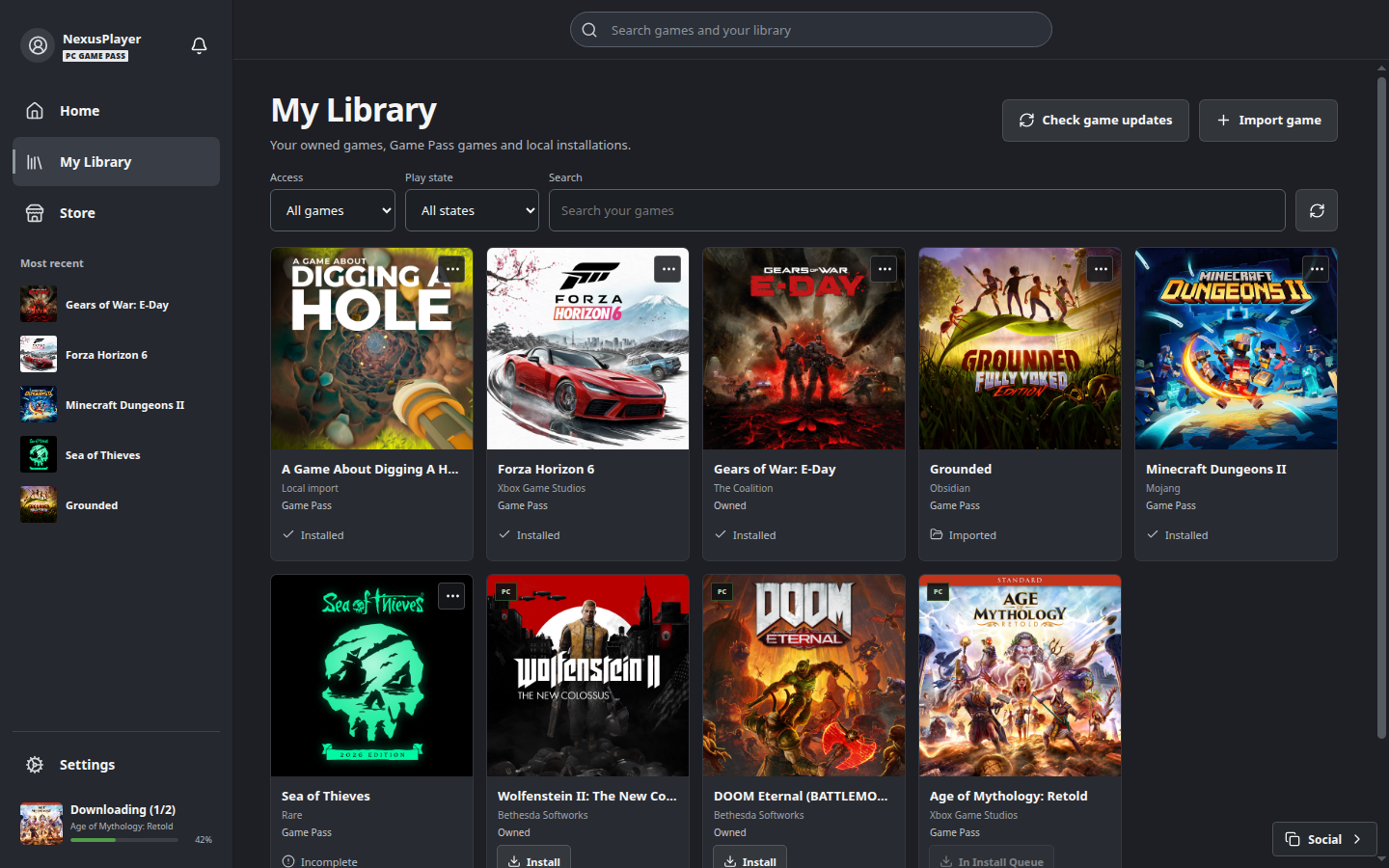
Image credit: Xodus Nexus project. Screenshot shows sample account data.
What Xodus Nexus is
Xodus Nexus describes itself as an Xbox-inspired desktop launcher for Xodus on Linux. It browses the Microsoft Store, shows owned and Game Pass games in one library, installs supported titles and launches them through a shared runtime. It also supports Xbox sign-in and cloud saves for games that expose those features.
The project is built on Xodus, an open source effort that reverse-engineers the framework used by Xbox PC games so they can run outside Windows. Nexus adds a graphical launcher, a patched backend and a patched runtime on top of that work. The launcher is MIT licensed, while the separate backend keeps its upstream GPLv3 license.
This is local installation, not cloud gaming. A Game Pass game downloaded through Nexus runs on the Linux machine, using the same kind of compatibility layers that Proton uses for Steam games. The difference is that the Microsoft Store and its licensing services are not designed for Linux, so the project has to reproduce enough of that stack to sign in, check a license, download a package and start the game.
The repository was created on October 11, 2026, and version 0.3.9 arrived nine days later. That pace explains both the interest and the rough edges. A project can add achievements, game pages and keyring diagnostics quickly when it is moving this fast, and it can also accumulate 53 open issues in the same week.
What versions 0.3.8 and 0.3.9 add
The October 20 release is primarily a reliability update. It adds compact system-keyring checks and an explicit Start service action in setup and account Settings, with clearer KDE Wallet guidance. It shows the launcher before optional account checks, avoids changing the shared Steam session graphical environment, adds a combined download speed limit, improves interrupted-download recovery and provides clearer account and licensing diagnostics.
The same release fixes runtime installation failing because of unrelated loader warnings, makes the game-detail Manage menu match the library menu, copies complete game logs for issue reports and extends update notifications to the launcher, backend and runtime. The Nexus backend moves to 0.2.9 for the accompanying keyring, Store-ticket and download fixes.
The previous 0.3.8 release on October 19 focused on the library interface. Game pages show descriptions, categories and screenshot galleries. The library shows Xbox achievements, time played and last activity when the account and game provide that data. The library also gets more room at smaller window sizes.
Controller navigation is the other visible change. The D-pad or left stick moves, A selects, B goes back, X opens a game menu and the shoulder buttons switch pages. Moving through library games selects them, A opens the game page and B returns to the card. The project still calls gamepad navigation experimental, and some actions such as recent games, settings and the install queue still require A.
The 0.3.8 release also added a keep-or-delete choice when cancelling a new installation, clearer installation license errors and better profile loading after a session expires. A first-run notice states that Nexus is an unofficial project. Its backend was 0.2.8, which added the Xbox activity and achievement data that 0.3.9 now builds on.
None of that is glamorous, but it is the work that turns a technical demo into something a person can use. The compatibility list is still the deciding factor, not the interface.
The compatibility list
The project publishes a table of games tested manually or reported by users. It is not a guarantee, and the README says user reports describe individual setups. The list is still the most useful thing on the page, because it separates games that launch from games that actually play.
| Game | Status | What the project reports |
|---|---|---|
| Gears of War: E-Day | Playable | Playable online |
| Forza Horizon 6 | Playable | Playable online; some setups need VC++ prerequisites |
| Avowed | Playable | Playable |
| Sea of Thieves | Playable | Playable online |
| DOOM Eternal | Playable | Playable |
| The Outer Worlds 2 | Playable | Playable |
| Hollow Knight: Silksong | Playable | User report |
| Kingdom Come: Deliverance II | Playable | User report |
| Tony Hawk's Pro Skater 3 + 4 | Partial | Solo playable; joining other players and public matchmaking unconfirmed |
| ARC Raiders | No | Launches but cannot connect to online services |
| The Witcher 3 | No | Crashes on launch |
| Hell Let Loose | No | Crashes at startup |
Source: Xodus Nexus README compatibility table, fetched October 20, 2026. Results come from manual testing and user reports.
The pattern is clear. Single-player games and some online titles work, while games with aggressive anti-cheat or older packaging are the weak spot. Hell Let Loose: Vietnam is listed as crashing after Easy Anti-Cheat initializes on Arch Linux with an Arc A770. ARC Raiders starts but cannot reach online services. The Witcher 3 crashes on launch even though it is a well-known title that runs well under Proton elsewhere.
That last point is the important caveat. A game working under Steam Proton does not mean it works under Nexus, because the Microsoft Store package, licensing path and runtime are different. The compatibility list is specific to this project, and it will change as the backend and runtime are patched.
How it works
Nexus is split into three parts. The launcher handles the Store, library, install queue and launch controls. The Nexus backend is a patched build of Xodus that handles account sign-in, license checks, package downloads and launch preparation. The Nexus runtime is built on Xodus Proton and Xodus XGameRuntime, with additional compatibility patches. Every game uses the same launch path and shared runtime.
That architecture is why the project can add features such as cloud saves, achievements and add-on management without patching each game separately. It is also why a backend update can fix several titles at once, and why a backend regression can break several titles at once.
The upstream Xodus project targets Microsoft's newer GDK and MSIXVC packages. SteamDeckHQ reported in August that older UWP titles such as Forza Horizon 3 and Gears of War 4 are not planned. That scope applies to the runtime Nexus uses, so a large part of the older Microsoft Store catalog is out of reach even when the launcher itself runs.
The project requires a valid game purchase or subscription. It is not a way to play games without a license, and it does not include the games themselves. The launcher downloads the packages from Microsoft's services after the account and license checks succeed.
Requirements and install
The launcher ships as an approximately 130 MB x86_64 AppImage. After opening it, the user installs the Nexus backend and runtime from Settings, then signs in with a Microsoft account. The project also offers an install script for supported Arch, Debian, Ubuntu and Fedora systems, but SteamOS users are told to use the AppImage instead of changing system packages.
Sign-in depends on the system keyring. KDE Wallet or GNOME Keyring must be enabled, unlocked and expose Secret Service support. On SteamOS, the keyring has to be set up in Desktop Mode before Game Mode, because prompts may not be visible there. If a passkey sign-in gets stuck, the fallback is Continue in browser, which requires Google Chrome and does not support other browsers.
Adding a game to Steam requires native Linux Steam. Flatpak Steam is not supported yet. The launcher can create a Non-Steam shortcut with artwork, and Steam can stay running, including in Game Mode. A DualSense compatibility mode is available per game, but the project warns that it may disable advanced haptics and adaptive triggers.
| Requirement | Detail |
|---|---|
| Operating system | x86_64 Linux; SteamOS and similar handheld systems are supported experimentally |
| Launcher | Xodus Nexus 0.3.9 AppImage, about 130 MB |
| Backend and runtime | Nexus backend 0.2.9 and Nexus runtime, installed from Settings |
| Account | Microsoft sign-in and a valid purchase or Game Pass subscription |
| Keyring | KDE Wallet or GNOME Keyring with Secret Service support |
| Passkey fallback | Google Chrome required for Continue in browser |
| Steam integration | Native Linux Steam; Flatpak Steam not supported |
| Handheld status | Experimental; the developer tested on virtualized SteamOS |
Source: Xodus Nexus README and Getting Started wiki, fetched October 20, 2026.
The caveats that matter
The biggest caveat is that handheld support is experimental. The developer says the current testing and debugging is happening on virtualized SteamOS, so the behavior on a real Steam Deck or a Bazzite handheld is not fully verified. The release notes ask users to report issues and say the developer is looking to buy an older Steam Deck or a similar device for testing. That is an honest statement, and it should temper any claim that this is a finished Steam Deck solution.
Anti-cheat is the second caveat. Games that depend on kernel-level anti-cheat or tight online integration are the most likely to fail. The compatibility table already lists Hell Let Loose: Vietnam as crashing after Easy Anti-Cheat initialization and ARC Raiders as unable to connect online. A game that runs solo may still fail when it reaches a multiplayer service.
The third caveat is that this is unofficial software built on reverse-engineered components. The project says it is not affiliated with Microsoft or Xbox, and it is not an official release from the upstream Xodus developers either. It requires a valid license, but it still depends on Microsoft's services and package formats. A change on Microsoft's side can break it, and the project cannot promise otherwise.
The fourth caveat is account and data handling. The launcher stores Microsoft sign-in credentials in the system keyring and keeps a local diagnostic log with error codes and operation results. The README says the log does not contain credentials, and it asks users to review logs before sharing them. That is the right guidance, and it is still a reason to treat any unofficial launcher as software that deserves a careful look before use.
Why this matters for Linux gaming
Linux gaming has spent years solving the Steam problem. Proton made Windows games run, and the Steam Deck made that work mainstream. The Microsoft Store and PC Game Pass remained a separate problem because they depend on Microsoft's account, licensing and packaging stack. Cloud streaming apps can reach Game Pass on a handheld, but they do not install the PC version locally.
Xodus Nexus is interesting because it attacks the local installation problem rather than the streaming problem. If it works for a game, the user gets the PC build, the same saves and the same achievements, without a Windows partition. That is a meaningful difference for a Steam Deck owner who already pays for Game Pass.
The project is also a reminder that compatibility work is rarely a single breakthrough. Xodus, Nexus, Proton and XGameRuntime are separate layers, and each one has to handle its part of the stack. The compatibility table is the visible output of that work, and the 53 open issues are the invisible part.
It is not a replacement for Windows yet. The list of failures is too long, handheld support is experimental and online games are unreliable. But it is a credible attempt at a problem that Microsoft has not solved for Linux, and the pace of releases makes it worth watching.
FAQ
What is Xodus Nexus?
Xodus Nexus is an unofficial open source launcher that lets Linux users browse the Microsoft Store, install owned or Game Pass games and launch them locally. It is built on the Xodus project and is not affiliated with Microsoft or Xbox.
Does it stream games from the cloud?
No. It installs supported games locally and runs them through a compatibility runtime. That is different from Xbox Cloud Gaming, which streams a video feed from a remote server.
Which games work?
The project's compatibility list names playable titles including Gears of War: E-Day, Forza Horizon 6, Avowed, Sea of Thieves, DOOM Eternal, The Outer Worlds 2 and Hollow Knight: Silksong. Others are partial or fail, including ARC Raiders, The Witcher 3 and Hell Let Loose. Results come from manual testing and user reports.
Do I need a Game Pass subscription?
You need a valid purchase or subscription for the game you install. The launcher does not include games or bypass licensing. A Game Pass subscription covers games in the catalog that the project supports.
Does it work on Steam Deck?
It can run on SteamOS, but handheld support is experimental. The developer has been testing on virtualized SteamOS rather than a real Steam Deck, and the project asks users to report issues. Native Linux Steam is required for the Add to Steam feature; Flatpak Steam is not supported.
Is it legal and safe to use?
The project requires a valid game license and says it is not affiliated with Microsoft or Xbox. It relies on reverse-engineered components and Microsoft's services, so it can break when those services change. Treat it as unofficial software and review the repository and logs before signing in with an account you care about.
Our take
The compatibility list is the most impressive part of this project, and it is also the most honest. A launcher that claims to run everything is easy to market and hard to trust. A table that says The Witcher 3 crashes, ARC Raiders cannot connect and Tony Hawk is only partially playable tells you more about the state of the work than any feature list.
The speed is both exciting and worrying. Version 0.3.9 arrived nine days after the repository was created, with achievements, game pages, controller navigation and keyring diagnostics. That is a lot of progress in a short time, and it is also a warning that the project is young. The 53 open issues are not a reason to dismiss it, but they are a reason to use it on a spare account or a test device before making it part of a daily routine.
The part I would watch is anti-cheat. Single-player games are the easy case, and the list already shows several of them working. Online games are where the Microsoft Store runtime, the game's anti-cheat and the Linux compatibility layer all have to agree. If Nexus solves a few of those, it becomes more than a curiosity. If it does not, it remains a useful tool for a subset of the catalog.
Microsoft has no official local Game Pass client for Linux. Xodus Nexus is not a substitute for one, and it is not trying to be. It is a community bridge with a compatibility list, a keyring dependency and a long issue tracker. That is enough to make it worth covering, and not enough to call the problem solved.
Bottom Line
Xodus Nexus is an unofficial open source launcher that installs and runs supported Microsoft Store and PC Game Pass games locally on Linux, including SteamOS. Version 0.3.9, released October 20, 2026, adds keyring checks, a Start service action, download reliability fixes, clearer diagnostics and a combined download speed limit. The project had 598 stars and 53 open issues as of October 20, uses an MIT licensed launcher with a GPLv3 backend, and requires a valid purchase or subscription plus a Microsoft sign-in. Games such as Gears of War: E-Day, Forza Horizon 6 and Avowed are listed as playable, while The Witcher 3, Hell Let Loose and ARC Raiders are listed as failing or partial. Handheld support is experimental, anti-cheat is the weak spot and the software is not affiliated with Microsoft or Xbox.
Sources: domsvoboda/xodus-nexus repository and README; Xodus Nexus 0.3.9 release notes; TechPowerUp, October 19, 2026; Club386, October 19, 2026.
Related: Wine, Proton, DXVK, VKD3D-Proton: The Four Layers That Decide Whether a Windows Game Runs on Linux | Gears Of War E-Day Launches October 6 Day One On Game Pass