
D2Android: Diablo II 1.13d on Android Without Mouse Emulation
By Indie Kings | November 4, 2026
Updated November 4, 2026: D2Android runs Diablo II: Lord of Destruction 1.13d on a 64-bit Android phone, with a touch layout built for thumbs and a small game module that sends walking, attacking, picking up items and drinking potions as game commands rather than as mouse and keyboard emulation. Version 1.5.3 shipped on November 4, 2026. The project holds 118 stars, 12 forks and 31 open issues, ships no Blizzard files, and needs your own purchased copy of the game.
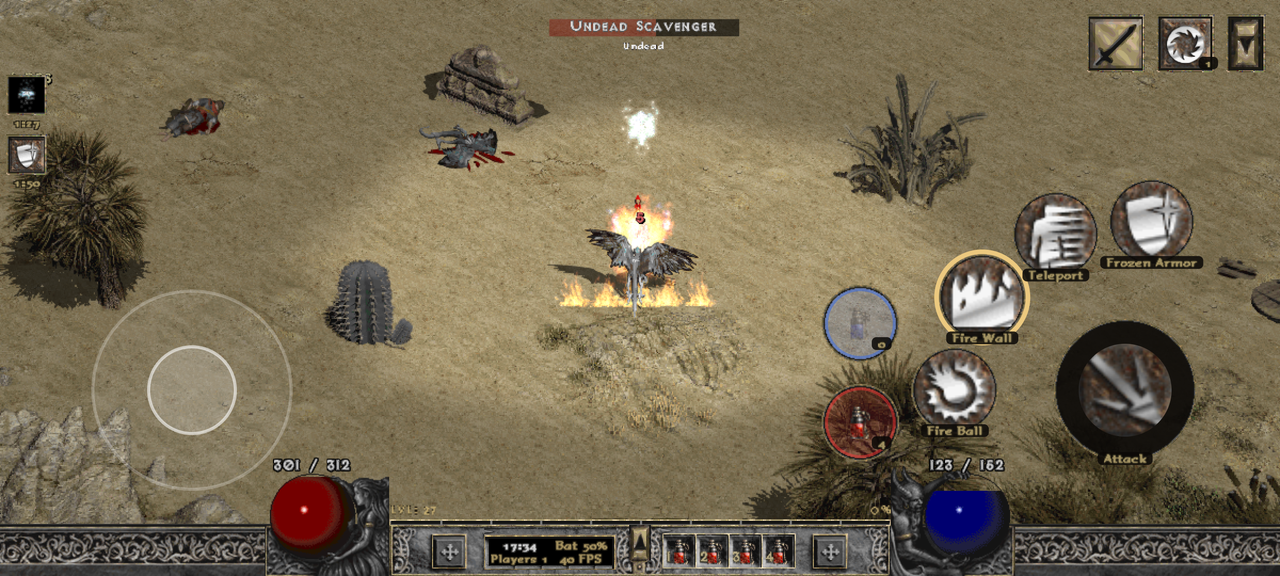
Image: Touch combat in D2Android, with the joystick, attack and skill buttons, damage numbers and the effect column. Credit: N1v0k/GitHub.
Per the official repository README, D2Android is not just the PC game running on Android. The README's own framing is that the project aims for modern user experience and quality-of-life standards for a great game: a touch layout made for thumbs, a readable widescreen picture, and helpers that take care of what is fiddly on a phone, while the game itself stays the original. That last clause is the promise the whole project rests on, and the feature list is written to keep it.
The technical approach is the part worth understanding before you install it. Under the hood most core actions need no mouse or keyboard emulation. A small game module talks to the game directly, so walking, attacking, picking up items and drinking potions are sent as game commands rather than as clicks at screen coordinates. The README states the consequence plainly: the character does what your thumb means, not where a virtual pointer happens to be.
Why 1.13d, and how it runs
The README answers the obvious question directly. 1.13d is the classic version the community mods are built for, naming PlugY and the D2DX widescreen work as examples, and it runs well through a compatibility layer. Diablo II: Resurrected is a different game and is not supported. That is a deliberate trade rather than a limitation discovered late.
The project's legal position is stated first and without ambiguity. D2Android contains no files from Blizzard Entertainment, it is a fan project, and it is not affiliated with, endorsed or supported by Blizzard. You need your own purchased copy of Diablo II and Lord of Destruction, either from CD keys or an existing installation. The README also points to where Blizzard still sells the two classic products separately, and notes where to find the CD keys in a Blizzard account, which is the honest way to handle a requirement most projects leave vague.
Single player only is the other boundary, and it is enforced rather than implied. In the main menu, Battle.net and Other Multiplayer do nothing, and the game helpers work only in single player. The README asks readers not to use it on Blizzard's servers. That is a clear line drawn in the project's own documentation, which matters for a tool that could otherwise be misrepresented.
| Item | Requirement per the README |
|---|---|
| Phone or tablet | 64-bit, Android 8 or newer |
| Graphics | Adreno (Snapdragon), or from 1.5.1 Mali, Samsung Xclipse or PowerVR DXT graphics |
| Free space | About 5 GB for an installation without a PC, less once installed |
| Game | Your own Diablo II and Lord of Destruction, two CD keys, or a 1.13d game folder |
| Optional | A Bluetooth or USB gamepad |
The device matrix reads like one that was written after real testing rather than from a spec sheet. The README names the RedMagic 8 Pro and RedMagic 10 Pro for Adreno, two tablets with Mali-G52 and Mali-G57, and an Xclipse 940 and PowerVR DXT device. Everything else with those chips is described as best effort and not officially supported, and PowerVR BXM and older PowerVR chips are explicitly not supported yet. App store advice is given for the Play Protect warning that appears because the app targets an older Android version so it can run the game's own programs from its files.
A touch layer designed for a phone
The control scheme is the strongest part of the project, and the README documents it in enough detail to judge. A joystick sits in the left half of the screen, with the attack button and skill buttons on the right, and the buttons can be moved and resized. Two sets of four skill buttons switch with a small button at the top of the arc, covering F1 through F8. A skill that only comes from your second weapon is marked and swaps weapons, casts and swaps back with one tap, which is the kind of detail that only appears when someone actually plays the game this way.
Teleport gets the most care, and deservedly so, because it is the hardest skill to play without a mouse. Holding its button shows a ring on the ground where you will land while the character stands still, and you aim with the joystick or by dragging the button, then let go to jump once. Dragging back to where your finger came down cancels the jump. It only lands where you can really reach, the ring moves to the nearest free spot in front of walls and cliffs, and a red cross means there is nowhere to jump. Distance follows how far you push the joystick, from a short hop to the edge of the screen, and like the PC version it goes through thick walls and across gaps when the point lies behind them.
Targeting is handled with a single Take button that picks up the next item, opens chests, enters portals and waypoints, and talks to people, showing the item's name under the button in its quality colour. Holding Take opens a ring of all targets in the middle of the screen that you choose by pushing your thumb toward one, and holding it on a townsperson shows their options as a ring. Aim assist sends attacks to the monster in the joystick direction with the target highlighted as it would be with a mouse, with separate reach for melee and for spells and bows, and a blind spot behind the character that leaves monsters directly behind you alone until you turn. Releasing the joystick stops the character at once.
Gamepad support is configured like Diablo II: Resurrected and enabled by default. The left stick walks, the buttons attack, take and cast, holding a trigger gives a second row, and the D-pad drinks from the belt. Every button can be reassigned, including to a skill, a potion, the town portal, the map, the inventory or swapping weapons, and the touch buttons hide while the pad is in use and return on the first tap.
Installing without a PC, using Blizzard's own files
The installation route is unusual and worth describing carefully, because it is where the project's legal design is most visible. The app downloads Blizzard's official downloaders for Diablo II and Lord of Destruction from Blizzard's own servers and runs them. You type in your two CD keys, which are handed straight to Blizzard's installer and, per the README, are never stored, logged or sent anywhere else by the app, staying masked on screen. Blizzard's installer installs the game into the app's own storage, then the app applies Blizzard's official 1.13d patch and checks the result. If the patch stops, it continues on the next start without needing the keys again.
The alternative is to copy an existing 1.13d game folder from a PC to the phone and choose it in the app. The app does not search the phone for a game by itself, it uses the folder you choose, it tells you what it found there, and it checks the version, rejecting 1.14 and Resurrected. It then copies the folder once into its own storage with progress shown and plays from there.
Saves are handled with more care than a phone port usually gets. From 1.5.1 the game and saves live inside the app, and the README explains that this makes saving smooth. Characters can be brought across from another phone running D2Android, or from a PC by copying the save folder before choosing the game folder, and characters must come from 1.13d or older single player. PlugY's shared stash lives in its own file next to the characters and has to be copied too or it starts empty, and the app backs up saves before the first start with PlugY. Saving is defended on several fronts: the app checks saved games the way the game does, waiting on save and quit until the character is completely written, and restoring a cut-off stash or character from the last PlugY backup, with Hardcore characters never replaced automatically.
The optional quality of life layer
The helpers are the argument for playing this rather than a straight emulation, and the README is careful to frame them as compensating for the platform. Every helper can be switched off one by one, and the stated goal is the vanilla experience, with the helpers there to make it playable on a phone rather than to change the game. Even the automatic potion helper carries a note that it does not refill your life for you and that you still manage potions yourself.
The list is long enough to be worth grouping. Mapping options reveal the map with exits and waypoints labelled and can hide it during a fight. Pickup helpers collect nearby gold, potions up to a reserve, town portal scrolls, runes, gems, jewels, rings and amulets. Inventory management adds a long press to sort without opening the inventory, a double tap on a potion to move it to the belt, and a materials storage that keeps runes, gems and skulls as counts across 68 kinds with a separate store for Hardcore. A loot filter hides ground names for junk in off, mild, strict or custom settings, hiding only the names, and it is kept per character.
Two features deserve individual mention because they are information the original never shows. Item tooltips gain a rating from 0 to 10 at the end, with the item you are wearing shown beside the one you are looking at and a list of what would change in life, mana, resistances, speeds and weapon damage, with green meaning better and red meaning worse. Damage numbers rise over each monster with an optional DPS display, and damage over time is summed in the element's colour. There is also a Builds page covering all seven classes with 27 builds in total, suggesting where to put skill and attribute points with strengths, weaknesses and tips, marking the next point with a pulsing frame and offering to return all points and spend them again following the build.
Device support and where it stands
D2Android was created on October 12, 2026, was last pushed on November 4, 2026, and holds 118 stars, 12 forks and 31 open issues. The latest release, 1.5.3 on November 4, 2026, drew 170 downloads across its assets, including a 57 megabyte APK and a source archive. The previous release, 1.5.1 on October 30, drew 3,335 across its assets, with 2,441 of those on the APK alone, and the project publishes separate LGPL source archives and a source offer file with every release, which is what the free software it bundles requires.
The privacy statement is specific rather than reassuring in the abstract. Anonymous statistics go to Aptabase on servers in the EU, only if you agree when the app first asks, and then at most once a day and after a crash. What is sent is app and Android version, phone maker and model, rounded RAM, chip, graphics chip with driver versions, audio output, the device check result, some settings, play time, the game's memory use, characters as numbers only, and after a crash where the app was and how it ended. No names, no saved games, no logs and no device ID, and it can be turned off in the settings. The only other connections are the Blizzard downloads during installation and a daily version check that can also be turned off.
The roadmap is unglamorous and credible: picking up items by your own list and bringing loot to the stash by town portal when the inventory is full, continuing where you left off in more places, more of the remaining menus redrawn in the game's style, a larger inventory and stash with more gestures, more languages for the app and the installation, and syncing saved games with cloud storage. No dates are promised.
Our take: the design decision that makes this work is sending game commands instead of synthesising mouse input. Emulating a pointer on a phone always feels like a pointer on a phone, and this project avoided that trap by talking to the game. Installing from Blizzard's own servers with your own keys, running single player only, and shipping the LGPL source archives with every release is the version of this project that can exist in public.
FAQ
Does D2Android include Diablo II?
No. Per the official repository README, it contains no files from Blizzard Entertainment. You need your own purchased copy of Diablo II and Lord of Destruction, either two CD keys or an existing 1.13d game folder.
Why does it support 1.13d and not Resurrected?
Per the README, 1.13d is the classic version the community mods are built for, naming PlugY and the D2DX widescreen work, and it runs well through a compatibility layer. Diablo II: Resurrected is a different game and is not supported.
Are my CD keys stored anywhere?
No. Per the README, the keys are handed straight to Blizzard's installer and are never stored, logged or sent anywhere else by the app, and they stay masked on screen.
Can I play on Battle.net or with other people?
No. Per the README, D2Android is made for single player, Battle.net and Other Multiplayer do nothing in the main menu, the helpers work only in single player, and you are asked not to use it on Blizzard's servers.
How do the controls work without a mouse?
Per the README, most core actions need no mouse or keyboard emulation. A small game module talks to the game directly, so walking, attacking, picking up items and drinking potions are sent as game commands rather than clicks at screen positions.
What happens to my saves when I update or reinstall?
Per the README, from 1.5.1 the game and saves live inside the app and stay when you update it. Uninstalling removes them, Android asks whether to keep the app's data, and the Share saved games option gives you a copy to keep anywhere.
Bottom Line
D2Android is the phone port that looks like it was made by someone who plays the game. Walking, attacking, taking items and drinking potions are sent as game commands rather than as fake mouse clicks, teleport gets a landing ring you can cancel, and every helper can be switched off so the vanilla experience is still available. Version 1.5.3 shipped on November 4, 2026 with 118 stars and a documented device matrix covering Adreno, Mali, Xclipse and PowerVR DXT.
The constraints are clear and self-imposed. Single player only, 1.13d only, your own CD keys or game folder, and no Blizzard files in the package, with the LGPL sources published alongside each release. If you own classic Diablo II and want it on a phone, this is a complete and carefully documented option, and the README will tell you honestly whether your chipset is on the supported list.
Related: D2Decomp: Diablo II Rebuilt as a Native Engine, Mod Diablocraft: Diablo 3 Systems Rebuilt on a WotLK AzerothCore Server
Sources: per the official D2Android repository README at github.com/N1v0k/D2Android-Releases, fetched in full on November 4, 2026, including the feature list, requirements, installation and update sections, the privacy statement and the roadmap; repository metadata (118 stars, 12 forks, 31 open issues, created October 12, 2026, language Java) re-verified via the GitHub API on November 4, 2026; release notes and download counts for v1.5.3 (November 4, 2026) and v1.5.1 (October 30, 2026) from the same repository.