
Fletcher: The Windows EQ That Measures Whether Your Tweak Did Anything
By Indie Kings | November 4, 2026
Updated November 4, 2026: Fletcher is a modern front end for Equalizer APO on Windows, written in Rust and React through Tauri, and it appeared in the last three months with a plain claim: your EQ tweak probably does nothing, and the reason is loudness. Version 0.7.3 shipped on November 4, 2026 with dark mode and a security tightening, and the project now holds 43 stars, no forks and one open issue.
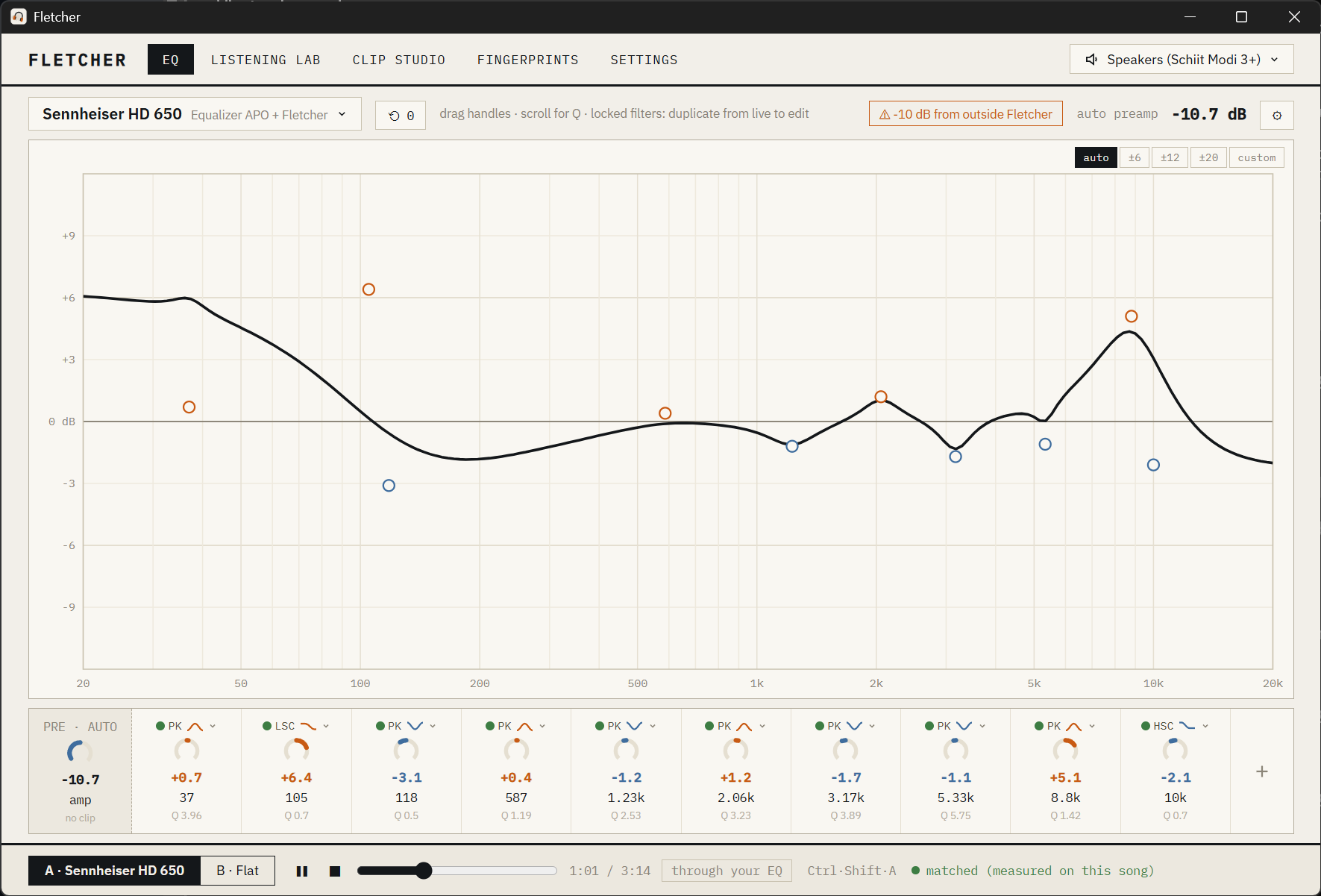
Image: Fletcher's equalizer screen, a Sennheiser HD 650 correction curve with the A/B bar showing a comparison measured on the playing song. Credit: andrewsalinas09/GitHub.
Per the official repository README, Fletcher is a parametric EQ for Windows that is pleasant to use and honest about what you can actually hear. It is a front end for Equalizer APO, the system-wide audio engine, and it adds one capability that no EQ application has had: a way to find out whether your tweak actually sounds different. The name comes from the Fletcher Munson curves, the classic measurements of how human hearing depends on loudness, and that is not a decorative choice. It is the entire technical argument.
Equalizer APO remains, by the README's own description, the best system-wide EQ engine on Windows. Its weakness is its interface: editing means text files or dated windows. Fletcher replaces that interface with a live curve you can drag and with a testing discipline borrowed from psychoacoustics. The two halves are not separate products. The editor exists to make a change, and the listening lab exists to tell you whether the change was worth making.
The problem it is named after
When two settings differ in loudness, the louder one almost always sounds better, even when nothing else changed. That is the whole premise. A tweak you made at 2 a.m. may have felt better because it was louder, and nobody in the hobby measures the difference. Fletcher level-matches every comparison so loudness cannot cheat, then runs blind ABX tests with real statistics. The README's version of the question is the sharp one: was that 13 out of 16 skill, or luck? The app answers it.
The loudness matching is done the way loudness meters do it. Version 0.3.0 changed the matching to judge loudness by LUFS, which stopped treble-heavy presets being under-counted, and when one side cannot reach the reference level without clipping, the other side now comes down with it instead of one side playing quieter. If two settings genuinely cannot be matched, Fletcher says so rather than calling them matched. That last behaviour is the kind of detail that does not demo well and matters in practice.
The name points at the deeper idea. Equal-loudness contours describe how the ear's sensitivity changes with volume, so a curve that sounds right at one volume is wrong at another. Fletcher ships a loudness-compensation mode as an opt-in, off by default, which reshapes the EQ gently with listening level following those contours. It is the namesake feature of the project and one of the few things in a PC equalizer derived from an actual hearing model.
A listening lab inside an equalizer
The Listening Lab carries two different tests, and the distinction between them is the discipline. An ABX test answers whether A and B are distinguishable to you at all. A blind preference test answers which of the two you prefer when you do not know which is which. Both return exact p-values, and both can run as adaptive tests that stop early once the answer is clear. You can test on whatever is playing system-wide, or on your own music clips. The point of having both is that a preference without discrimination is noise, and a discrimination without preference tells you nothing about which setting to keep.
Clip Studio is the room where test material gets made. It imports tracks from files or a link, and lets you scrub through them on a waveform and a spectrogram while marking the passages that reveal differences. A live FFT at the playhead shows the music's spectrum with your EQ overlaid, so you can see where it boosts and cuts. There is a built-in signal generator for test tones and noise. In a clip test the A/B comparison is measured on the song itself: playing through your EQ, each flip measures both sides on the part of the song you are hearing, and the louder side comes down to match, so even extreme EQs flip at equal loudness. The A/B bar says "matched, measured on this song".
The most original piece is that Fletcher keeps a history you can branch, compare and test. Every edit is saved to a history tree. You can jump back to any version, branch off in a new direction, see exactly how two versions differ filter by filter, and start a blind test between them with one click. That turns tuning into an experiment rather than a sequence of guesses. The README's phrasing is worth repeating: did my last hour of fiddling actually improve anything?
Around those pillars sits a set of smaller features that are easy to underestimate. There is a separate EQ for each ear, with its own undo history, because ears and headphones are not perfectly symmetric. The per-ear editing arrived in 0.7.0 and keeps the other ear faintly visible for reference. There are 5,000 or more headphone corrections one search away through the AutoEQ database, importing as your own preset ready to tweak. Peace presets and Equalizer APO filter lines can be imported or pasted. Room EQ Wizard filters come in too, and anything Fletcher cannot reproduce exactly, such as first-order or Linkwitz filters, is listed by name rather than dropped silently.
Loudness cannot cheat
The daily workflow is the A/B flip. Press Ctrl+Shift+A anywhere in Windows and Fletcher switches your EQ against flat, with both sides matched in loudness so you are comparing the sound and not the volume. Since 0.6.1 the flip can also be a hold rather than a press: hold to switch, release to switch back, and you can choose whether holding gives you flat or your EQ. Version 0.7.2 gave every preset its own hotkey, so you can switch speakers and headphones on the same output from any app. The popup names the preset and the device. Updates never install during a blind test or a hearing-profile session.
Two behaviours protect the comparison from being quietly unfair. Any rise in level, from a reference change, a preset switch or leaving a comparison, fades in over about a second and never more than 3 dB at a time, which means no sudden volume jumps. Large typed increases ask first. And while you are on B, which is flat, editing is paused with a note to switch back to A, because in an earlier version adding or pasting a filter on B could replace your preset with flat plus that one filter.
| Feature | What it does | Status per the changelog |
|---|---|---|
| Parametric EQ on a live curve | Drag handles for frequency and gain, scroll for Q, peaking, shelf, pass and notch filters, automatic preamp | Shipped |
| Per-ear editing | Separate left and right curves per preset, each with its own undo history | Shipped in 0.7.0 |
| AutoEQ corrections | More than 5,000 headphone corrections, one search away | Shipped |
| Level-matched A/B | System-wide flip between your EQ and flat, loudness matched | Shipped, LUFS matching in 0.3.0 |
| Blind ABX and preference tests | Distinguishability and preference tested separately, with exact p-values | Shipped |
| History tree | Branch, compare and blind-test any two versions | Shipped |
| Clip Studio | Waveform, spectrogram, live FFT with EQ overlay, signal generator | Shipped |
| Setup check and diagnostics | Plays a faint tone and measures whether the EQ reaches your output; exports a diagnostics zip | Shipped in 0.7.1 |
| Dark mode | Light, dark, or match Windows, applied to every window | Shipped in 0.7.3 |
| Fingerprints | Measure your own hearing's equal-loudness profile per headphone, without a microphone | Experimental |
Clip Studio also solves the oldest silent failure in this hobby. For years the most common support question in PC equalizer forums was "my EQ does nothing", and the answer was usually that Windows updates or audio driver reinstalls had quietly removed Equalizer APO from the device. Since 0.2.0 Fletcher detects that, names the affected device, and offers a button to open APO's device selector. Version 0.7.1 went further with a setup check that plays a faint tone for a few seconds and measures whether Fletcher's EQ actually changes what your output plays. If it does not, it says why: Equalizer APO is not on the device, it is installed only before mixing, Windows enhancements are off, or a line in the config limits Fletcher to another device. A diagnostics export bundles that check, the APO config files, your playback devices and their effects, audio software by name, and your presets. Nothing is sent anywhere, though it does show your Windows user name and device names.
What it refuses to touch
Fletcher adds a single include line to Equalizer APO's config and only ever writes its own file. It backs up your config before the first change, never edits files that belong to other tools such as Peace, and never makes your audio suddenly louder. That restraint is what makes a front end for someone else's engine safe to install on a machine with an existing setup. You can keep Peace installed and it will not fight you.
Version 0.7.3 tightened the other side of that contract. Fletcher's windows now only run Fletcher's own code, and if anything is ever blocked, a red bar names it right away and includes it in the diagnostics export, so nothing fails silently. The changelog credits the user who pointed this out. Combined with the automatic preamp that keeps the EQ from clipping, the 3 dB fade rule and the refusal to write outside its own file, the safety posture is unusually careful for a 0.x release.
The one honest friction is the installer. It is not code-signed yet, so Windows SmartScreen shows an unknown publisher warning and you have to click More info, then Run anyway. The README tells you that in the getting started steps rather than hiding it. Installation itself is three steps: install Equalizer APO and enable it for your headphones or speakers in its Configurator, reboot if it asks, then run Fletcher and load a correction.
Where a 0.7.3 project stands
Read the numbers for what they are. Fletcher was created on August 23, 2026, is written in Rust, is Apache-2.0, and has been pushed as recently as today. It holds 43 stars and one open issue, and it has shipped from 0.1.0 to 0.7.3 in about ten weeks, with the last four releases landing between October 31 and November 4. v0.7.2 drew 227 downloads in three days, the largest of the recent releases. The README says plainly that Fletcher is in early development, that 0.x means rough edges, and asks people to open an issue if something breaks.
The roadmap language is unusually honest about what does not work yet. The feature map marks Fingerprints as experimental and states that the first version uses timed listening comparisons rather than any microphone measurement. It also states that headphone-level switching cannot be magic: Windows reports USB DAC connect and disconnect and default-device changes, so "DAC appears, its profile activates" is real, but which headphone hangs off a DAC's analog jack is not detectable, so headphone switching is a fast manual switcher rather than automation. Per-device profiles do exist, and Fletcher follows device switches made anywhere, and can load a preset whenever a device becomes your Windows default. It just will not guess about the headphone on the end of the cable.
There is an MCP agent hook listed as a future item, which would expose Fletcher's analysis so an AI agent could answer questions about a moment in a track with real spectral data. It is described as an ecosystem phase rather than a promise, and it should be read as an idea rather than a feature. The same goes for the measurement overlays on the graph, which are documented as a later step.
Our take: the loudness discipline is genuinely new to PC equalizers and it is the reason this project exists. Most front ends for Equalizer APO compete on curve rendering and shortcut counts. Arriving with LUFS-matched blind tests, a branchable history you can test against itself, and a setup check that detects the classic silent failure is a stronger pitch than any of those. The small audience and the missing code signature are the practical caveats, and the design intent is clear enough that neither should stop anyone from trying it.
FAQ
Is Fletcher a replacement for Equalizer APO?
No. Per the repository README, Fletcher is a front end for Equalizer APO. It adds one include line to the APO config and writes only its own file, and it needs APO installed and enabled for your device first.
Why is loudness matching such a big deal?
Because when two settings differ in loudness, the louder one almost always sounds better even when nothing else changed. Per the README, Fletcher level-matches every comparison using LUFS so that loudness cannot cheat, and says so when two settings cannot be matched.
What is the difference between an ABX test and a blind preference test?
An ABX test asks whether A and B are distinguishable to you at all. A blind preference test asks which of the two you prefer when you do not know which is which. Fletcher runs both and reports exact p-values for each.
Can I load a correction for my headphones?
Yes. Per the README, the AutoEQ database with more than 5,000 headphone corrections is one search away, and a correction imports as your own preset. Peace presets, Equalizer APO filter lines and Room EQ Wizard filters can also be imported or pasted.
Is it safe alongside my existing setup?
Per the README, Fletcher adds a single include line to the Equalizer APO config, backs it up before the first change, never edits files belonging to other tools, and never makes audio suddenly louder. Version 0.7.3 also added a check that its windows only run its own code.
Is Fletcher finished?
No. Per the README, it is in early development at 0.7.3, rough edges should be expected, and the Fingerprints feature is experimental. The installer is also not code-signed, so Windows SmartScreen shows an unknown publisher warning.
Bottom Line
Fletcher is the first Equalizer APO front end that treats "did that actually help?" as a question worth answering with statistics. A modern draggable parametric editor, per-ear curves, more than 5,000 headphone corrections, a branchable history you can blind-test against itself, and loudness matching done by LUFS rather than by ear, all under Apache-2.0 and released through 0.7.3 on November 4, 2026.
The caveats are scale and polish. Forty-three stars, an unsigned installer that trips SmartScreen, an experimental Fingerprints feature, and a README that asks you to expect rough edges. None of those blunts the idea, and the setup check that detects when your EQ silently stops working is on its own worth the download for anyone who has ever wondered why their correction went quiet after a Windows update.
Related: How to Set Up Spatial Audio on Windows 11: A Step-by-Step Guide, Improved Spatial Upscaling through FidelityFX Super Resolution for Real-Time Game Engines
Sources: per the official Fletcher repository README, feature map and changelog at github.com/andrewsalinas09/Fletcher, all fetched in full on November 4, 2026; repository metadata (43 stars, no forks, one open issue, Apache-2.0, created August 23, 2026, language Rust) re-verified via the GitHub API on November 4, 2026; release notes for v0.7.3 (November 4, 2026) and v0.7.2 (November 1, 2026) from the same repository.