
Headroom: A Local Context Compressor That Claims 57 Percent Fewer Tokens
By Indie Kings | November 4, 2026
Updated November 4, 2026: Headroom is an MIT-free context compression layer for AI agents that reduces tool outputs, logs, search results, RAG chunks, files and conversation history before they reach a model. The project claims 21 to 57 percent fewer input tokens on four agent scenarios, above 90 percent on repeated JSON arrays and log lines, and low overhead from compression. It is open source under Apache-2.0. Its compression runs locally.
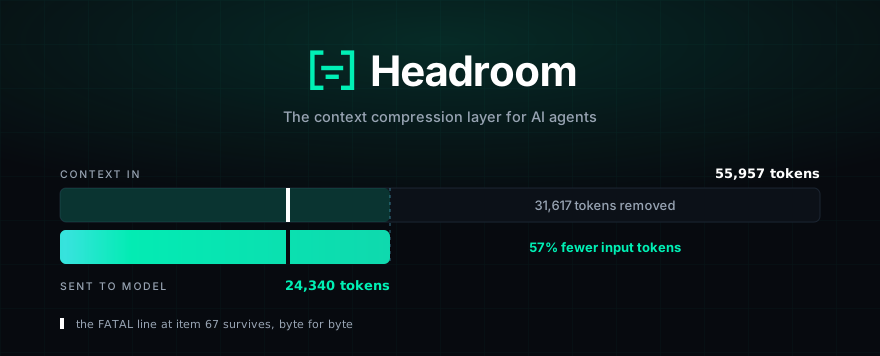
Image: The official Headroom banner, which pairs a 55,957-token prompt with a 24,340-token compressed prompt and says the fatal line survives. Credit: headroomlabs-ai/GitHub.
Per the official repository README, Headroom compresses everything your AI agent reads before it reaches the model. The targets are tool outputs, logs, retrieval-augmented generation chunks, files and conversation history. The promise is not magic: same answers with fewer input tokens, and the README gives its own measured examples, with little expected on prose or already-dense output. It is offered as a library, a proxy and a coding-agent wrapper, with an MCP server and a cross-agent memory layer included.
The most important thing about the project is where the compression runs. Per the README, it runs on your machine and no prompt or file content is sent anywhere to be compressed. That does not mean the final model never sees content. It means the lossy decision happens before the request leaves. Headroom keeps the original available locally and can retrieve it on demand through a mechanism the project calls CCR. That is a different contract from sending everything to a hosted compression API.
Why agents need a context budget
Coding agents read a lot of text that is not useful to the model. A test command may emit thousands of passing test names while three failures actually matter. A code search can return a hundred files where three snippets are enough. A logs dump can repeat the same line hundreds of times. Each of those tokens is carried through the context window, and the model pays for all of them, whether or not they add information.
The usual answer is summarization. Summarization has two obvious problems. It can lose the one detail that made the output actionable, and it adds a model call in the hot path. Headroom takes a different route: identify content types, apply specialized compression, and keep the source recoverable. For JSON arrays, repetitive logs and source code, that is a storage-and-representation problem. For prose, there is simply less to shave.
The project is also careful about what it measures. Its README says savings scale with how repetitive the payload is. Repeated JSON arrays and log lines clear 90 percent in one benchmark, while prose and already-dense output compress very little. That is the honest shape of the idea. Nobody should expect a permanent 50 percent discount on every prompt.
How the pipeline routes content
Headroom names the internal pieces clearly enough that the architecture is not hidden behind a single "compress" button. Per the README, a CacheAligner flags volatile content that would bust a provider's KV-cache prefix and never rewrites prompts. A ContentRouter detects the content type and chooses the path. SmartCrusher handles JSON. CodeCompressor uses AST-aware techniques for Python, JavaScript, TypeScript, Go, Rust, Java, C, C++, C# and PHP. Kompress-v2-base, the project's Hugging Face model, handles prose and general text.
The pipeline keeps live-zone compression in view. Only new bytes, such as fresh tool output and the latest turn, are compressed, while the frozen prefix stays byte-identical so the provider cache can survive. Originals are cached locally and can be retrieved by the model through CCR. The architecture document links CacheAligner, ContentRouter and CCR rather than pretending compression and caching are the same thing.
| Layer | What it handles | What it preserves |
|---|---|---|
| CacheAligner | Volatile content inside the frozen prompt prefix | The prefix remains byte-identical for provider cache hits |
| SmartCrusher | Repeated JSON arrays, objects and log-like payloads | Error items, outliers, boundaries and field-variance decisions |
| CodeCompressor | Source code across supported languages | AST-aware structure rather than blind line truncation |
| Kompress-v2-base | General prose and dense text | The project's Hugging Face text compressor, trained on agent traces |
| CCR | Everything risky enough to lose | Originals stay local and can be retrieved on demand |
The README says compression costs well under a millisecond, with 0.21 ms p50 on a 10,000-token JSON search result and 1.4 ms at 100,000 tokens, so the step is not intended to become a new bottleneck. That claim is specific to the benchmark it describes. On a different workload with another payload, the result will land elsewhere.
The claimed savings, and their limits
Headroom reports four concrete scenarios built from real MCP server output formats, measured with the provider tokenizer and the shipped compress() function. The benchmark is seeded and executable offline. The table reproduced below shows 21 percent savings for code search with 100 results, 57 percent for SRE incident debugging, 42 percent for codebase exploration and 30 percent for GitHub issue triage.
| Scenario | Before | After | Saved |
|---|---|---|---|
| Code search, 100 results | 17,199 | 13,597 | 21% |
| SRE incident debugging | 55,957 | 24,340 | 57% |
| Codebase exploration | 58,801 | 33,895 | 42% |
| GitHub issue triage | 46,067 | 32,429 | 30% |
Those figures are the project's measurements, not an independent audit. Treat them as useful until your traffic says otherwise. The open-source benchmark is the right way to interrogate them: clone the repo and run the seeded test set. Headroom also publishes accuracy results for GSM8K, TruthfulQA, SQuAD v2 and BFCL, with a 97 percent score on SQuAD v2 at 19 percent compression and a 97 percent score on BFCL at 32 percent compression. On the published sample, the factual benchmark showed no detectable improvement over the baseline, and the README says so plainly.
Wrapping an agent, or calling a function
Headroom offers two main adoption paths. If your own app builds the prompt, call compress() and pass the returned messages to the provider. If you want savings around an existing coding agent, headroom wrap starts a local proxy and launches the supported agent through it. The supported list includes Claude Code, Codex, Grok, Cursor by manual setup, Aider, Copilot CLI, VS Code Copilot, OpenClaw, OpenCode, Cline, Continue, Goose and more.
The MCP surface is straightforward. The server exposes headroom_compress, headroom_retrieve and headroom_stats, so a client can use compression as a tool instead of a middleware. The Python library works with OpenAI and Anthropic message dictionaries. The TypeScript package ships as a library and relies on the proxy for code changes; npm does not provide the Python CLI.
The proxy also owns output token reduction in the project's design, and it is off by default. A verbosity steering note can be appended to the end of the system prompt, output savings are labelled estimated unless you hold out a control group, and the README is clear that counterfactual output savings are not the same as a metered bill. The "Headroom for Teams" section announces an enterprise offering with more cost savings, tokens secured, on-premise deployment and deep attribution. Nothing in that pitch changes the Apache-2.0 status of the open-source repo as written in this fetch.
What it will not fix
Headroom will not make a bad prompt good. It does not decide which facts matter to your business, and it will not recover a claim that was never in the source. It will not help materially with prose, with a short conversation, or when your provider's native compaction is already handling the exact traffic you care about. Those limits are listed in the project's documentation and repeated in the README.
The telemetry beacon is on by default, and the README is explicit about it. It reports how compression behaved, including ratios, counters, provider and model IDs and the operating system, and it never sends prompts, completions, code or file paths. It can be disabled with HEADROOM_BEACON=off, HEADROOM_TELEMETRY=off, DO_NOT_TRACK=1 or HEADROOM_OFFLINE=1. That is a real privacy decision a team should make deliberately, not discover by suspicion.
The image and memory paths also deserve a skeptical audience. Image compression is listed at 40 to 90 percent reduction through a trained ML router, and cross-agent memory is a shared store with provenance and automatic deduplication. Kompress-v2-base is a text model trained on agentic traces; it is not a general reasoning model and it will not solve reasoning errors inside the compressed content. The safest reading of the format is "compression, with retrieval when the model needs everything", not "a replacement for context management".
FAQ
What does Headroom actually do?
Per the official README, it compresses the tool outputs, logs, files, RAG chunks and conversation history that an AI agent reads before they reach the model, aiming for the same answers with fewer input tokens.
Does any of my content leave my machine?
Compression runs locally per the README. Originals are cached locally for retrieval through CCR, and the README states that no prompt or file content is sent away to be compressed.
How much will it save on my traffic?
The README reports 21 to 57 percent on its four scenarios, more than 90 percent on highly repeated JSON and log payloads, and little on prose. Run headroom savings against your own traffic for the applicable figure.
Is Headroom free?
The repository is Apache-2.0 as read today, and the README says everything in it stays open source. The same README sells a Headroom Enterprise offering for teams that want more cost savings, on-premise deployment and deeper attribution.
Which agents can it wrap?
Per the README, the supported agents include Claude Code, Codex, Grok, Aider, Copilot CLI, VS Code Copilot, OpenClaw, OpenCode, Cline, Continue, Goose and more. Cursor requires manual proxy setup.
Does it collect telemetry?
Yes, and the README says it is on by default. It reports compression ratios, counters, provider and model IDs and OS details, not prompts, completions, code or file paths. Disable it with HEADROOM_BEACON=off or HEADROOM_OFFLINE=1.
Bottom Line
Headroom is the cleanest context-cost answer we have seen for coding agents: content-aware compression that runs locally, a reversible cache for originals, and a direct "run headroom savings" path to find the number that matters on your own workload. The two limits to carry into any evaluation are that prose and already-dense output compress very little, and that the default telemetry beacon reports compression behaviour until you turn it off.
Related: DeepInfer: DeepSeek Open Sources Its Production Inference Engine Without the Serving Layer, REA Tools: A Website for Agent-Driven Reverse Engineering
Sources: per the official Headroom repository README at github.com/headroomlabs-ai/headroom, fetched in full on November 4, 2026, including the measured benchmark table, accuracy benchmarks, security and telemetry sections and installation documentation. Repository star and fork totals were not independently re-verified on November 4, 2026 because the public API was rate-limited; do not quote a number from this article.