
steamac: Valve's SteamOS for Steam Frame Runs in a VM on Apple Silicon
By Indie Kings | November 4, 2026
Updated November 4, 2026: steamac runs Valve's own ARM64 SteamOS, the image built for the Steam Frame, inside a lightweight VM on Apple Silicon, with GPU acceleration routed through Venus and MoltenVK. Version 1.9.9 shipped on November 3, 2026 and drew 1,721 downloads. The project holds 1,857 stars, 69 forks and 38 open issues under Apache-2.0, and it was created on October 4, 2026.
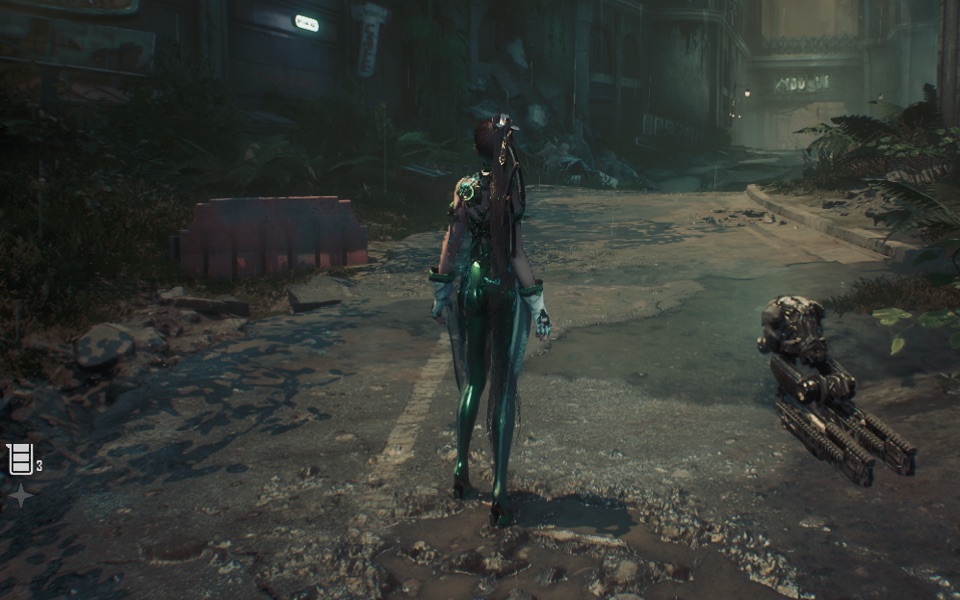
Image: The Stellar Blade demo running inside the steamac VM. Credit: fxgl/GitHub.
Per the official repository README, steamac puts Valve's official ARM64 SteamOS, the Steam Frame image, into a VM on Apple Silicon. It runs on macOS 15 or later in a lightweight VM on Hypervisor.framework through libkrun, with GPU acceleration via Venus. The full stack is a chain: a game using DirectX 9, 10 or 11 goes through DXVK under Proton 11 with x86 translation through FEX into Vulkan, then the guest Mesa Venus driver, then virtio-gpu, then libkrun and virglrenderer, then MoltenVK or KosmicKrisp, then Metal.
The important thing about this project is that it is not reimplementing SteamOS. It downloads Valve's signed image from Valve's servers, verifies it, and boots it. The README's status section lists what is verified: SteamOS boots to the graphical target with autologin and a gamescope session, networking through gvproxy with a 583 megabyte Steam client update downloaded, SSH reachable, Venus in the guest reporting Vulkan 1.4 with a render test and display output that match the reference pixel for pixel, keyboard, tablet, mouse and a virtual pad visible in SteamOS, Desktop Mode with Plasma, an official A to B update through OTA and rollback, GL through zink, Steam sign-in, Proton 11.0-2 and FEX installed, and a DirectX 11 game running through DXVK into Venus into MoltenVK.
Valve's image, not a reimplementation
Because the guest is Valve's own image, the whole operating system is authentic: the gamescope session, the client, the Proton builds. The launcher layers its own work over it rather than modifying the root filesystem. The README states that the SteamOS root filesystem is not modified, that all changes come from initramfs and the layer, and that official Valve updates through RAUC and atomupd therefore install into the other slot and roll back normally. That was verified with an update from the September 22 build to the September 28 build and a rollback.
The guest layer contains the progress agent, the virtual gamepad, optional DXMT payloads, the per-title environment scripts, the shader and screensaver defaults, and a QR-code sign-in mode that swaps to the public Steam Deck client while there is no remembered account. The kernel is Linux 7.2.9 with everything built in and Apple TSO for FEX. The guest Mesa provides Venus and a zink GL stack.
The host side is a Swift and AppKit launcher with a Metal window, a boot and shutdown progress overlay, and optional MetalFX super resolution. Rounding out the host plumbing are virglrenderer, libkrun and libepoxy, plus gvproxy for networking. The settings cover display, mouse, controller, sound, games and advanced VM configuration, each field labelled as applying now or applying on next start.
The disk is signed, verified and reconstructed
The launcher creates the SteamOS disk itself, and the verification chain is the best piece of engineering in the project. The user accepts Valve's SteamOS and Steam Client Back-Up Image end user licence agreement and the Steam Subscriber Agreement first, and nothing is downloaded until then. Only the stable and release-candidate branches are offered, because beta, preview and main may be signed with Valve's development signing key, which the launcher does not trust. A saved unsupported branch falls back to stable and is logged.
The download sequence is pinned at every step. A metadata endpoint names the latest candidate. A small RAUC bundle is downloaded and its CMS signature is verified only against Valve's pinned CA certificate, with the fingerprint embedded in the code; the system trust store is not used. A custom squashfs reader extracts the manifest and the root filesystem image, and the compatibility string, version and slot size are checked. The official desync tool assembles the 10 gigabyte root filesystem from Valve's chunk stores. The disk is then created as a sparse file with the same partition names, order, types, sizes and alignment as Valve's own disk script, and random partition UUIDs. The root filesystem is hashed in a single pass and the hash must match the signed manifest. The disk appears under its final name only after all checks pass.
If a download cannot reach Valve securely, the window explains that a VPN, proxy or network filter may be interfering. Where an rc build is signed with the development key instead of the production CA, it is not accepted, and the launcher explains that it cannot verify the development signature and asks you to pick stable or try again later. That expected rejection is logged only, while all other signature failures report. HTTPS certificate validation is never bypassed. A second integrity failure remains reportable, and no disk is published without a matching signed manifest.
Two Vulkan drivers, and a measurable difference
The host Vulkan driver behind Venus is selectable per VM boot. The default is KosmicKrisp where available, which is Mesa on Metal 4 for macOS 26 and later, and MoltenVK otherwise, which is the UTM fork with steamac's patches for macOS 15. Switching drivers changes the Venus driver identity, so Steam and games rebuild their shader caches.
The performance difference is documented with a split-screen video. On an M1 Max, the Stellar Blade demo runs at about 29 frames per second on KosmicKrisp against about 18 on MoltenVK. That is the headline for the newer driver, and it is worth reading alongside the caveats in the same row of the table: the first run spends about 28 minutes compiling shaders on an M1 Max, it is macOS 26 only, and a build host on an older macOS cannot build it.
| Driver | Requirements | What the README documents |
|---|---|---|
| KosmicKrisp | macOS 26 or later, built on macOS 26 or later | Stellar Blade demo about 29 FPS against about 18 on MoltenVK on an M1 Max. First run compiles shaders for about 28 minutes there. |
| MoltenVK | macOS 15 and later, every supported Mac | The default on macOS 15 and in builds without KosmicKrisp. The release DMG includes KosmicKrisp since 1.7. |
The driver hardening work is where the repository spends most of its substance. The host drivers refuse the Vulkan inputs that would otherwise trip a Metal assertion ending the whole VM, and they log the Vulkan arguments. Metal shader compilation costs about 50 to 100 milliseconds per new pipeline, and Metal caches the result on disk, so the effect does not stutter again after a restart, measured via Venus at 102 milliseconds falling to 0.95 milliseconds per pipeline in a new process. Steam's shader pre-caching and background processing are on by default in the VM, because pre-caching is what brings Proton the transcoded cutscene videos that it cannot decode itself.
The memory model is shared rather than isolated. Automatic VM RAM is half of physical RAM, capped between 4 and 16 gigabytes, and the launcher reserves at least 3 gigabytes or a quarter of host RAM for macOS and driver overhead, with the remainder as a graphics budget. For a 16 gigabyte Mac that is 8 gigabytes of VM, 4 of graphics and 4 of reserve. Both drivers advertise that smaller heap through Venus's device-local heap, so the guest sees a smaller heap than the whole machine's unified RAM. That guides texture budgets; it is not a hard allocation cap, and it cannot prevent every out-of-memory if a game ignores it.
The experimental path that breaks the VM boundary
The optional DXMT path runs D3D11 directly on the Mac's Metal through an executor process inside the VM process. It is off by default, applies on next start, and carries the project's sharpest warning: while this is on, guest programs can run code on the Mac with your user's rights. The in-process executor and DXMT's raw-host-address protocol are not a VM security boundary. That is why the path is off by default and experimental, and why an executor fault can also stop the VM. Enable it only for guest software you trust.
The performance case is real. On an M1 Max at 120 hertz with 6 virtual CPUs and 8 gigabytes of RAM, Death's Door's title screen measured about 41 frames per second on the default Proton 11 ARM64 with DXVK path, and about 117 on DXMT, held by the 120 hertz display. A DirectX 11 benchmark with 100 draws and 16 full-screen passes measured 44, 50 and 100 frames per second across the DXVK variants and DXMT. With 2000 draws and 4 passes it measured 133, 139 and 115, where DXMT stops at the display's 120 hertz and the Vulkan path goes past it. D3D12 and native Vulkan stay on Venus. The path covers D3D11 and D3D10 only, not D3D9, and DXMT still has compatibility gaps including no stream output.
The controller support is the other area where this project goes beyond a demo. The pad is not a virtio-input device: the launcher sends it over a virtio-console port to a guest service that creates it with uinput, so it follows the Mac while the VM runs. It appears when a controller connects, disappears when the controller goes, and changes kind with it. Automatic mode mirrors the real controller: DualSense into DualSense, anything else into an Xbox 360 controller. Rumble works through the kernel's memoryless force feedback rules. A DualSense can also be passed through as itself over raw HID so Steam gets the touchpad, gyro, lightbar and adaptive triggers, and a Steam Controller goes through as itself. Several controllers become players 2 to 4 for local co-op.
The limits list is the most honest part
The README's limitations section has three entries and each one is a real constraint. DirectX 12 through vkd3d-proton reaches feature level 12.0 on KosmicKrisp and 11.0 on MoltenVK, with shader model 6.0 on both and no shader model 6.2 or later on Apple GPUs. Audio latency is about 65 milliseconds on built-in speakers. Anti-cheat systems that block VMs will not work. LogicOp is unavailable because the private Metal API in the MoltenVK fork does not build.
Per-title handling shows up as a default rather than as code. Dragon's Dogma 2 asks for D3D feature level 12.1, which vkd3d-proton derives from rasteriser ordered views and conservative rasterization, and on Metal neither exists. The title only checks the level, so it is reported as feature level 12_1 and shader model 6_6 together with the extension disable list emptied. The entry applies only where the Venus device advertises the features it needs, on Apple8 and later, and it is taken back when a later Steam start finds them gone.
Steam's idle screensaver is off in the VM, because after a few minutes without input Steam puts its own screensaver window in front of a running game. The Mac's time zone and clock format are taken into the guest. Suspend keeps the VM state in memory only and does not serialize guest memory or host GPU state, so quitting the app, an app crash, a logout or a Mac shutdown is an ordinary SteamOS shutdown and unsaved game progress is lost.
The distribution story is finished work. The release DMG is signed with a Developer ID, hardened, notarized and stapled, and the DMG itself is signed, notarized and stapled, so Gatekeeper lets it through even offline. The complete source code of the GPL components, including the kernel with patches and configuration, is shipped alongside each release. Crash reports go to the developers' own Sentry server and are enabled by default, with a settings toggle and a detailed list of what is sent and what is not. Game statistics sharing is off until you agree. Both of those are honest defaults for a project that runs a VM on your machine.
Our take: the verified boot, the signed download chain and the published limits are what make this worth covering rather than filing as a curiosity. SteamOS on Apple Silicon is a large surface, and this is the most careful public attempt at it we have seen. The experimental DXMT path is the place to be careful, because it trades the VM boundary for performance, and the project says so in those words.
FAQ
Is SteamOS supplied by Valve?
Yes. Per the repository README, the SteamOS image is downloaded from Valve's servers as a signed RAUC bundle, and its signature and sha256 are verified before use. SteamOS is not part of the project and is not distributed with it.
What do I need to run it?
An Apple Silicon Mac on macOS 15 or later with about 150 gigabytes of free space, because the disk image is sparse. Xcode 26 or later, Homebrew and rustup are needed to build from source. The signed release DMG is available for download.
Which Vulkan driver should I use?
KosmicKrisp is the default where available on macOS 26 and later and measured about 29 frames per second against about 18 on MoltenVK for the Stellar Blade demo on an M1 Max. MoltenVK is the default on macOS 15 and works on every supported Mac.
Is the DXMT path safe?
It is experimental and off by default. Per the README, while it is on, guest programs can run code on the Mac with your user rights, and the executor is not a VM security boundary. Enable it only for guest software you trust.
Does anti-cheat work?
No. Per the README's limitations, anti-cheat systems that block VMs will not work.
How does the disk image get created?
The launcher downloads Valve's signed bundle, verifies the CMS signature against Valve's pinned CA rather than the system trust store, assembles the root filesystem from Valve's chunk stores with desync, checks the hash against the signed manifest, and writes the disk with Valve's partition layout. Only stable and release-candidate branches are offered.
Bottom Line
steamac is the serious attempt at running Valve's SteamOS on Apple Silicon: Valve's own signed ARM64 image, booted in a lightweight VM, with Venus and a patched MoltenVK or a Metal 4 Mesa driver underneath, verified boot and rollback through Valve's own update mechanism, and a 1.9.9 release on November 3, 2026 with 1,857 stars.
The limits are stated where they belong. Shader model 6.0 only, about 65 milliseconds of audio latency, anti-cheat that blocks VMs will not work, and an experimental DXMT path that deliberately gives up the VM security boundary for performance. Read those before deciding. The project has done the work of telling you.
Related: Wine, Proton, DXVK, VKD3D-Proton: The Four Layers That Decide Whether a Windows Game Runs on Linux, SteamOS 3.9: Valve Ships Plasma 6.7 and Linux 7.2 to Everyone
Sources: per the official steamac repository README at github.com/fxgl/steamac, fetched in full on November 4, 2026; repository metadata (1,857 stars, 69 forks, 38 open issues, Apache-2.0, created October 4, 2026, language Swift) re-verified via the GitHub API on November 4, 2026; release notes and download counts for v1.9.9 (November 3, 2026) from the same repository.