
WotLK Item Forge: Deterministic Loot for AzerothCore Servers
By Indie Kings | November 3, 2026
Updated November 3, 2026: WotLK Item Forge is a Windows desktop workbench that generates World of Warcraft 3.3.5a items for AzerothCore servers from a fixed seed. It reads local DBC and SQL sources, writes reviewable SQL plus client and server DBC files, and never touches a live database. Version 0.1.3 added rarity controls and multi-difficulty creature spawns on November 1.
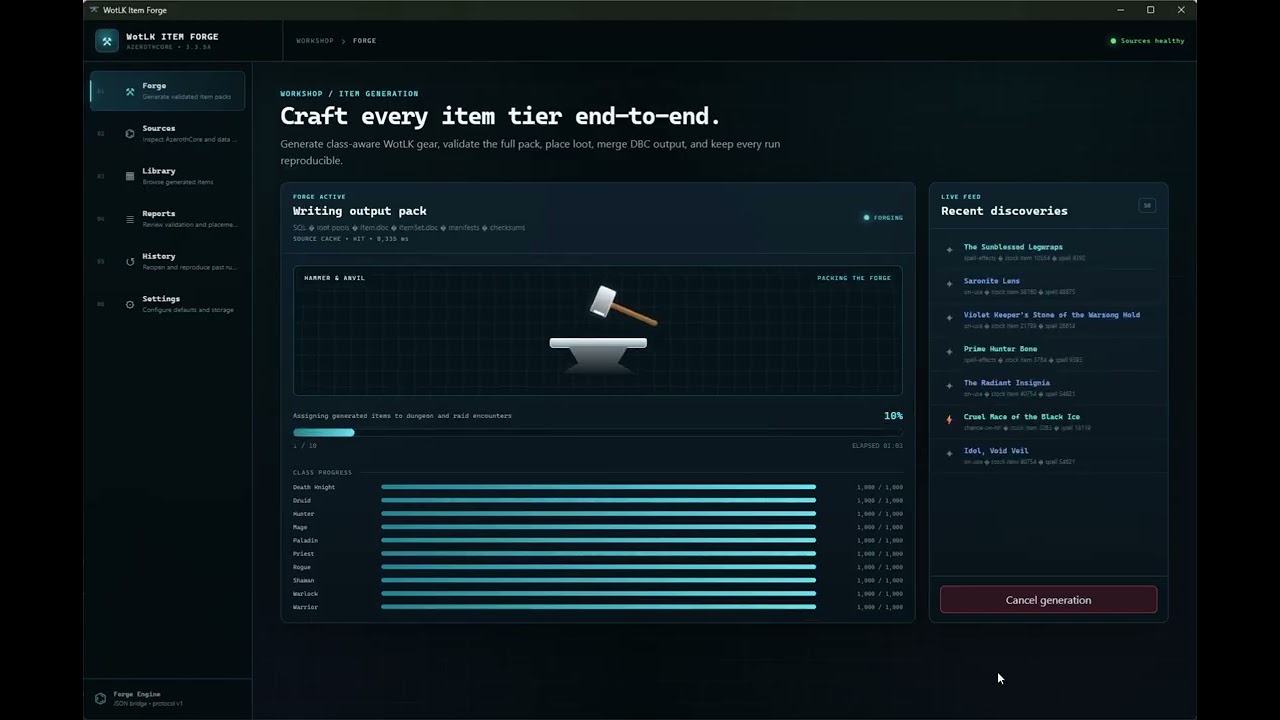
Image: the WotLK Item Forge video preview. Source: STRHercules/WotLKItemGenerator.
Deterministic item generation for AzerothCore
AzerothCore is an open-source server emulator for World of Warcraft: Wrath of the Lich King 3.3.5a, build 12340. Running a custom server means creating items that do not exist in the original game: new gear for a custom dungeon, a set for a class, a legendary with a specific theme, or a loot table for an encounter. Doing that by hand means editing SQL rows, matching DBC entries, and keeping the client and server copies of the data in sync. WotLK Item Forge turns that into a form-driven workflow with a reproducible output folder.
The project calls itself a Tauri desktop workbench. The interface is React and TypeScript, the backend is Rust, and the generator is a Python sidecar. It is aimed at server operators who already have an AzerothCore checkout and a set of local WotLK DBC and SQL files. It does not ship a server, does not connect to one, and does not modify a live database. Every run writes files that the operator reviews and imports deliberately.
The repository is small in audience and large in contents. GitHub lists 6 stars, 8 forks, no open issues, an MIT licence, and a repository of about 358 MB. That size comes from the bundled data and the Python engine, not from a large codebase. The project was created on September 6, 2026. Version 0.1.2 shipped on September 16 and was downloaded 46 times; version 0.1.3 arrived on November 1 and had 4 downloads at the time of writing. More forks than stars is a useful signal: people are taking it apart to adapt it rather than just watching it.
The core promise is reproducibility. Each run records the configuration and source fingerprints, then creates a folder named generated-<seed>. The same inputs and the same seed should produce the same items. That matters when a server operator wants to test a change, roll it back, or explain to players why a particular item exists. It also makes the output reviewable before it goes anywhere near a database.
Sources in, reviewable SQL out
The app has four main steps. Sources scans the input folders, shows which required and optional files are present, and lets you choose paths or rebuild the source cache. Forge configures the run: expansion (Classic, The Burning Crusade, Wrath or All), classes, item count, seed, effects, loot destinations, sets, sockets, Legendaries, disenchant data and advanced overrides. Run records the configuration and source fingerprints, then launches the generator sidecar and shows live progress, discoveries, validation and errors. Review indexes the completed output into a local library and report index.
The supporting screens are Library, Reports, History and Settings. Library is a searchable, read-only view of generated item metadata and item details. Reports collects validation, placement, encounter, set, distribution, manifest and source-audit reports. History shows prior configurations, source drift, output folders and reproducible regeneration. Settings holds default paths, generation values, appearance and cache maintenance.
The required inputs are specific: creature, creature loot, creature template, disenchant loot, instance encounters, item template, reference loot, spell proc and spell script names SQL files, plus DungeonMap, Item, ItemSet, Map, MapDifficulty, Spell and SpellItemEnchantment DBC files. Optional inputs include Item.custom.dbc, gameobject SQL and gameobject template and loot files. The app blocks Forge until required data, the AzerothCore source root, DBC baselines and the output location are ready. That is a better failure mode than generating a half-valid item and letting the operator discover it at import time.
The architecture keeps the risky parts in Rust. The webview does not spawn processes directly. Rust owns the local SQLite database, source fingerprints, report and index maintenance, dialogs, cancellation and the sidecar lifecycle. It translates the Forge configuration into generator arguments and starts wotlk-item-forge-engine in its JSON UI mode. The engine emits protocol-v1 newline-delimited JSON events on standard output, and Rust validates them and forwards them to the interface while capturing diagnostics in an app-local log. When a run completes, Rust indexes items.ndjson and the known report files.
The Python generator remains the authority for generation. That is a sensible split: the interface and file management are desktop app problems, while the item rules and data parsing stay in the tool that already knows them. Expensive source mappings are cached locally and can be rebuilt from the Sources screen. The engine can also be run from the command line, which is useful for automation or for checking a configuration without opening the app.
| Output | What it is for |
|---|---|
sql/ and IMPORT_ORDER.txt | Reviewable SQL files and the order to import them |
client/Item.dbc | Client item data, optionally with ItemSet.dbc |
server/dbc/ItemSet.dbc | Server set data when sets are enabled |
additem_commands/ | Commands for granting generated items |
validation_report.json | Validation results for the run |
manifest.csv | Manifest of generated items and files |
| Placement reports | Where generated items were placed in loot and encounters |
00_SCHEMA_CHECK.sql | Checks the target schema before import |
00_PREIMPORT_COLLISION_CHECK.sql | Checks for ID or name collisions before import |
99_REMOVE_GENERATED_ITEMS.sql | Removes the generated items if the run is rolled back |
The output folder is designed to be read. A generated README explains the run, the SQL folder has an import order, and the reports are separate from the SQL so an operator can inspect placement and validation before importing anything. The client DBCs are packaged under DBFilesClient/, and the server DBC goes to the server's DBC folder. That separation between client and server data is one of the details that makes the tool useful rather than merely convenient.
The safety rails before an import
The README's import procedure is a checklist, and it is worth following in order. Back up acore_world first. Run 00_SCHEMA_CHECK.sql. Run 00_PREIMPORT_COLLISION_CHECK.sql and stop if any collision count is non-zero. Import the files listed in sql/IMPORT_ORDER.txt. Copy the generated server ItemSet.dbc when sets are enabled. Package the generated client DBCs under DBFilesClient/. Restart worldserver and clear Cache/WDB/<locale>/itemcache.wdb if names or icons are stale.
Two of those steps deserve emphasis. The collision check is there because item IDs and names can collide with existing content, and a collision can corrupt a character's inventory or make an item resolve to the wrong row. The removal script is there because a generated run should be reversible. Neither step replaces a backup, but together they turn an import from a leap of faith into a process with a rollback path.
The app's own boundary is equally important. It never connects to or modifies a live database. It reads local sources, writes local files, and leaves the import to the operator. That design means a mistake in the Forge configuration cannot silently change a running server. It also means the tool cannot verify the live server state for you, which is why the collision check and the backup are part of the documented procedure rather than optional suggestions.
The source-audit report is another safety feature. Because the app records fingerprints of the DBC and SQL inputs, History can show when the sources have drifted from the ones a previous run used. If a server operator updates a DBC baseline and regenerates, the report shows the change rather than hiding it. For a project that is meant to be reproducible, that is the difference between a seed that means something and a seed that only looks deterministic.
0.1.3 and the limits of a small tool
Version 0.1.3, published on November 1, added rarity controls across the command line, desktop interface and reports. That includes Common items and fixed-quality generation, so a run can produce a specific quality band instead of a random spread. It also added support for creature spawns with multiple difficulty IDs and validation for unsupported schemas. The release fixed legendary naming and low-level legendary policies, two areas where a generator can produce something that looks valid but plays badly.
The packaged build is Windows only. The installer is about 11.7 MB, which is small because the app expects your own DBC, SQL and AzerothCore source directories. An installed app still needs access to those folders, and Forge stays blocked until they are configured. The development path uses npm install and npm run tauri dev, and the release script builds the Python engine with Nuitka, stages it for Tauri, and creates an NSIS installer.
The limits are the usual ones for a young specialist tool. Six stars and four downloads on the latest release mean a small user base and limited field testing. The documentation is a README rather than a manual. The required input list assumes familiarity with AzerothCore's database layout and DBC files. The tool generates items, but it does not design a balanced loot table for you; the configuration options are broad, and the quality of the result depends on the operator's choices.
There is also a version boundary. The project targets Wrath of the Lich King 3.3.5a, build 12340, and AzerothCore. Other cores, other expansions and other client builds are outside its stated scope. The expansion selector covers Classic, The Burning Crusade, Wrath and All, but that is about the item data the generator produces, not a promise that every client version will accept it. Read the required file list before assuming a different setup will work.
For the right operator, those limits are acceptable. A server admin who already maintains DBC baselines and knows the import order can use the tool to produce a reviewable batch of items in minutes. The alternative is hand-editing SQL and DBC rows, which is slower and easier to get wrong. The value is not that the tool makes item design automatic; it is that it makes the mechanical parts repeatable and the output inspectable.
FAQ
Does WotLK Item Forge connect to my server?
No. It reads local DBC and SQL sources, writes local output, and never connects to or modifies a live database. You import the generated files yourself after reviewing them.
Which game version does it support?
It targets World of Warcraft: Wrath of the Lich King 3.3.5a, build 12340, on AzerothCore. The Forge screen can generate for Classic, The Burning Crusade, Wrath or All, but the stated target is the 3.3.5a AzerothCore stack.
What does deterministic generation mean?
Each run records its configuration and source fingerprints and writes to a folder named after the seed. The same inputs and seed should produce the same items, so a run can be repeated, reviewed or rolled back.
Can I undo a generated batch?
Yes, if you follow the documented procedure. The output includes 99_REMOVE_GENERATED_ITEMS.sql, and the README tells you to back up acore_world before importing anything.
Does it run on Linux or macOS?
The packaged desktop build is for Windows. The development stack uses Tauri and can be built from source, but the release notes and requirements describe Windows as the supported packaged platform.
Does it include the game data?
No. You need a local WotLK DBC and SQL source bundle, an AzerothCore source checkout and a writable output folder. The app reads those files and does not ship a server or game client.
Bottom Line
WotLK Item Forge is a focused tool for a specific job: generating custom WotLK items for AzerothCore in a way that can be reviewed, reproduced and rolled back. The split between a React interface, a Rust backend and a Python generator is sensible, and the output folder is designed for operators rather than for a demo. Version 0.1.3 adds rarity controls, multi-difficulty spawns and better legendary handling, which are the kind of details that matter after the first test run.
The caveats are the size of the audience and the age of the project. Six stars, four downloads on the latest release and a README-only manual mean you should expect to read the required file list carefully and test on a copy of your database. The Windows-only packaged build and the 3.3.5a AzerothCore target narrow the field further. The tool also assumes you already know how to import SQL and DBC data safely.
Our take: if you run an AzerothCore server and already work with DBC and SQL sources, this is worth a test on a staging copy. Start with a small item count and a fixed seed, run both check scripts, and inspect the placement and validation reports before importing. If you are new to AzerothCore item data, learn the manual process first; the tool will make more sense once you know what the output is supposed to look like.
Sources
- GitHub STRHercules/WotLKItemGenerator README, requirements, workflow, architecture, output files, import steps and licence, accessed November 3, 2026
- GitHub release 0.1.3, release notes and installer size, published November 1, 2026, accessed November 3, 2026
- GitHub release 0.1.2, asset size and download count, published September 16, 2026, accessed November 3, 2026
- GitHub API metadata for STRHercules/WotLKItemGenerator, stars, forks, open issues, creation date, language, size and licence, accessed November 3, 2026
Related: Mod Diablocraft: Diablo 3 Systems Rebuilt on a WotLK AzerothCore Server | SahtoutCMS V2: Web CMS for AzerothCore WotLK Private Servers | WoTLK_MultiTool: Automates the Routine Chores of WotLK Model Retroporting